New in Solo.Shots 3.0
Your timelapse is already in your photos
Turn years of photos of you, your child or your cat or dog into one lined-up timelapse, without picking photos one by one and without uploading anything.
Quick answer
To make a growing-up video from photos you already have, you need one clear photo per day, week or month, in date order, with the face in the same place in every frame. Solo.Shots does that on your iPhone: choose Me, Someone Else or My Pet, tap who it should follow, and it walks back through your library, keeps one clear, front-facing photo of each period and lines every frame up on the eyes. Previewing is free; saving it as a project needs Premium.
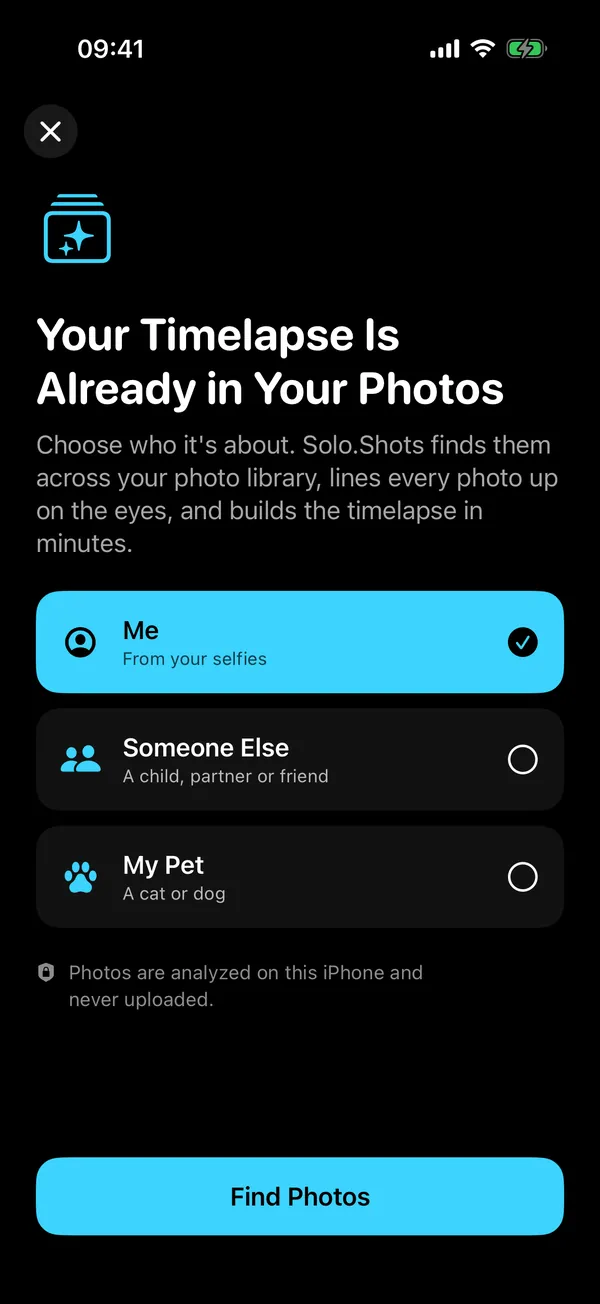
What does "Timelapse From Your Photos" make?
A short portrait timelapse of one person or one pet, built from photos that are already in your library: one photo per period, oldest to newest, with the eyes in the same spot in every frame. The face stays still while everything around it changes, which is exactly what makes these videos so watchable.
Each frame is lined up into a 1080 × 1440 (3:4) portrait image. You'll find the feature under the sparkles button at the top of the Solo.Shots Home screen, or on the Make a timelapse from your photos card if you haven't started a project yet.
Saved results get friendly names you can change later: Me Through the Years, Through the Years (someone else) and My Pet Through the Years.
How do I make a timelapse from photos I already have?
Pick who it's about, let Solo.Shots find them, check the frames, then save. Building takes minutes rather than an evening of scrolling, depending on the size of your library.
- Open it. Tap the sparkles button at the top of the Home screen. On an empty Home screen, tap the Make a timelapse from your photos card instead.
- Choose who it's about. Me starts from your Selfies album, Someone Else is for a child, partner or friend, and My Pet looks for a cat or dog. Tap Find Photos.
- Allow photo access. Full access finds the most photos. If you've shared only some photos, Solo.Shots can only look at those, and it tells you so.
- Tap who it should follow. Solo.Shots looks through your recent photos, groups the faces it finds and asks Who should it follow? (or Which pet?). Tap one.
- Let it build. It walks back through your library one period at a time and counts the photos it has found so far.
- Check the frames. A preview plays at the top. Below it, every frame is shown with its date. Tap any photo to leave it out: a blurry one, a sunglasses day, a moment you'd rather not see in a video.
- Save it. Save as Project (Premium) turns the frames into a normal Solo.Shots project. From there you can export the video, make a poster and keep adding new photos with the Photo Ghost.
How does it find the right face, or the right pet?
It compares faces on your iPhone with Apple's Vision framework, and it learns as it goes back in time.
First it samples your recent photos, finds faces (or cats and dogs) and groups the ones that belong to the same person or animal, so you can tap who you mean. Then it starts from today and walks backwards, one period at a time. In each period it checks that period's most recent photos and keeps the best match it finds: sharp and facing the camera. If none of them is a clear match, that period is skipped.
Here's the clever part: it doesn't compare every old photo with today's face. After each match, it updates what the person looked like in that period. That's how it can follow a child from today all the way back to babyhood, even though a toddler and a ten-year-old look nothing alike.
Finally, every chosen photo is rotated, scaled and shifted so the eyes land in the same place. That's what turns a slideshow into one face, growing up.
How far back can it go, and how many photos does it pick?
Up to 180 periods, which is fifteen years of months. Solo.Shots picks the period length for you, based on how far back your library goes:
| Your library covers | One photo per | Example |
|---|---|---|
| 2 years or more | Month | 6 years of photos → up to 72 frames |
| 3 months to 2 years | Week | 1 year → up to 52 frames |
| Less than 3 months | Day | 6 weeks → up to 42 frames |
Periods without a clear photo of them are skipped, so the real number depends on how often they appear in your photos. It needs at least two good frames to make a timelapse.
Which photos does it skip?
Anything that would make the video worse. Specifically:
- Screenshots, always.
- Videos: it only uses photos.
- Tiny faces, such as someone far away in a group shot.
- Strong side profiles and faces turned away. It prefers front-facing photos.
- Unsure matches, where it isn't confident the face is the same person.
- Anything you tap in the review grid.
Tip: the more front-facing photos you have of someone, the smoother the result. If a month only has side profiles, that month is simply left out.
Is it private? Are my photos uploaded?
Nothing is uploaded. The analysis runs on your iPhone with Apple's Vision framework, and Solo.Shots has no account and no developer servers to send photos to. The face data used for matching stays in memory while it works and isn't saved.
Three honest details:
- If you use iCloud Photos with Optimize iPhone Storage, finding faces uses the versions already on your iPhone; when you save the result, full-size originals may be downloaded from your own iCloud Photos so the frames are sharp. That's Apple's sync, not an upload to Solo.Shots.
- If you save the result as a project and Premium iCloud Backup is on, the project is backed up to your own private iCloud.
- The free version shows Google AdMob ads. Ads never get your photos, but the App Store privacy label lists data used for advertising. The privacy policy has the details.
Is it free?
Building and previewing is free; the preview carries a small SOLO.SHOTS watermark. Saving the result as a project, which is what lets you export the video, needs the optional Premium upgrade; see the current price on the App Store.
Premium is a monthly auto-renewing subscription with no yearly plan, and you can cancel in your Apple Account settings. Videos you export are ordinary files in your Photos app, so they stay yours. See Free vs Premium for everything else it unlocks.
What can I make with it?
- A birthday film. Through the Years of your child, from today back to their earliest photos.
- A gift for the grandparents. Export it square (1:1) for the family chat or wide (16:9) for the TV.
- Me Through the Years. Your selfies, lined up. Old haircuts included, no extra charge.
- Your pet's adoption anniversary. Kitten to cat, puppy to dog, in under a minute.
- A head start on a new project. Save it, then keep going: the Photo Ghost of the newest frame helps every new photo line up with the old ones.
When isn't it the right tool?
- You want a music slideshow of moments (a trip, a whole family, a year): Apple Photos' built-in Memories makes movies around a person, pet, place or event. It doesn't line faces up, but it's free and already on your iPhone.
- You want to hand-pick every photo, or pull them from Google Photos: an app built around manual selection fits better. Lapse, for example, lets you choose photos with the system picker or from Google Photos. See the honest app comparison.
- They rarely face the camera (the toddler who runs, the dog who only shows you his back): there may be too few clear photos, and Solo.Shots will tell you it found Not enough photos yet.
- Your pet isn't a cat or a dog. My Pet only recognizes those two.
FAQ
Does it work with photos stored in iCloud Photos?
Yes. Finding faces uses the versions already on your iPhone, so it works even when iCloud Photos keeps space-saving versions there. When you save the result, Solo.Shots may download full-size originals from your own iCloud Photos so the frames are sharp. That download comes from Apple's iCloud; nothing is sent to the developer.
Can it follow my child from today back to babyhood?
That's what it was built for. It learns from each period it matches, so it keeps up as a face changes over the years. It needs clear, front-facing photos along the way; periods without one are skipped.
Which pets does My Pet support?
Cats and dogs. Other animals aren't recognized.
Do I need the newest iPhone or iOS?
No. Solo.Shots runs on iPhone and iPad with iOS or iPadOS 17.6 or later.
Can I use it without sharing my whole photo library?
Yes. With limited access, Solo.Shots only looks at the photos you shared, so it finds fewer. You can change this any time in Settings › Solo.Shots › Photos.
Sources
- Apple Support: View your memories in Photos on iPhone (checked 16 Oct 2026)
- App Store: Lapse: Face Timelapse (listing) (checked 15 Oct 2026)
- Solo.Shots pricing on the App Store (US, checked 15 Oct 2026)
 Solo.Swipe
 DUMP
 Solora
 ATHA