 Solo.Swipe
From Shoot to Post in 10 Minutes
Quick answer
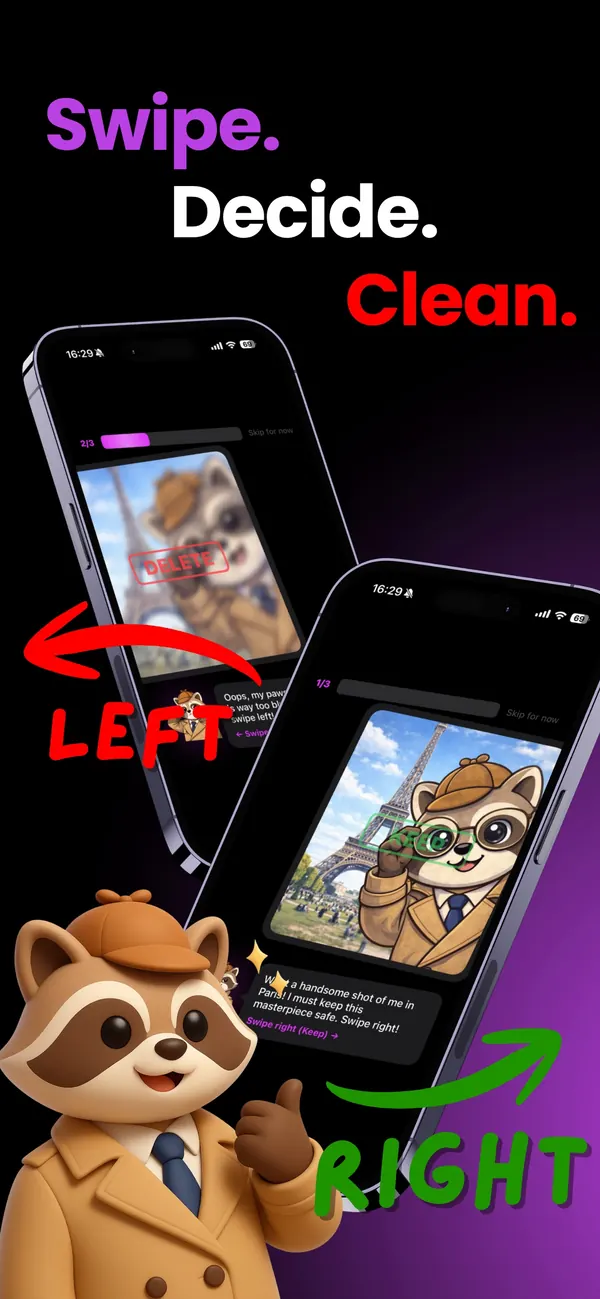
Separate choosing from editing. Right after a shoot, spend about ten minutes culling on your phone: delete the obvious rejects, file the selects into one album per post, and skip the maybes. Then build the post from that album, not from your whole camera roll. In Solo.Swipe that's a swipe left, a swipe up, and a “Create a post with DUMP” card at the end.
Say you shot 200 frames for one carousel. Ten will make it. The other 190 will sit in your camera roll for years, quietly making every future search slower. This guide is the ten-minute routine that stops that from happening, with or without an app.
Why does posting stall after a shoot?
Because choosing is harder than editing, and most people try to do both at once. You open the camera roll to make a post, scroll past 200 similar frames, pick one, second-guess it, and close the app. The edit was never the problem. The pile was.
Culling first fixes that. When the only photos left are the ten you'd actually post, building the carousel takes minutes, and you're far more likely to post while the shoot still feels fresh.
There's a timing bonus too. Right after a shoot you remember exactly why take 37 lost (the hand was weird, the light dipped, someone blinked). A month later every reject looks like a maybe.
What do you need before you start?
Not much. Here's the checklist:
- The shoot is finished, or at least one setup is. Cull per setup if the day is long.
- One album name per post, decided now: “Oct carousel — café”, “Brand X deliverables”. Naming later is a task you'll skip.
- Ten minutes with nothing else open. A timer helps more than you'd think.
- A safety net. On iPhone, deleted photos stay in Recently Deleted for 30 days, so a fast decision is a reversible one.
The 10-minute cull, step by step
The steps work in Apple's Photos app; they're just faster when every decision is a single swipe. Times are rough guides for a shoot of around 200 photos.
-
Open only the shoot 30 sec
Not “All Photos”. Open the day of the shoot, or Recents if it was in the last three days. A set with an end is a set you'll finish.
-
Swipe the obvious rejects left 3 min
Blinks, motion blur, test shots, the accidental photo of the floor. Use a two-second rule: if a frame needs longer than two seconds of thought, it isn't an obvious reject, so skip it.
-
Swipe the selects up into the post's album 3 min
When a frame is clearly a keeper, file it straight into the album you named. You're building the post's shortlist while you clean, instead of hunting for it later.
-
Skip the maybes, then do one second pass 2 min
Swipe down to skip anything you're unsure about. Once the rejects and selects are gone, the maybes are easier to judge, because you're comparing them with the frames you already chose.
-
Compare retakes side by side 1 min
For each setup, keep the best frame and at most one alternate. Bursts and retakes sit next to each other in the day view, so the comparison is quick.
-
Confirm and stop 30 sec
Confirm the deletions and close the session on purpose. In Solo.Swipe there's an in-app Final Review first, then the iOS prompt, and everything lands in Recently Deleted for 30 days.
How many photos should you keep from a shoot?
Usually the frames you'll post, plus one alternate per setup. Everything else is rarely opened again. A practical starting point:
| What you shot | Keep | Why |
|---|---|---|
| Pose or outfit setup | 1 select + 1 alternate | The alternate covers a late change of mind. Twelve alternates don't. |
| Product shots | The clean shot + one wide version | Wide frames re-crop for other formats without a re-shoot. |
| Video clips | The takes you'll edit + reusable B-roll | Video is where the storage goes; unused takes are the biggest files. |
| Behind the scenes | 2 or 3 for stories | They're for this week, not for the archive. |
| Reference screenshots | None, once the post is out | Mood boards expire the day the post ships. |
If the work is paid, export the delivered files to a real backup before you clear anything. A synced camera roll is working storage, not an archive.
How do you turn the album into a post?
Build the post from the album, never from the whole camera roll. Any tool works once your selects are in one place: Instagram's own picker, a design app, or a dedicated carousel maker.
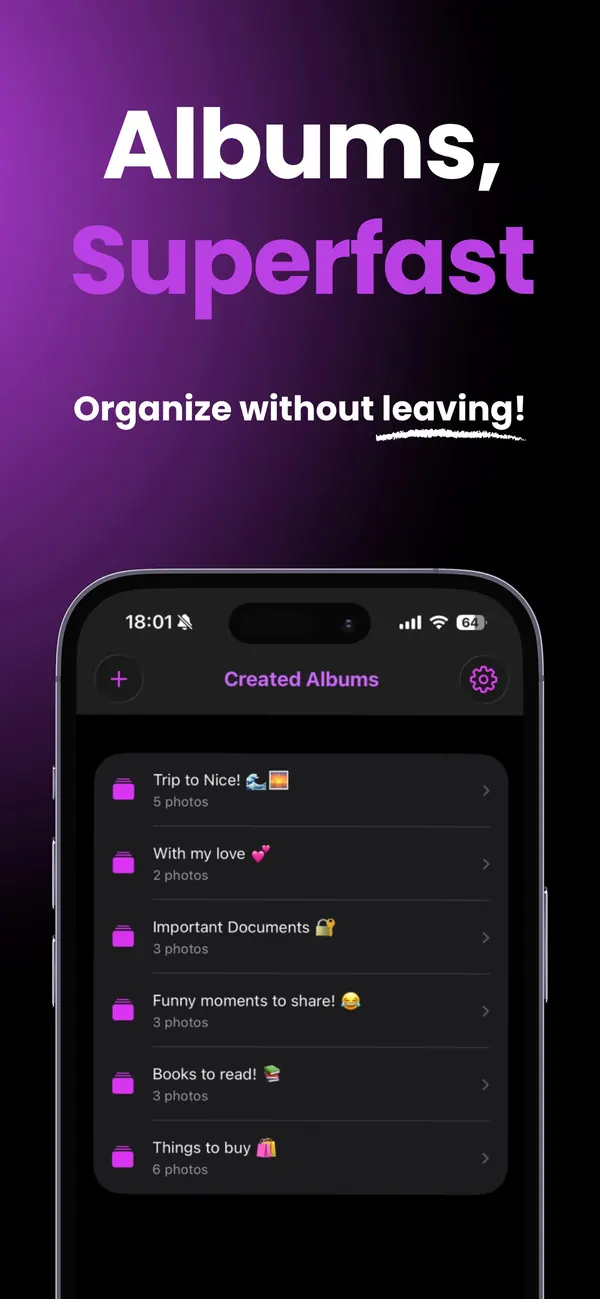
In Solo.Swipe, the albums you filed into appear in the Created Albums tab, and each one has a “Create a post with DUMP” card. It links to DUMP, a carousel and photo-dump app by the same developer (or its App Store page if you don't have it yet). In DUMP you pick that album and build a carousel from it, reorder or replace photos, and preview the post before you export it.
You don't need DUMP for the cull to pay off. The album is just a folder of your best frames, and every posting tool can read it.
What about the leftovers a week later?
Give them one short weekly reset. The post-shoot cull handles the shoot; the weekly pass handles everything that piled up around it:
- Screenshots saved as references, briefs and mood boards.
- Unused clips and screen recordings, which are usually the largest files you have.
- The maybes you skipped, which are easy calls a week later.
In Solo.Swipe, the Screenshots and Videos views cover the first two (videos can be filtered to long clips, 4K or screen recordings), and Large Files lists your 20 biggest videos (a Pro feature you can unlock for a day by watching a short ad). The Camera Roll Reset has the full weekly routine.
Which mistakes make culling slow?
- Culling from “All Photos”. No end in sight means no finish. Open the day.
- Editing while choosing. Pick first, edit later. Two jobs, two sessions.
- Too many albums. One per post or campaign plus a “Repurpose” album is plenty.
- Waiting a week. Context fades fast, and same-day culling is much quicker.
- Trusting a tool blindly. Suggestions are a shortlist, not a verdict. Look before you delete.
Questions
How long should a post-shoot cull take?
About ten minutes for a shoot of a couple of hundred photos, if you cull the same day and use a two-second rule for obvious rejects. Longer shoots are easier to handle setup by setup than all at once.
Should I delete rejected takes or keep them just in case?
Keep one alternate per setup and delete the rest. On iPhone, deleted photos stay in Recently Deleted for 30 days, which covers most late changes of mind. Paid deliverables should be exported to a backup, not kept in the camera roll as insurance.
Can I cull photos on iPhone without an app?
Yes. In the Photos app, open the day of the shoot, use Select to mark rejects, and put selects into an album with Add to Album. It works; it's just slower than deciding each photo with one swipe.
Does Solo.Swipe find duplicate takes automatically?
Only exact duplicates: photos captured in the same second at the same size, shown as pairs (a Pro feature, or free for a day after a short ad). Similar retakes are different photos, so for those you browse the shoot's day and keep the best frame per setup.
Does Solo.Swipe edit photos or post to Instagram?
No. Solo.Swipe handles the cull and the filing: reviewing, deleting and sorting what's on your phone. Editing and posting happen in other apps, such as DUMP for carousels and photo dumps.