 Solora
Disclosure. I make Solora, one of the apps on this page, so I'm not neutral. Every competitor fact below comes from that app's own App Store page or website, checked on 3 November 2026, and I compared listings rather than testing each app for weeks. There are no affiliate links. Prices are US prices and can change; if something here is out of date, email solostaseraofficial@gmail.com and I'll fix it.

How do AI planner apps compare?
Two questions separate these apps quickly: what does the AI actually do, and is the iPhone app complete on its own?
| App | What the AI does | iPhone alone? | Price | Privacy label |
|---|---|---|---|---|
| Solora | Creates tasks, habits and projects from plain language, plans the day, breaks goals into timed steps; runs on the device | Yes | Free; Premium $5.99/month, $39.99/year or $99.99 lifetime | Data Not Collected |
| Structured | Drafts your day, replans missed tasks (Pro) | Yes | Free; Pro monthly, yearly or $99.99 lifetime | Linked: email, user content; others not linked |
| Tiimo | Turns a brain dump into a day, groups priorities | Yes | Free to download; Pro purchases listed from $7 to $54 | Includes identifiers used to track you |
| TickTick | AI Assistant, adding tasks by voice | Yes | Free; $4.99/month or $49.99/year | Linked: contact info, content, identifiers, diagnostics |
| Akiflow | AI daily planner on a time-blocked calendar, 3,000+ tools | Also on web and desktop | Purchases listed from $16.99/month and $114.99/year | Linked: contact info, content, identifiers, usage, diagnostics |
| Motion | Auto-plans your day, schedules meetings, manages projects | No, "not a standalone app" | Subscription required: $44.99/month or $294.99/year | Linked: contact info, usage, diagnostics; device ID not linked, used for advertising |
Prices and privacy labels are from the US App Store, checked 3 Nov 2026. Labels are declared by developers and aren't verified by Apple.
Which AI planner is best for a busy work calendar?
Motion and Akiflow are built for that, and both make the most sense if you live at a computer. Motion's listing is direct about it: it "is best used on a computer" and the mobile app is a companion.
They connect to your work calendars and, in Akiflow's case, thousands of tools. Solora doesn't compete here. It has no team features or work integrations.
Which AI planner is best for a visual day?
Structured and Tiimo. Both lay out your day visually, and both use AI to draft it.
Structured's AI planning and replanning are in Pro, while its timeline is free. Tiimo's AI Co-Planner is aimed at people who find executive function hard, and it's designed with neurodivergent users in mind.
Which AI planner keeps your data private?
Solora is the only app on this list with the label Data Not Collected. Its assistant uses Apple's on-device Foundation Models, and voice input is transcribed on the device too.
A planner knows a lot about you: your health tasks, family plans, money worries. Solora has no account and no server, so that information stays on your device, and the assistant works without internet on supported devices.
That choice has a cost. An on-device model is smaller than the big cloud models, and it needs iOS 26 on a supported device such as an iPhone 15 Pro or iPhone 16 or later. On an older iPhone you still get roles, the Big 3, habits and projects, but not the assistant.
What does Solora's AI do for free?
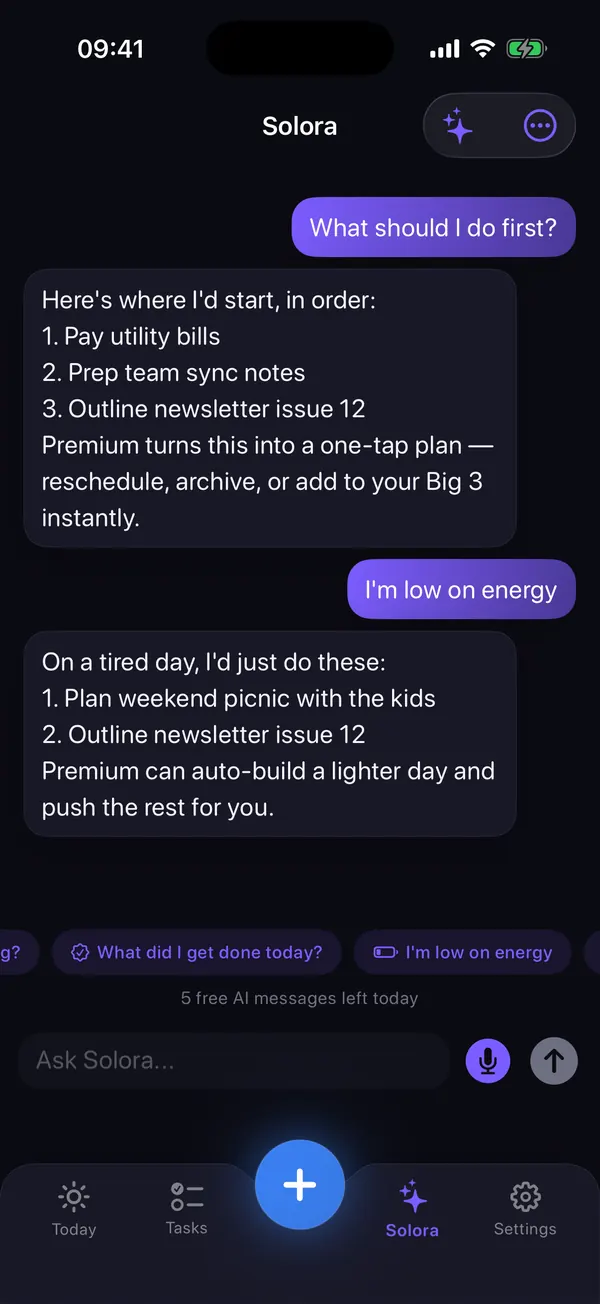
The free plan includes 5 assistant chats a day and 3 AI project breakdowns a month. You can type something like "I need to renew my passport, book the vet and start running" and get editable proposals you can undo.
Premium removes those limits and adds calendar-aware day planning, one-tap plans for prioritizing, rescheduling and lighter days, assistant memory for preferences you tell it, and an AI-written weekly report.
What can't Solora do?
Solora is a personal planner for one person on iPhone and iPad, and it has real gaps.
- No cloud sync between devices, no web app and no data export. Your data stays on the device and in its normal backup.
- No shared or team lists, and no Apple Watch app or native Mac app.
- The AI assistant needs iOS 26 and an Apple Intelligence device (iPhone 15 Pro, iPhone 16 or later, or an M1 iPad or later) with Apple Intelligence turned on. Everything else works without it.
Try it
Try Solora free, with no account
Roles, a daily Big 3 and habits that survive bad days, on iPhone and iPad. It's listed on the App Store as Solora: AI Daily Planner.
 On your computer?Scan with your iPhone camera
Free plan: 4 roles, 15 active tasks, 20 habits, 5 projects, 5 assistant chats a day. Premium: monthly, yearly or one-time Lifetime. iOS 18.6 or later; the assistant needs iOS 26 with Apple Intelligence.
Frequently asked questions
What is the best free AI planner app for iPhone?
Solora has a free plan with 5 on-device assistant chats a day and needs no account, on iOS 26 with Apple Intelligence. TickTick is free and lists an AI Assistant. Structured is free, but its AI planning needs Pro.
Is there an AI planner that works offline?
Yes. Solora's assistant runs on the device with Apple Intelligence, so it works without internet on supported devices. The rest of the app also works offline because it has no server.
Which AI planner doesn't send my data to a server?
Solora runs its AI on the device using Apple's Foundation Models, has no account and shows Data Not Collected on the App Store. Check the listing and privacy policy of any other app, since most don't state this in their listing.
Is Motion worth it on iPhone?
Only if you also use it on a computer. Motion's App Store listing says the mobile app is a companion and not a standalone app, and it requires a subscription, listed at $44.99 a month or $294.99 a year.
Does Solora's assistant work on every iPhone?
No. It needs iOS 26 or later on an Apple Intelligence device, such as iPhone 15 Pro or iPhone 16 and later, with Apple Intelligence turned on. Every other feature works from iOS 18.6.
Sources
- Motion on the App Store
- Akiflow on the App Store
- Structured on the App Store
- Tiimo on the App Store
- TickTick on the App Store
- Solora on the App Store
All checked on 3 November 2026.

Thanks for reading. If this helped, or if I got something wrong, I'd love to hear from you.
Independent iOS developer and the maker of Solora, so read my take on it with that in mind. The methods here work on paper too. Say hello on Instagram or at solostaseraofficial@gmail.com.