 Solora
Disclosure. I make Solora, one of the apps on this page, so I'm not neutral. Every competitor fact below comes from that app's own App Store page or website, checked on 3 November 2026, and I compared listings rather than testing each app for weeks. There are no affiliate links. Prices are US prices and can change; if something here is out of date, email solostaseraofficial@gmail.com and I'll fix it.

Why do people look for a Sunsama alternative?
Usually price or platform. Sunsama's pricing page says it "doesn't have a free forever plan and doesn't plan to". Pro costs $22 a month, or $17 a month billed yearly, after a 14-day trial with no card required.
The second reason is the phone. Sunsama's App Store listing calls it a "companion app to the desktop app" and says you can use it once you've planned your first day on desktop, "not as a standalone replacement". That's a fair design for a tool aimed at knowledge workers, but it doesn't help if your iPhone is the only place you plan.
How do the Sunsama alternatives compare?
Only some of these work fully from an iPhone with no computer, and only one has a guided morning and evening ritual and no account.
| App | Best for | Works from iPhone alone? | Price | Privacy label |
|---|---|---|---|---|
| Sunsama | Guided workday planning with work tools | No, first day is planned on desktop | $22/month or $17/month billed yearly; no free plan | Linked: contact info, content, identifiers, usage, diagnostics |
| Solora | Personal life by role, with daily rituals | Yes | Free; Premium $5.99/month, $39.99/year or $99.99 lifetime | Data Not Collected |
| Structured | Time-blocked day on a timeline | Yes | Free; Pro monthly, yearly or $99.99 lifetime | Linked: email, user content; others not linked |
| TickTick | Free tasks, calendar and habits | Yes | Free; $4.99/month or $49.99/year | Linked: contact info, content, identifiers, diagnostics |
| Akiflow | Time blocking with 3,000+ connected tools | iPhone, Watch, web and desktop | Purchases listed from $16.99/month and $114.99/year | Linked: contact info, content, identifiers, usage, diagnostics |
Prices and privacy labels are from the US App Store, checked 3 Nov 2026. Labels are declared by developers and aren't verified by Apple.
Which alternative is closest to Sunsama's daily ritual?
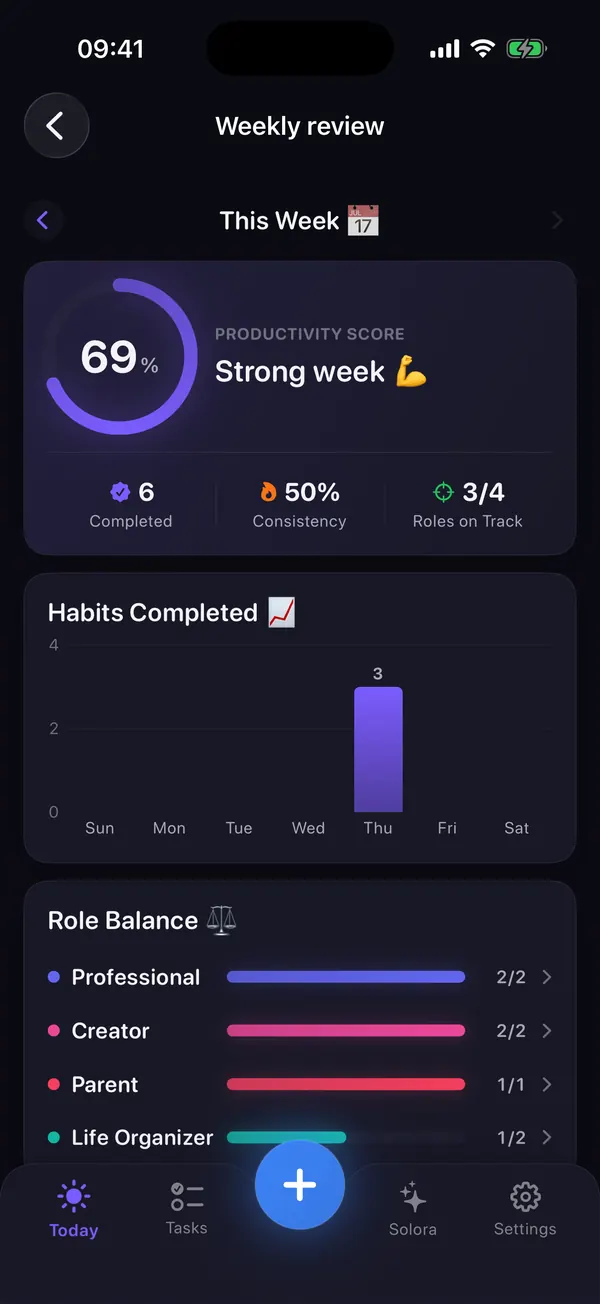
Solora is the closest match for the ritual on a phone, because the rituals are built in: a Morning Kickoff with an energy check-in, an Evening Shutdown and a Weekly Review.
In the morning you check your energy and choose your Big 3. In the evening you decide what happens to anything unfinished, so nothing is silently dropped. Once a week, the review shows completed tasks against the target for each role, so you can see whether work quietly ate your family time or your own projects.
The difference is the audience. Sunsama pulls in work from your tools. Solora has none of those integrations, and it's aimed at your whole life rather than your workday. You can read the method in the morning kickoff and evening shutdown guide, and it works on paper too.
When is Akiflow or Structured the better pick?
Choose Akiflow if integration is the reason you liked Sunsama. Its listing describes one to-do list you drag onto your calendar, sync with Google Calendar and Outlook, and connections to more than 3,000 tools. It's paid and aimed at people who work at a computer.
Choose Structured if time blocking is what you liked. Its free plan has the timeline, while calendar connection and AI planning are in Pro. See free Structured alternatives for more.
Choose TickTick if you mainly want to stop paying and keep a synced task list. It has no guided ritual, so you'd need to build the habit yourself.
What can't Solora do?
Solora is a personal planner for one person on iPhone and iPad, and it has real gaps.
- No cloud sync between devices, no web app and no data export. Your data stays on the device and in its normal backup.
- No shared or team lists, and no Apple Watch app or native Mac app.
- The AI assistant needs iOS 26 and an Apple Intelligence device (iPhone 15 Pro, iPhone 16 or later, or an M1 iPad or later) with Apple Intelligence turned on. Everything else works without it.
Try it
Try Solora free, with no account
Roles, a daily Big 3 and habits that survive bad days, on iPhone and iPad. It's listed on the App Store as Solora: AI Daily Planner.
 On your computer?Scan with your iPhone camera
Free plan: 4 roles, 15 active tasks, 20 habits, 5 projects, 5 assistant chats a day. Premium: monthly, yearly or one-time Lifetime. iOS 18.6 or later; the assistant needs iOS 26 with Apple Intelligence.
Frequently asked questions
Does Sunsama have a free plan?
No. Sunsama's pricing page says it has no free forever plan and doesn't plan to add one. It offers a 14-day trial, then Pro at $22 a month, or $17 a month billed yearly.
Can I use Sunsama on iPhone without a computer?
Not at the start. The App Store listing says the mobile app is a companion to the desktop app and can be used once you've planned your first day on desktop.
What is the best free Sunsama alternative?
For a guided daily ritual on iPhone, Solora has a free plan with a Morning Kickoff, Evening Shutdown and Weekly Review. For a free synced task list and calendar, TickTick is a strong option.
Does Solora connect to Slack, Gmail or Asana?
No. Solora has no work tool integrations or team features. It can optionally read your calendar, and it's built for planning personal life across roles.
Sources
- Sunsama on the App Store
- Structured on the App Store
- TickTick on the App Store
- Akiflow on the App Store
- Solora on the App Store
- Sunsama pricing
All checked on 3 November 2026.

Thanks for reading. If this helped, or if I got something wrong, I'd love to hear from you.
Independent iOS developer and the maker of Solora, so read my take on it with that in mind. The methods here work on paper too. Say hello on Instagram or at solostaseraofficial@gmail.com.