 Solora
Disclosure. I make Solora, one of the apps on this page, so I'm not neutral. Every competitor fact below comes from that app's own App Store page or website, checked on 3 November 2026, and I compared listings rather than testing each app for weeks. There are no affiliate links. Prices are US prices and can change; if something here is out of date, email solostaseraofficial@gmail.com and I'll fix it.

What do you get for free in Structured?
Structured's free plan includes the visual timeline, an inbox, sync across iPhone, iPad, Apple Watch and Mac, subtasks, a Pomodoro timer and widgets. Pro adds connected calendars and Reminders, recurring tasks and routines, AI day planning, automatic replanning of missed tasks and custom notifications.
So the honest question is which Pro feature you're missing. If it's recurring tasks or calendar connection, Structured Pro may simply be worth buying: it offers monthly, yearly and $99.99 lifetime options, and its App Store page lists monthly plans from $2.99 to $7.99 and yearly plans from $9.99 to $49.99. If the timeline itself is the problem, no discount will fix that, so read on.
How do the free Structured alternatives compare?
The biggest difference is the shape of your day: a timeline (Structured, Tiimo), a list with a calendar (TickTick), a week without hours (Tweek), or a short daily focus list grouped by role (Solora).
| App | How you plan | AI | Privacy label | Paid options |
|---|---|---|---|---|
| Structured | Hour-by-hour timeline | AI day planning (Pro) | Linked: email, user content. Not linked: purchases, identifiers, usage, diagnostics | Monthly, yearly or $99.99 lifetime |
| Solora | Roles with weekly targets + daily Big 3 | On-device assistant (iOS 26 + Apple Intelligence) | Data Not Collected | $5.99/month, $39.99/year or $99.99 lifetime |
| TickTick | Lists, calendar, habits, Pomodoro | AI Assistant listed | Linked: contact info, content, identifiers, diagnostics | $4.99/month or $49.99/year |
| Tiimo | Visual schedule, neurodivergent-friendly | AI Co-Planner | Includes identifiers used to track you | Pro, purchases listed from $7 to $54 |
| Tweek | One clean week, no hourly slots | None mentioned in its listing | Not linked: contact info, user content, identifiers, diagnostics | $5.99/month or $49.99/year; family plans |
Prices and privacy labels are from the US App Store, checked 3 Nov 2026. Labels are declared by developers and aren't verified by Apple.
TickTick: best free all-rounder
TickTick lists tasks, flexible recurring tasks, calendar views, a Pomodoro timer and habit goals, and says it's "always free" with Premium for higher limits such as 299 lists and 999 tasks per list. Choose it if you want one app that syncs everywhere and does a bit of everything. It's less opinionated than Structured, so you're the one who decides what today looks like.
Tiimo: closest visual match
Tiimo is a color-coded visual schedule with an AI Co-Planner and focus timer, and it describes itself as a neurodivergent-friendly planner. Its App Store page cites iPhone App of the Year 2025. Choose it if the visual timeline is what you love about Structured. Note that its privacy label includes identifiers used to track you.
Tweek: best if you hate hours
Tweek calls itself a minimal weekly planner built around one week view with no hourly slots, plus two-way sync with Google, Outlook and Apple calendars. Choose it if you want the feeling of a paper planner and sharing with family or a team.
Solora: best if a timeline makes you feel behind
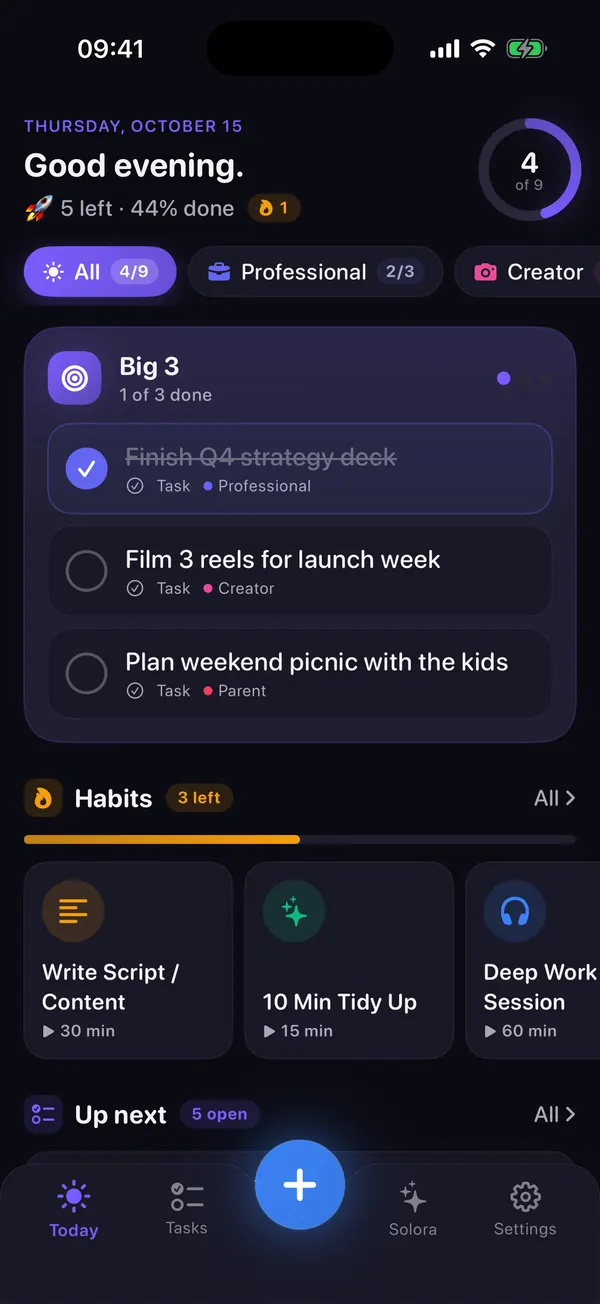
Timelines work until 10:30 goes wrong, and then the whole afternoon is out of date. Solora skips the clock. You choose a daily Big 3 (or 1, or 5) from tasks that belong to roles such as Parent, Student or Creator, and whatever you don't finish carries over to tomorrow. When a task slips, Solora asks what got in the way and offers to move it, split it, make it easier or drop it.
The free plan covers 4 roles, 15 active tasks, 20 habits, 5 projects and 5 assistant chats a day, with repeating tasks and task templates included since version 3.2. There's no account, and the App Store label is Data Not Collected.
Stay with Structured instead if you need to see your day by the hour, use an Apple Watch or Mac, or want sync between devices. Solora doesn't do any of those.
What can't Solora do?
Solora is a personal planner for one person on iPhone and iPad, and it has real gaps.
- No cloud sync between devices, no web app and no data export. Your data stays on the device and in its normal backup.
- No shared or team lists, and no Apple Watch app or native Mac app.
- The AI assistant needs iOS 26 and an Apple Intelligence device (iPhone 15 Pro, iPhone 16 or later, or an M1 iPad or later) with Apple Intelligence turned on. Everything else works without it.
Try it
Try Solora free, with no account
Roles, a daily Big 3 and habits that survive bad days, on iPhone and iPad. It's listed on the App Store as Solora: AI Daily Planner.
 On your computer?Scan with your iPhone camera
Free plan: 4 roles, 15 active tasks, 20 habits, 5 projects, 5 assistant chats a day. Premium: monthly, yearly or one-time Lifetime. iOS 18.6 or later; the assistant needs iOS 26 with Apple Intelligence.
Frequently asked questions
Is Structured free?
Yes, Structured is free to download and its free plan includes the visual timeline, inbox, sync, subtasks, a Pomodoro timer and widgets. Connected calendars, recurring tasks, AI day planning and automatic replanning need Structured Pro.
What is the best free alternative to Structured?
TickTick is the best free all-rounder if you want lists, a calendar and habits. Solora is a better fit if you don't want an hourly timeline and prefer a short daily focus list with no account. Tweek suits people who want a simple week view.
Is there a Structured alternative without a timeline?
Yes. Solora uses a daily Big 3 grouped by role and Tweek uses a week view with no hourly slots. Neither asks you to assign times to your day.
Which Structured alternative doesn't collect data?
Solora's App Store label is Data Not Collected and it needs no account. The other apps compared here declare some collected data, so check each label on its App Store page.
Sources
- Structured on the App Store
- TickTick on the App Store
- Tiimo on the App Store
- Tweek on the App Store
- Solora on the App Store
All checked on 3 November 2026.

Thanks for reading. If this helped, or if I got something wrong, I'd love to hear from you.
Independent iOS developer and the maker of Solora, so read my take on it with that in mind. The methods here work on paper too. Say hello on Instagram or at solostaseraofficial@gmail.com.