 Gül Eda Aydemir
Guide · Life admin
How to organize your life when you don't know where to start
Getting organized isn't a personality trait or a weekend project. It's a few small, slightly boring moves done in the right order. Here's that order as a 7-day plan you can print, with honest notes on where an app helps and where paper is plenty.
 By Gül Eda Aydemir, indie iOS developer · Updated · 13 min read
Quick answer
Start smaller than you think. On day 1, empty your head onto one page. On day 2, sort that list by the 3–5 roles you play. From then on, pick just three things each morning, clear one visible mess for 10 minutes, add one tiny habit, and close each day with a 5-minute shutdown. None of it needs an app; apps only make it easier to keep going.
Full disclosure: I make three of the apps mentioned here (Solora, Solo.Swipe and ATHA). Every step works with a pen and paper. Where an app genuinely saves effort, I say exactly what it does, what's free and what it costs.
On this page
- Where should you start?
- Why it feels so overwhelming
- Step 1: Empty your head
- Step 2: Name your roles
- Step 3: Pick three things a day
- Step 4: Clear one visible mess
- Step 5: Add one tiny habit
- Step 6: Close the day
- The 7-day plan (printable)
- Apps that help, and what they cost
- What not to do in week one
- FAQ
Where should you start organizing your life?
Start with your head, not your house. Before you buy a planner or empty a cupboard, write down everything that's nagging you, on one page, in one sitting. Organizing is mostly deciding, and you can't decide about things you're only half-remembering.
After that, the order matters more than the method: sort the list by role, choose three things a day, get one visible win, add one habit, close each day. It's the same spirit as the NHS's advice for stress: plan ahead and set small targets you can easily achieve
.
Why does getting organized feel so overwhelming?
Because you're trying to fix everything at once, and nothing ever feels finished. An endless to-do list has no finish line, so even a productive day ends with the feeling of being behind.
Most fresh starts fall into one of three traps:
- The all-at-once trap. You reorganize the house, the inbox and the calendar in one Saturday, and you're exhausted by Sunday.
- The tool trap. You build a beautiful system, then spend your energy maintaining the system instead of living your life.
- The invisible-progress trap. You were busy all day, but nothing you can actually see has changed.
The plan below dodges all three: small batches, a system that fits on one page, and one visible win every day.
Step 1: How do you empty your head? (10 minutes)
Set a 10-minute timer and write down every open loop: tasks, worries, errands, things you keep meaning to do. Don't sort, don't judge, don't fix anything yet. One page, one list.
If you dry up after two minutes (everyone does), scan these prompts:
- Work or study: deadlines, emails to answer, things you promised someone
- Home: repairs, cleaning, things to buy or return
- Money and admin: bills, renewals, forms, appointments
- People: calls to make, birthdays, favours you owe
- Body: doctor, dentist, sleep, movement
- Phone: full storage, a camera roll you avoid, apps you never open
- Someday: trips, courses and projects you keep postponing
You don't need an app for this step. Paper is genuinely better here: nothing to set up, nothing to format, and no notification to derail you halfway through.
Step 2: Why name your roles? (5 minutes)
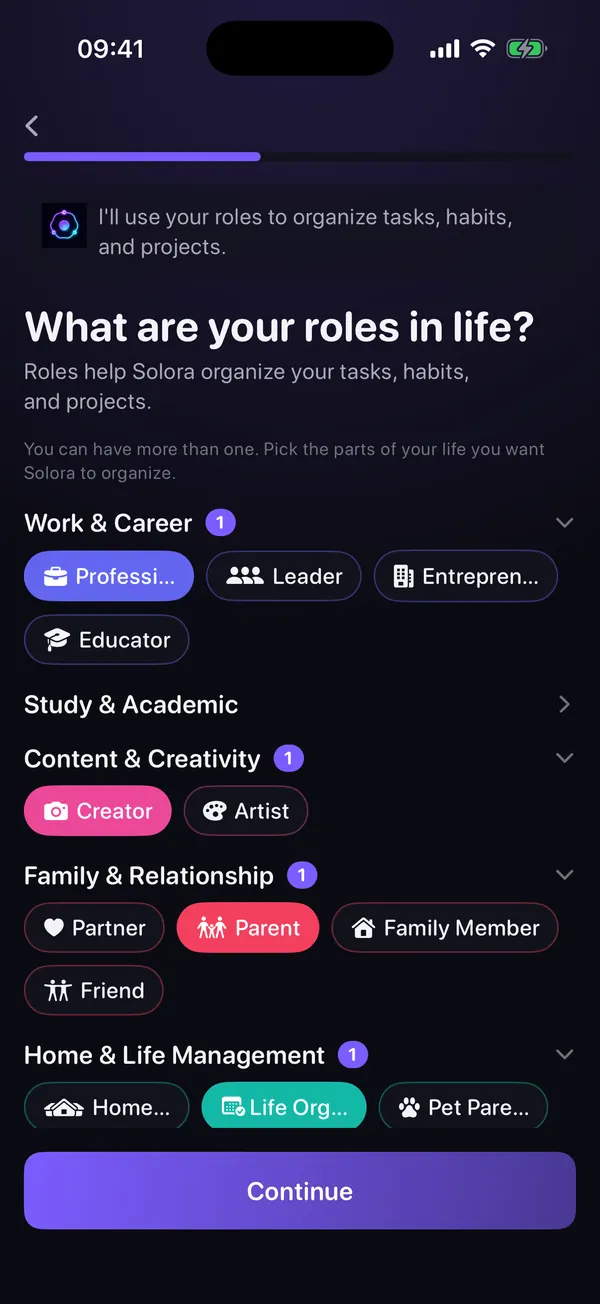
Because “my life” is too big to plan, but “me as a parent this week” isn't. Write down the 3–5 roles you actually play (professional, student, parent, partner, creator, home manager, and simply “me”), then mark every item on your list with one of them.
Two things usually jump out. One role is eating almost everything, and one role (very often “me”) has nothing at all. That's your first real insight, and it took fifteen minutes.
Now cross out anything that doesn't belong to a role you care about. That isn't giving up; that's deciding.
In Solora, roles are the core idea: you pick from 23 role templates or make your own, give each one a weekly target, and any task, habit or project can belong to a role. Its Weekly Review then points out the role you've been neglecting. Want more role ideas and the 5-minute “neglected role” check? Read role-based planning.
Step 3: How many things should you do in a day? Pick three.
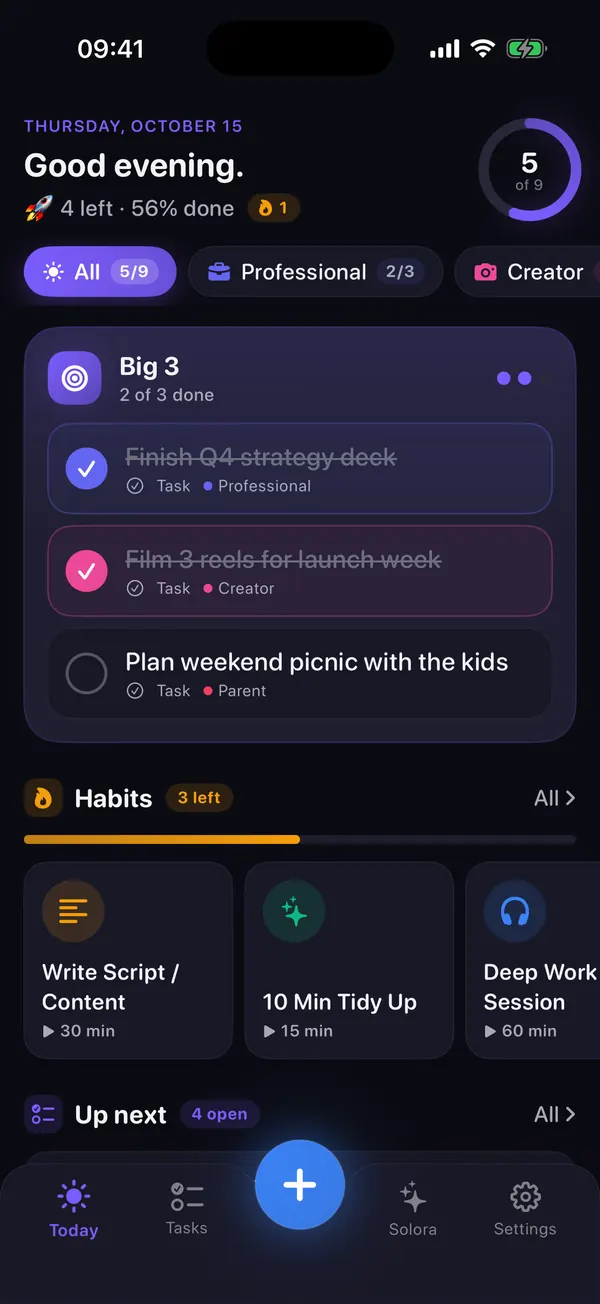
Pick three. Each morning, choose the three things that would make today a good day, and treat everything else as a bonus. Three is small enough to finish and big enough to matter.
A simple way to choose:
- One thing with a real deadline or a real consequence if it slips.
- One thing that moves something you care about a step forward.
- One thing for the role you've been neglecting (often “me”).
If an item would take more than an afternoon, it's a project, so write down only the next step: “draft the first section”, not “write the report”. And if something doesn't get done, move it to tomorrow on purpose or decide it doesn't matter. Just don't let it quietly vanish.
Solora is built around this. You choose 1, 3 or 5 daily priorities (it recommends three), unfinished Big 3 items carry over to the next day, and overdue tasks keep a “Late” tag instead of disappearing. If you like comparing methods, the Big 3 method guide sets it next to MIT, 1-3-5, Ivy Lee and the Eisenhower matrix.
Step 4: What's the fastest visible win? Clear one mess for 10 minutes.
Pick one mess you see every day (your desk, your bag, your inbox or your camera roll) and give it 10 minutes, not a whole weekend. Stop when the timer rings. Tomorrow, another 10.
Visible progress is fuel. Once the desk is clear, the rest of the plan suddenly feels possible. Good 10-minute targets:
- The surface you work or eat at
- Your bag or wallet: receipts, wrappers, mystery cables
- Your inbox: unsubscribe from five newsletters you never read
- Your home screen: move apps you haven't opened in a month off page one
- Notifications: switch off the ones that never need you right now (Settings › Notifications, then tap the app)
- Your camera roll: this week's screenshots and near-identical shots
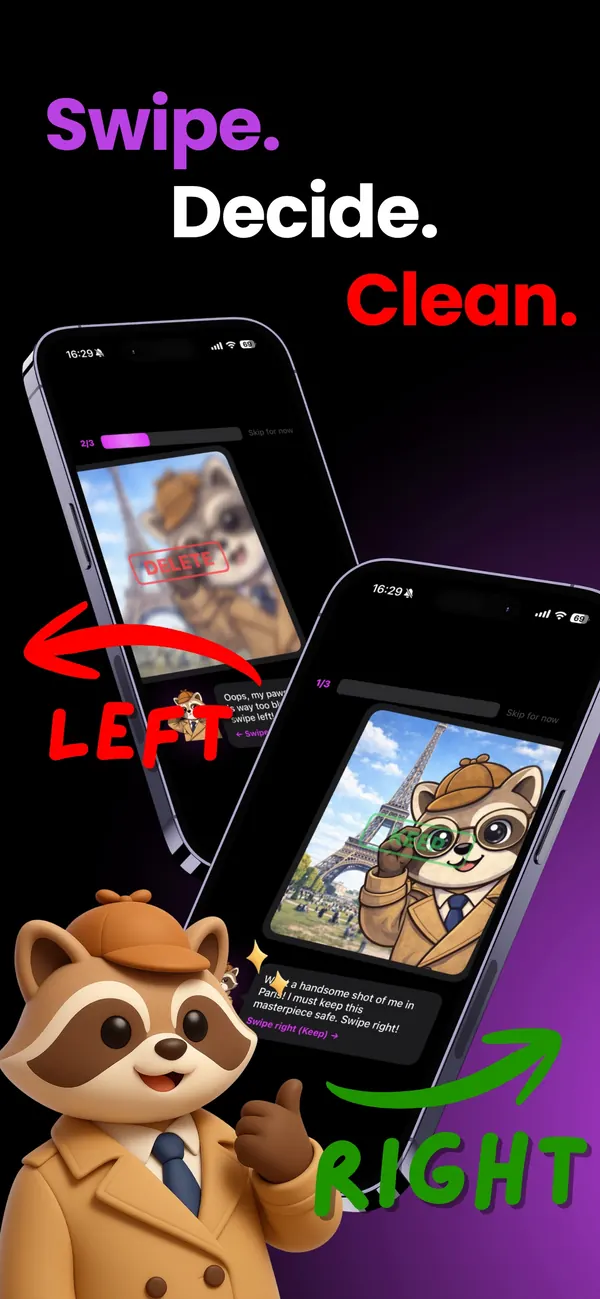
The camera roll deserves a special mention: it's huge, it grows every day, and deciding in bulk is exhausting. Solo.Swipe shows one photo at a time: swipe left to delete, right to keep, up to file it into an album. Deleted photos wait in Recently Deleted for 30 days, so a wrong swipe isn't a disaster. The free version shows ads and allows 50 deletions a day (plus 20 for each optional ad you watch); Pro is an optional monthly or yearly plan; see the current price on the App Store.
For the full method, read how to clean a huge iPhone photo library or the wider iPhone declutter guide.
Step 5: How do you add a habit that actually sticks? Make it tiny.
Choose one habit, attach it to something you already do every day, and decide on a tiny version for bad days. Then repeat it in the same place or at the same moment until it runs on autopilot.
Research on habit formation supports exactly this. In the work summarised by Gardner, Lally and Wardle, doing something without having to think about it levelled off after about 66 days on average, with big differences between people, and missing a single day didn't seriously set anyone back. Their practical advice: expect it to take around 10 weeks.
Use this sentence: “After I ___, I will ___. On bad days, I'll ___.”
- After I pour my morning coffee, I'll write today's three things. Bad day: just one.
- After I close my laptop, I'll do two minutes of slow breathing. Bad day: three slow breaths.
- After lunch, I'll walk for 10 minutes. Bad day: to the end of the street and back.
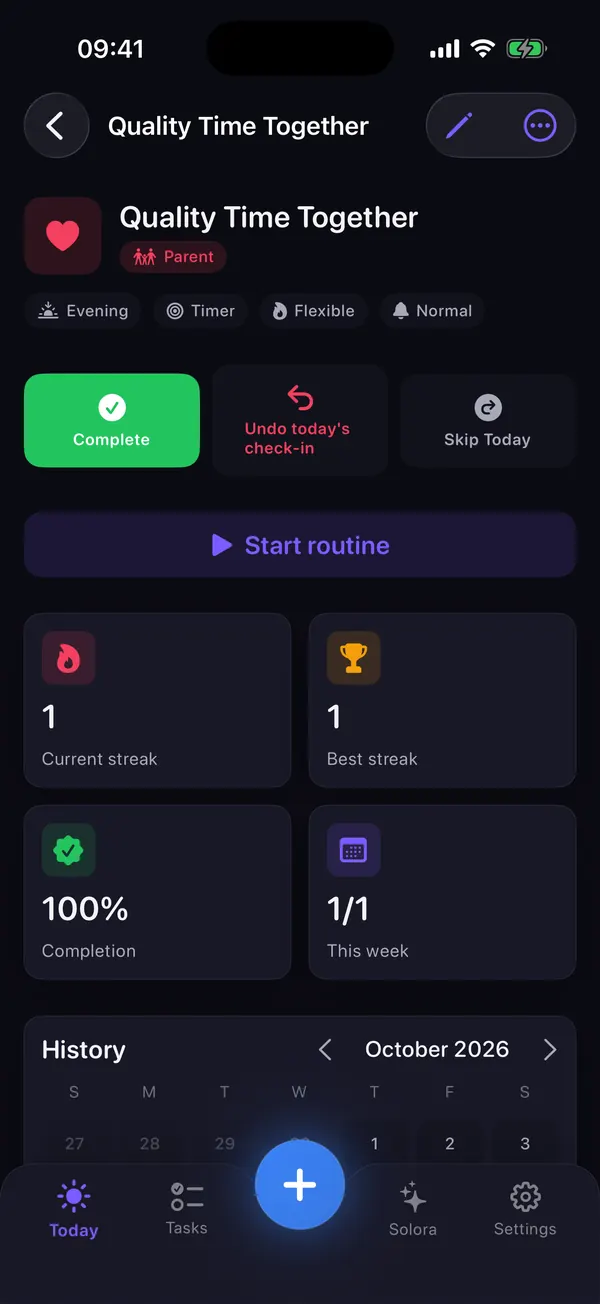
Solora lets each habit have an easier version for low-energy days, and its streaks can be flexible or “shielded” for sick days and travel, so one rough week doesn't wipe out your progress (there's a whole guide on what to do on a low-energy day). If your habit is breathing, ATHA is completely free: tap Breathe now and follow along, and a routine can remind you at the same time each day.
Step 6: How do you end the day so tomorrow starts easier? (5 minutes)
Do a 5-minute shutdown: tick off what's done, move or drop what isn't, and write tomorrow's first three things as specifically as you can. Then stop for the day.
There's a small but lovely piece of evidence for that last part. In a sleep-lab study of 57 young adults, people who spent five minutes writing a to-do list for the coming days fell asleep faster than people who wrote about what they had already done, and the more specific the list, the faster they fell asleep (Scullin and colleagues, 2018). It's one small study, so treat it as a nudge, not a promise.
- Tick off what's done (and actually enjoy it for a second)
- For every open item: move it to tomorrow, give it a date, or drop it
- Write tomorrow's three things, specifically: “email Sam the budget draft”, not “budget”
- Clear one surface, or close every browser tab
- Optional: a few minutes of slow breathing
If your mind keeps running after the shutdown, slow breathing can help you settle. The NHS describes a simple version: breathe in gently through your nose while counting to about 5, breathe out through your mouth for about 5, and keep going for at least 5 minutes. ATHA guides breathing like this for free, with a moving light, gentle vibrations or soft tones. There's a longer evening routine in ATHA's 10-minute wind-down guide.
Prefer a slightly longer version with a matching morning routine? Solora's guide to a 5-minute morning kickoff and 10-minute evening shutdown walks through both.
This guide is general information, not medical or mental-health advice.
Your 7-day plan to get organized (printable)
Each day takes 10–25 minutes. Do the days in order; if you miss one, simply do that step next time instead of doubling up.
| Day | Do this | Time | Done when | Optional app |
|---|---|---|---|---|
| Day 1 | Empty your head onto one page (step 1). | 10 min | Everything that's nagging you is on paper. | None: paper |
| Day 2 | Name your 3–5 roles and mark every item with one. Cross out what doesn't matter. | 15 min | Every item has a role or a line through it. | Solora (free: 4 roles) |
| Day 3 | Your first “pick three” morning and your first 5-minute shutdown. | 5 + 5 min | Today's three chosen; tomorrow's three written. | Solora Big 3 |
| Day 4 | Clear one visible mess: desk, bag, inbox or camera roll. Keep up your three and the shutdown. | 10 min | The timer rang and you stopped. | Solo.Swipe for photos |
| Day 5 | Choose one tiny habit with a bad-day version, and do it once. | 5 min | “After I ___, I will ___” is written down. | Solora habit or ATHA (free) |
| Day 6 | Take the three oldest items on your list: do one, schedule one, delete one. | 15 min | Three old loops are closed. | None |
| Day 7 | Weekly reset: 10 min tidying your photos and phone, 10 min planning next week by role (including Monday's three), 5 min slow breathing. | 25 min | Monday is planned and your phone is lighter. | Solo.Swipe, Solora, ATHA |
From week 2: keep the daily three and the shutdown, and repeat the day 7 reset every week. Add a second habit only once the first one feels automatic. Two ways to deepen the weekly reset: the five questions in a 15-minute weekly review, or the phone-focused Sunday digital reset.
Prints just the plan, black on white.
Which apps help you get organized, and what do they cost?
You can run this whole plan on paper. If you'd rather use your phone, these three apps each cover one part of it. Here's exactly what's free, what's paid and what happens to your data.
| App | Helps with | Free version | Paid plan | Your data |
|---|---|---|---|---|
 Solora | Roles, daily Big 3, habits, morning and evening check-ins, weekly review | 4 roles, 15 active tasks, 20 habits, 5 projects, 5 AI chats a day. No ads | Optional Premium, monthly, yearly or one-time lifetime (price on the App Store) | “Data Not Collected”. On-device AI, no account |
 Solo.Swipe | 10-minute camera-roll cleanups, filing photos into albums, streaks | Most browsing modes (Duplicates, Large Files and Smart Modes need Pro or a short ad per day), 50 deletions a day (+20 per optional ad). Shows ads | Optional Pro, monthly or yearly (price on the App Store) | Photos analysed on the device, never uploaded. Google AdMob ads; Firebase usage stats and crash reports tied to a random app ID (no in-app switch in version 5.0). App Store label: “Data Used to Track You” |
 ATHA | Slow breathing for the shutdown, bad days and busy moments | Everything. No ads, no in-app purchases | Nothing to buy | “Data Not Collected”. No network requests, no account |
US prices from the App Store, checked 15 October 2026; your local store shows your price. Subscriptions renew until you cancel them in your Apple account settings.
When these apps aren't the right fit
- If you already use Apple Reminders, Notes, a paper planner or another app happily, keep it. The order of the steps matters far more than the tool.
- Solora keeps everything on one device: there's no iCloud sync between iPhone and iPad, and no shared lists for families or teams.
- Solora's AI assistant needs iOS 26 and an iPhone that supports Apple Intelligence. The planner itself works on iOS 18.6 and later.
- Solo.Swipe's free version shows ads and stops at 50 deletions a day. If you want to clear 10,000 photos in one weekend, that limit will annoy you; the daily-session approach is what it's designed for.
What should you not do in your first week?
Don't redesign your whole life. Week one is only for proving to yourself that small steps work.
- Don't buy a new planner, app or notebook system before day 3. Use what's in front of you first.
- Don't start five habits. One. Seriously, one.
- Don't reorganize the whole house. Ten minutes, one area, then stop.
- Don't track everything. Your three things and one habit are enough data.
- Don't restart the week because you missed a day. Just do the next step.
Want the phone version of this plan?
Three apps, free to download, one job each. Use one, two or none: the plan works either way.
Roles, a daily Big 3 that carries over, habits with bad-day versions. Free to start; optional Premium.
Download on theApp StoreSwipe to keep, delete or file photos, with a streak to keep you going. Free with ads; optional Pro.
Download on theApp StoreGuided slow breathing with light, vibration or soft tones. Completely free, no ads, no account.
Download on theApp StoreQuestions people ask
How long does it take to get your life organized?
About a week to set up a simple system, and a couple of months for it to feel automatic. In habit research summarised by Gardner, Lally and Wardle, a daily habit took about 66 days on average to become automatic, with a wide range between people, so give yourself around 10 weeks before judging.
What if I miss a day?
Carry on with the next step. In the same research, missing a single day didn't seriously affect how habits formed. What does the damage is the all-or-nothing reaction: “I missed Tuesday, so the week is ruined.”
Do I need a planner app to get organized?
No. Every step in this plan works with paper and a pen. An app helps when you want unfinished items to carry over automatically, reminders at the right moment, or a weekly view of how balanced your roles are. Solora does those things on your iPhone without an account; Apple Reminders or a paper notebook are perfectly good too.
What should I organize first?
Your head. Write everything that's bothering you onto one page before you touch a cupboard or download an app. Then sort it by the roles you play and pick three things for today.
How do I get organized when I feel completely overwhelmed?
Shrink the day to one thing: pick the single item that would make tomorrow easier, do it, and stop. A few minutes of slow breathing can help you settle first. If you've been struggling to cope for a while, or the things you're trying aren't helping, the NHS recommends talking to a GP.
Related guides
Sources
- NHS, Get help with stress (page last reviewed 6 March 2026).
- Gardner B, Lally P, Wardle J. Making health habitual: the psychology of “habit-formation” and general practice. British Journal of General Practice, 2012.
- Scullin MK, Krueger ML, Ballard HK, Pruett N, Bliwise DL. The effects of bedtime writing on difficulty falling asleep. Journal of Experimental Psychology: General, 2018.
- NHS, Breathing exercises for stress (page last reviewed 12 June 2026).
- Apple Support, Use notifications on your iPhone or iPad (published 17 September 2026).
Sources checked on 15 October 2026. App details were checked against each app's code and App Store listing the same day.