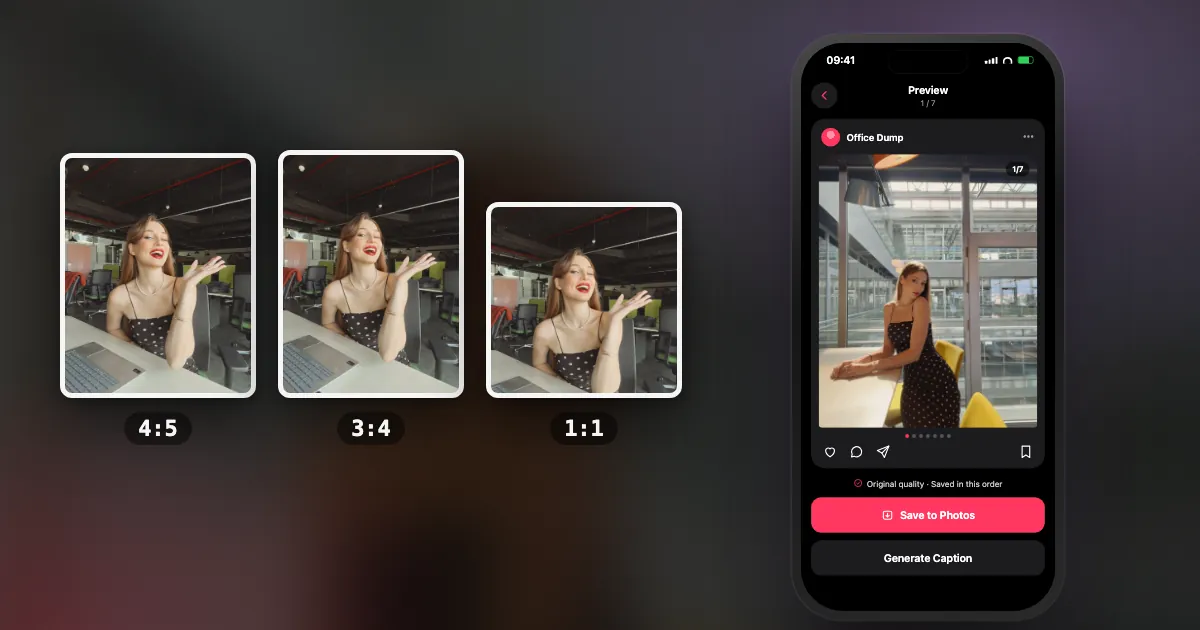
What are the Instagram sizes at a glance?
Use 1080 px wide for everything, and change only the height. This table covers every common format.
| Format | Pixels | Ratio | Use it for |
|---|---|---|---|
| Portrait post | 1080 × 1350 | 4:5 | The default for designed posts |
| Tall post | 1080 × 1440 | 3:4 | Uncropped iPhone photos |
| Square post | 1080 × 1080 | 1:1 | Grids and symmetrical layouts |
| Landscape post | 1080 × 566 | 1.91:1 | Wide scenery only |
| Story | 1080 × 1920 | 9:16 | Full-screen, 24-hour posts |
| Reel | 1080 × 1920 | 9:16 | Full-screen video |
| Profile photo | At least 320 × 320 | 1:1 | Shown as a circle |
Which feed post size should you use?
Use 4:5 for anything designed and 3:4 for phone photos you do not want cropped. Avoid landscape unless the photo truly needs it, because it takes the least room on the screen.
Taller posts take up more of a phone screen as someone scrolls, which is why portrait is the usual default. iPhone photos are naturally 3:4, and Instagram has supported that shape since May 2025. That means you can post them with no crop at all. Square is still good for collages and for content that looks best when centred.
What is the Instagram story size?
Instagram story dimensions are 1080 × 1920 px, a 9:16 ratio. Keep text and faces away from the top and bottom, where Instagram places its own buttons and profile name.
Designers commonly leave about 250 px clear at the top and bottom, though Instagram does not publish an exact number. So keep the important content inside the middle 1080 × 1420 px. If a photo is not 9:16, it appears on a background; a colour or blurred version of the same photo usually looks better than empty black bars.
What are the Reel sizes?
Reels are 1080 × 1920 px, also 9:16. Make the cover the same size, and keep the key part of it in the centre, since it gets cropped on your profile.
A Reel's buttons and caption cover the lower part of the screen, so keep on-screen text higher than you would in a Story. Want to turn a carousel into a video? DUMP's Premium plan can export a swipe video of 10 to 30 seconds, which you can post as a Reel.
How does the profile grid crop posts?
The profile grid now uses taller rectangles rather than squares. A 3:4 post fills its thumbnail fully, while 4:5 and square posts get trimmed at the sides. So keep your subject centred.
Instagram moved away from square thumbnails in early 2025. The feed still shows your full post. It is only the profile preview that is cropped, and you can usually adjust this when posting. If your grid matters, check the thumbnail preview before sharing.
What size should carousel posts be?
The same sizes as feed posts, with one rule: every slide uses the shape of the first slide. Choose it first and make everything match.
A portrait photo after a square first slide loses its top and bottom. Instagram gives no warning, so set the first slide's shape on purpose. All the details are in the Instagram carousel size guide, and if you want a picture to span several slides, there is a separate guide to the seamless carousel.
How do you resize a photo for Instagram?
You usually need to crop, not resize. On iPhone, open the photo in Photos, tap Edit, then Crop, choose a ratio such as 4:5, and save. Instagram handles the pixels.
If a photo does not fit the shape without losing something important, place it on a background of the correct shape, a coloured, textured or blurred canvas. This is why so many posts use paper textures: it started as a way around cropping.
Which file type and quality are best for Instagram?
Use a high-quality JPEG in the sRGB colour space. A PNG gains nothing once Instagram re-compresses it. The best thing you can do is avoid compressing the file more than once.
Screenshots and photos saved from messaging apps have already lost detail, so Instagram's compression makes that worse. Start with your originals, and use as few apps as possible along the way. There is more in why Instagram ruins your photo quality.
Frequently asked questions
What is the best size for an Instagram post?
1080 × 1350 px (4:5) for designed posts, and 1080 × 1440 px (3:4) for phone photos you want to keep uncropped.
What is the Instagram story size?
1080 × 1920 px, a 9:16 ratio. Keep important content away from the top and bottom, which are covered by Instagram's own interface.
Is 1080 × 1080 still OK for Instagram?
Yes. Square posts still work well in the feed, but on your profile grid they get trimmed at the sides to fit the taller thumbnail.
Why does Instagram crop my photos?
Your photo's shape does not match the post shape. In a carousel, all slides take on the first slide's shape. On the profile grid, thumbnails are trimmed to a taller rectangle.
Should I upload photos larger than 1080 px?
It is fine if the file is clean, but it will not look sharper. Instagram shows photos at up to 1080 px wide and scales down anything larger.
Get the sizes right automatically
DUMP sets the ratio up front and renders pages at 2160 px with no watermark, or saves your original photos untouched for a carousel. Free on iPhone and iPad, no account.
 On a computer?Scan with your iPhone camera
Free · iPhone & iPad · iOS 18.6+ · No account · Works offline

Instagram changes these from time to time, and I keep this page dated for that reason. If you see something that has moved, tell me and I will fix it.
Indie iOS developer, and the maker of DUMP. Say hello on Instagram or at solostaseraofficial@gmail.com.
Sources
- Instagram Help Center, photo resolution article: photos are shown at up to 1080 px wide and wider ones are sized down; landscape goes down to 1.91:1.
- 9to5Mac, 29 May 2025: Instagram supports 3:4 photos in single posts and carousels.
- Business Today, 21 Jan 2025: the profile grid moves from squares to taller rectangles.
- Buffer and Hopper HQ, checked 3 Nov 2026: third-party size guides, used for Story and Reel sizes and safe zones, which Instagram does not fully document.
- DUMP facts were checked against the source code of DUMP 3.0.1, the version on the App Store on 1 Nov 2026.