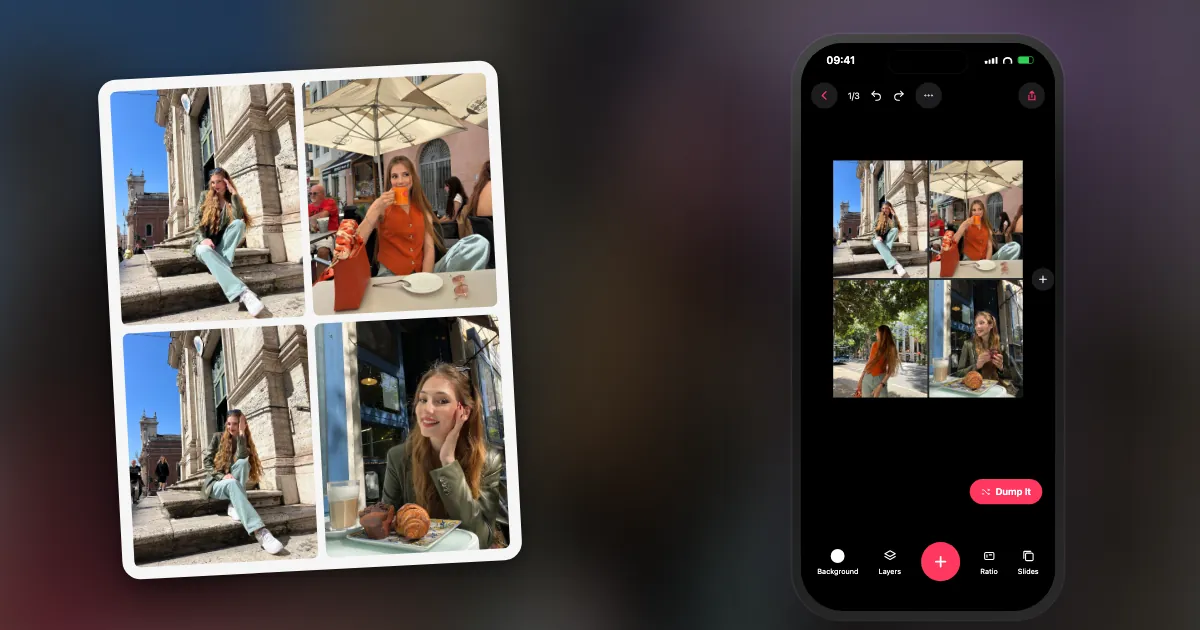
What is a photo grid?
It is one image divided into rows and columns, with a photo in each cell. A grid is the tidiest kind of collage, which is why it suits before-and-afters, series and recaps.
Because the cells line up, a grid makes unrelated photos look like a set. That is its main strength and also its weakness, since it can look stiff if the photos have nothing in common. If you want something looser, see the other types of photo collage.
Which grid layout suits how many photos?
Fit the layout to how much each photo needs to say. Two to four photos show detail; nine or more create a pattern. People will not study each cell in a big grid.
| Photos | Layout | Good for |
|---|---|---|
| 2 | Side by side, or stacked | Before and after, then and now |
| 3 | Three columns, or one large and two small | A short story: start, middle, end |
| 4 | 2×2 | The all-rounder; still readable on a phone |
| 5–6 | 2×3, or one hero with smaller cells | Recaps with one photo that leads |
| 9 | 3×3 | A pattern: one subject across many shots |
| 12–16 | 3×4 or 4×4 | Print, or a year in months |
What are the exact sizes for a photo grid?
Divide the canvas width by the columns and the height by the rows. These are the numbers for edge-to-edge grids on common Instagram canvases.
| Canvas | Grid | Each cell (px) |
|---|---|---|
| 1080 × 1080 (1:1) | 2×2 | 540 × 540 |
| 1080 × 1080 (1:1) | 3×3 | 360 × 360 |
| 1080 × 1080 (1:1) | 4×4 | 270 × 270 |
| 1080 × 1350 (4:5) | 2×2 | 540 × 675 |
| 1080 × 1350 (4:5) | 3×3 | 360 × 450 |
| 1080 × 1350 (4:5) | 2 side by side | 540 × 1350 |
| 1080 × 1350 (4:5) | 2 stacked | 1080 × 675 |
| 1080 × 1920 (9:16) | 2×3 | 540 × 640 |
With gaps, subtract them first. A 3×3 grid on a 1080 px canvas with two 12 px inner gaps across has cells of (1080 − 24) ÷ 3 = 352 px wide. Remember that a 360 px cell is small on a phone screen, so simple subjects read best at that size.
Should a photo grid have spacing?
Both work. Edge-to-edge looks modern and suits photos with a similar feel. Thin white or black borders separate photos with clashing colours. Just keep the gap the same everywhere.
If you do use gaps, keep them about 1 to 2% of the canvas width (roughly 12 to 20 px on 1080). Thicker frames start to take attention from the photos, although a deliberately thick white border can give a nice gallery feel.
How do you make a photo grid?
Choose a tool with grid layouts, set the ratio, pick the layout, add your photos and adjust their position in each cell. Then export at full quality.
- Pick the tool. Google Photos and Apple's Shortcuts do simple free grids. Here are seven options compared.
- Set the ratio. Use 4:5 for feed posts, 9:16 for Stories.
- Choose the layout using the table above.
- Add the photos and drag each one inside its cell so nothing important gets cut.
- Set the spacing and check it at phone size.
- Export at the highest quality, and do not screenshot it.
What is the difference between a photo grid and an Instagram grid maker?
A photo grid is several photos combined into one image. An Instagram grid maker does the opposite: it cuts one image into pieces, to post separately so they join up on your profile.
Tools called grid makers, grid splitters or image splitters usually chop a big image into 3, 6 or 9 tiles. They need careful sizing now, because the profile grid changed from squares to taller rectangles in 2025, so old square tiles no longer line up. DUMP does not cut images for the profile grid. If you want one picture to span several swipes instead, that is a seamless carousel, which DUMP does make.
Frequently asked questions
What is a photo grid?
One image split into rows and columns, with a photo in each cell. It is the tidiest kind of collage.
How do you make a 2×2 photo grid?
In a collage tool, choose a four-cell layout at your output ratio, add four photos, and adjust each one inside its cell. On a 1080 × 1350 px canvas, each cell is 540 × 675 px.
What size is a 3×3 grid for Instagram?
On a 1080 × 1080 px canvas, each cell is 360 × 360 px. On a 1080 × 1350 px portrait canvas, each cell is 360 × 450 px.
Can you make a photo grid for free?
Yes. Google Photos and Apple Shortcuts make simple grids for free, and DUMP's 28 grid layouts are on its free plan with no watermark on images.
What is the difference between PhotoGrid and a photo grid?
PhotoGrid is the name of one collage app from a particular company. A photo grid is the layout itself, and you can make one in many different apps.
Make your grid in DUMP
28 grid layouts, edge-to-edge or spaced, exported at 2160 px with no watermark. Free on iPhone and iPad, no account.
 On a computer?Scan with your iPhone camera
Free · iPhone & iPad · iOS 18.6+ · No account · Works offline

If you are stuck, use 2×2. It is hard to get wrong, and it almost always looks better on a phone than you expect.
Indie iOS developer, and the maker of DUMP. Say hello on Instagram or at solostaseraofficial@gmail.com.
Sources
- Business Today, 21 Jan 2025: the Instagram profile grid moves from squares to taller rectangles.
- Instagram Help Center, photo resolution article: photos are shown at up to 1080 px wide.
- Cell sizes are simple division of the canvas sizes. DUMP facts were checked against the source code of DUMP 3.0.1, the version on the App Store on 1 Nov 2026.