 Solora
Disclosure. I make Solora, one of the apps on this page, so I'm not neutral. Every competitor fact below comes from that app's own App Store page or website, checked on 3 November 2026, and I compared listings rather than testing each app for weeks. There are no affiliate links. Prices are US prices and can change; if something here is out of date, email solostaseraofficial@gmail.com and I'll fix it.

Why does a Notion life planner stop working?
Notion is a blank workspace, so you're both the user and the designer of your system. It's powerful, but every change in your life becomes a maintenance job.
Notion's own listing describes an "all-in-one workspace" for notes, tasks and projects, and it's free for personal use with thousands of templates. That's exactly why people love it. It isn't built to open on your phone in the morning and tell you what today is about unless you build that yourself, and checking off a habit in a database takes more taps than in an app designed for it.
If your dashboard works and you enjoy it, stay. This page is for people who've noticed they tinker more than they do.
How do Notion and the alternatives compare?
The main trade-off is flexibility against setup time. Notion can become anything; the others already are something.
| App | Structure | Runs on | Price | Privacy label |
|---|---|---|---|---|
| Notion | Whatever you build | iPhone, iPad, web, desktop | Free for personal use; Plus from $10/month on its site, $11.99/month in the app | Linked data, including for the developer's marketing and analytics |
| Griply | Goals, then habits and tasks | iPhone; desktop and web per its site | Free; Premium from $4.99/month, annual plans listed from $19.99 to $49.99 | Linked: purchases, contact info, identifiers; others not linked |
| Solora | Roles, Big 3, habits, projects | iPhone, iPad | Free; Premium $5.99/month, $39.99/year or $99.99 lifetime | Data Not Collected |
| Structured | Timeline of your day | iPhone, iPad, Mac, Watch | Free; Pro monthly, yearly or $99.99 lifetime | Linked: email, user content; others not linked |
| TickTick | Lists, calendar, habits | iPhone, iPad, Watch and more | Free; $4.99/month or $49.99/year | Linked: contact info, content, identifiers, diagnostics |
Prices and privacy labels are from the US App Store, checked 3 Nov 2026. Labels are declared by developers and aren't verified by Apple.
Which alternative is best for goals?
Griply is the closest to a goal-tracking Notion template. Its listing describes a "golden thread" from long-term vision to today's tasks and habits.
Pick it if your dashboard was mostly about annual goals and you want to keep that top-down view, plus access from desktop and web.
Which alternative is best for juggling several parts of life?
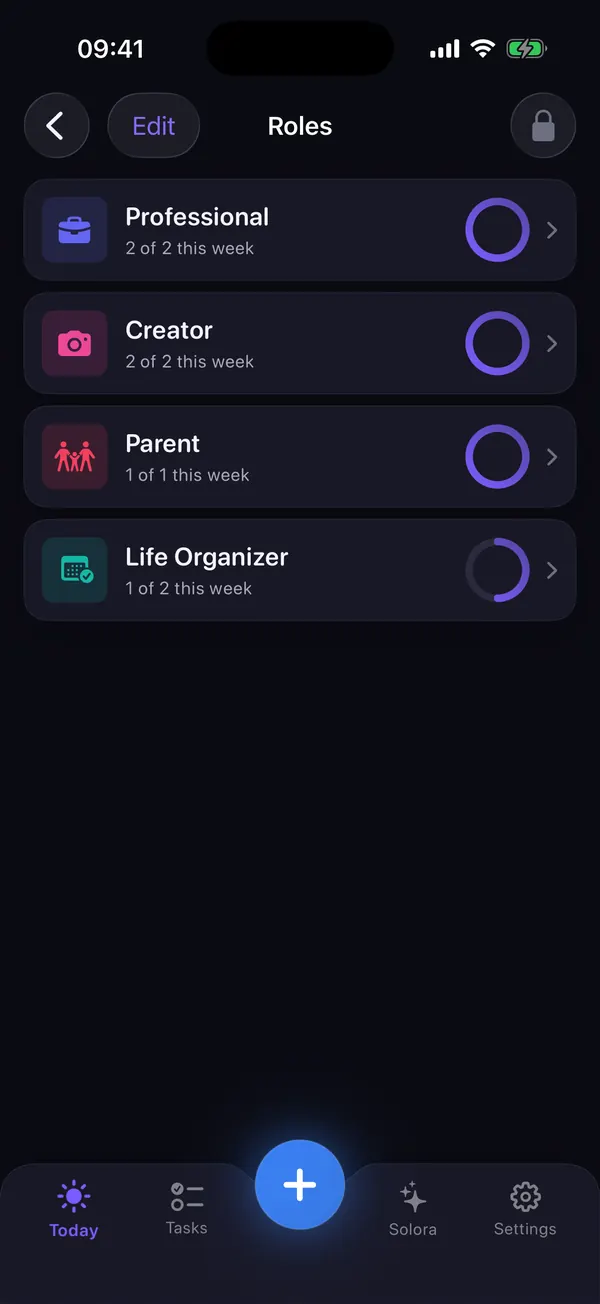
Solora, if your dashboard's real job was keeping work, family and your own projects in balance. Those sections become roles, each with a weekly target.
- Your "areas" database becomes roles, from 23 templates or your own.
- Your "today" view becomes a Big 3 of 1, 3 or 5 items, and unfinished ones carry over.
- Your habit table becomes habit tracking with heatmaps and 52 templates, including a flexible streak that forgives one missed day.
- Your project pages become projects with steps, 9 templates (trip, move, launch and more) and a moodboard of images, notes, links and colors.
- Your weekly review template is built in, and it counts for you.
What you lose is everything Notion is best at: free-form documents, linked databases, web access, sharing and exports. So keep Notion for those.
Can you use Notion and a planner together?
Yes, and it's often the sensible answer. Keep long-term reference material in Notion and let a phone app handle today.
Just don't copy tasks between them. Decide which app is the only place today's tasks live. Two sources of truth is how the original dashboard went stale.
What can't Solora do?
Solora is a personal planner for one person on iPhone and iPad, and it has real gaps.
- No cloud sync between devices, no web app and no data export. Your data stays on the device and in its normal backup.
- No shared or team lists, and no Apple Watch app or native Mac app.
- The AI assistant needs iOS 26 and an Apple Intelligence device (iPhone 15 Pro, iPhone 16 or later, or an M1 iPad or later) with Apple Intelligence turned on. Everything else works without it.
Try it
Try Solora free, with no account
Roles, a daily Big 3 and habits that survive bad days, on iPhone and iPad. It's listed on the App Store as Solora: AI Daily Planner.
 On your computer?Scan with your iPhone camera
Free plan: 4 roles, 15 active tasks, 20 habits, 5 projects, 5 assistant chats a day. Premium: monthly, yearly or one-time Lifetime. iOS 18.6 or later; the assistant needs iOS 26 with Apple Intelligence.
Frequently asked questions
Is Notion good for life planning?
It can be, if you enjoy building and maintaining your own system. Notion is free for personal use and has thousands of templates. If upkeep has become the problem, a ready-made planner such as Griply, Solora or Structured needs less setup.
What is a simpler alternative to Notion on iPhone?
For a personal planner, Solora gives you roles, a daily Big 3, habits and projects with no account or template to set up. TickTick is a simple option if you want a synced list, and Structured if you want a timeline.
Can Solora replace Notion?
For planning days, habits and personal projects, yes. For documents, databases, sharing and web access, no. Solora has no web app, no sync and no export, so keep Notion for those jobs.
Does Notion work without an account?
No. Notion needs an account. Solora doesn't: you can start planning right after installing it, and your data stays on the device.
Sources
- Notion on the App Store
- Griply on the App Store
- Structured on the App Store
- TickTick on the App Store
- Solora on the App Store
- Notion pricing
All checked on 3 November 2026.

Thanks for reading. If this helped, or if I got something wrong, I'd love to hear from you.
Independent iOS developer and the maker of Solora, so read my take on it with that in mind. The methods here work on paper too. Say hello on Instagram or at solostaseraofficial@gmail.com.