 Solora
Disclosure. I make Solora, one of the apps on this page, so I'm not neutral. To keep it fair, every competitor fact below comes from that app's own App Store page or website, checked on 15 October 2026, with links. There are no affiliate links. Prices are US App Store prices and can change; if something here is out of date, email solostaseraofficial@gmail.com and I'll fix it.
How did I compare these planner apps?
I compared each app on the questions that decide whether a role-based planner fits your life: how it plans (weekly, daily or by the hour), whether it has roles or life areas, habits, AI, what its App Store privacy label says, where it runs, languages and price.
- Planning style: weekly goals, a daily focus list, or a time-blocked timeline.
- Roles or life areas: can work stop swallowing everything else?
- Habits and bad days: can the plan bend without breaking?
- AI: what it does, and whether it's included or paid.
- Privacy label: what the developer declares on the App Store (“Data Used to Track You”, “Data Linked to You”, or “Data Not Collected”).
- Platforms, languages and price.
What I didn't do: rate apps out of 10 or rank them. Each one is built for a different kind of planner.
How do these planner apps compare side by side?
Here's the side-by-side summary in two tables: how each app plans, then privacy, platforms and price. Details and sources for every app follow below.
| App | How you plan | Roles / areas | Habits | AI |
|---|---|---|---|---|
| Week Plan | Weekly: Covey 7 Habits + OKRs, teams | Roles (per its website) | Not a core feature in its listing | None mentioned in its listing |
| Harmony | Weekly goals by role, mission statement | Roles | Yes | AI time-blocking for goals |
| Griply | Life areas → goals → habits and tasks; calendar time-blocking | Life areas | Yes | None mentioned in its listing |
| Structured | Hour-by-hour visual timeline | No | Routines and habits on the timeline | AI day planning (Pro) |
| Solora | Roles with weekly targets + a daily Big 3 | Roles | Yes, with easier versions (one-tap logging in a Premium widget) and shielded streaks | On-device assistant (iOS 26 + Apple Intelligence) |
| App | Privacy label (summary) | Runs on | Languages | Price |
|---|---|---|---|---|
| Week Plan | Data used to track you: contact info, identifiers, usage data | iPhone, iPad, Mac*, Vision; website lists web, Windows, Android | English | Free plan; Ultimate $9.99 or $103.99 |
| Harmony | Data used to track you: purchases, identifiers | iPhone, Mac* | English | Subscription for full features; lifetime $19.99 |
| Griply | Linked to you: purchases, contact info, user ID; no tracking section | iPhone, Vision, desktop, web | 11 | Free; Premium $4.99/month or annual plans listed $19.99–$49.99 |
| Structured | Linked to you: email address, user content | iPhone, iPad, Mac, Watch, Vision | 28 | Free; Pro subscription or $99.99 lifetime |
| Solora | Data Not Collected | iPhone, iPad, Mac*, Vision | 6 | Free; optional Premium (price on the App Store) |
Prices and privacy labels are from the US App Store, checked 15 Oct 2026. “Runs on” lists the devices in each App Store page's Compatibility section, plus platforms named in the listing or on the developer's website. * Mac means the iPhone or iPad app running on an Apple silicon Mac, which the App Store marks “Not verified for macOS”.
Week Plan: best for weekly Covey-style planning, especially with a team
Week Plan is the right pick if you plan by the week, like Stephen Covey's roles and Big Rocks approach or OKRs, and want the same planner on the web, Windows or Android, possibly with teammates.
- Strengths: its App Store listing says it's “Inspired by the book, 7 Habits of Highly Effective People by Stephen Covey and OKR”, with twelve-week plans and team members. Its website lists role-based planning and an Eisenhower matrix, and apps for web, iOS, Android and Windows, plus a free plan.
- Consider something else if: you want a simple daily list for personal life, an iPhone app in a language other than English (its iOS app lists English only), or an app whose privacy label has no “Data Used to Track You” section.
Sources: Week Plan on the App Store and weekplan.net, checked 15 Oct 2026.
Harmony: best for a mission statement and weekly role goals
Harmony suits people who want to start from a personal mission statement and plan weekly goals per role, with AI help to time-block them, on iPhone.
- Strengths: its subtitle is “Roles, goals, mission/vision”, and it says it will help you create a Personal Mission Statement. It tracks habits, and “Harmony's AI will help you time-block your goals”. Its lifetime purchase is listed at $19.99, which is low.
- Consider something else if: you want daily planning (its listing says “Rather than daily planning, we just review our weekly plan throughout the week”), a language other than English, or a full free tier (“A paid subscription is required to access full Harmony features”).
Source: Harmony: Weekly Planner on the App Store, checked 15 Oct 2026.
Griply: best for goal hierarchies across phone, desktop and web
Griply is a strong choice if you think in goals: life areas, then goals and subgoals, then the habits and tasks that move them, synced between your iPhone, a desktop app and the web.
- Strengths: it groups “goals, habits, and tasks under areas like work, health, and finance”, breaks big goals into subgoals, plans days on a calendar with time-blocking (with Google Calendar and Outlook support), and syncs across iPhone, desktop and web. Its listing covers 11 languages.
- Consider something else if: you want role balance (who you are) rather than goal hierarchies (what you're achieving), an AI assistant, or an app whose privacy label doesn't link contact info to you.
Source: Griply on the App Store, checked 15 Oct 2026.
Structured: best if you want an hour-by-hour timeline
Structured isn't a role-based planner, but it's what many people actually need: a visual timeline of the day, synced across every Apple device. If your problem is when things happen rather than what matters, start here.
- Strengths: a drag-and-drop visual timeline; the free version “Syncs across iPhone, iPad, Apple Watch, and Mac”; Pro adds calendar and Reminders integration and “AI-powered day planning”. 28 languages, and the App Store page shows an Editors' Choice badge.
- Consider something else if: you want roles or life balance, or you don't want to time-block every hour.
Source: Structured on the App Store, checked 15 Oct 2026.
Solora: best for roles plus a daily Big 3, privately on iPhone and iPad
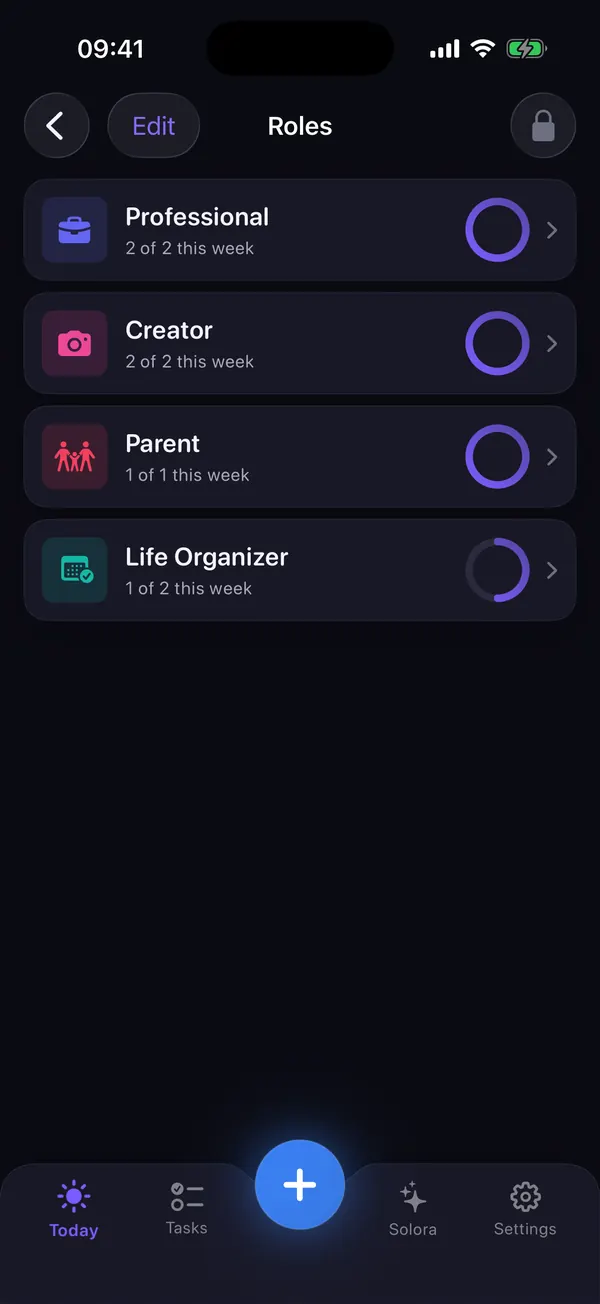
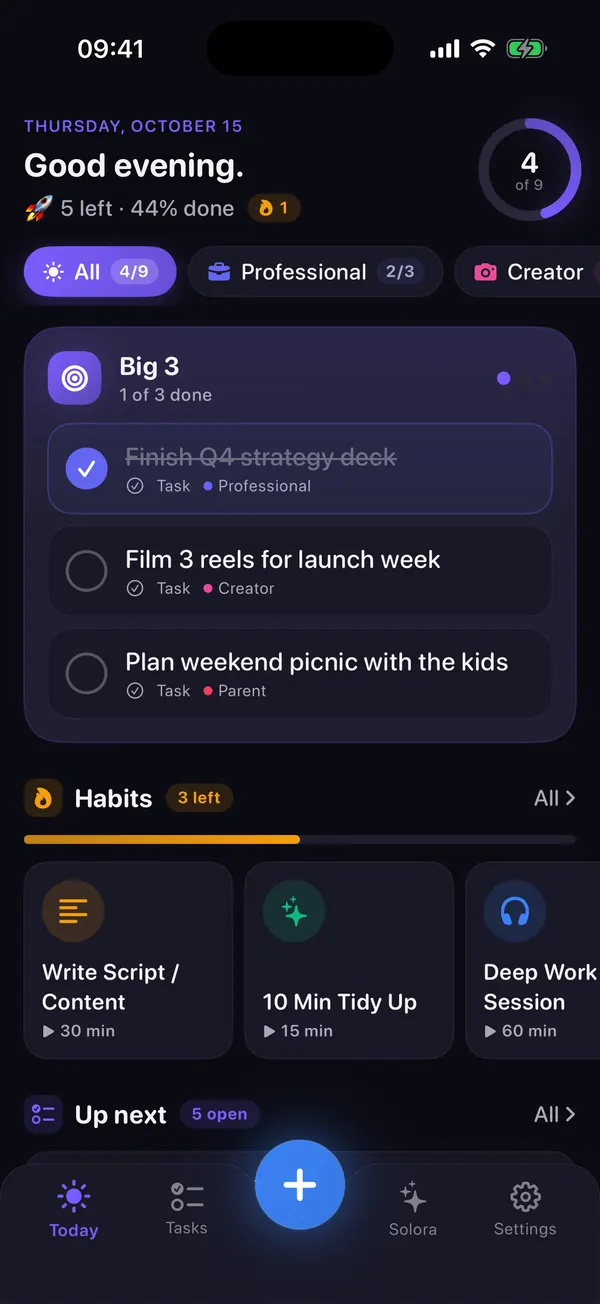
Solora: AI Life Planner is for people who juggle several roles and want one focused day at a time: roles with weekly targets, a daily Big 3, habits that survive bad days, and an AI assistant that runs on the device, with no account.
- Strengths: every task, habit and project can belong to a role with a weekly target, and the Weekly Review shows completed tasks vs target for each (habits and project steps don't count toward the target in Solora 3.0). A daily focus of 1, 3 or 5 with automatic carry-over. Easier versions, flexible or shielded streaks, and a recovery flow for missed tasks. An on-device assistant built on Apple Intelligence. App Store privacy label “Data Not Collected”. 6 languages, a usable free plan and a one-time Lifetime option.
- Consider something else if: you need any of the things below.
What Solora doesn't do
Solora has no cloud sync, no shared lists, no data export, no Mac, Watch, web or Android app, and no hour-by-hour timeline. If you need any of those, one of the apps above is a better fit.
- No sync: data stays on each device (and its normal backup), so iPhone and iPad keep separate plans.
- No sharing: no family or team lists, no collaboration.
- No export of your data to another app.
- No time-blocked timeline: Solora plans by priority and role, not by the hour.
- The AI needs recent hardware: iOS 26 and an Apple Intelligence–capable device. Everything else works on iOS 18.6 and later.
- Big 3 suggestions aren't role-balanced automatically: they're ranked by overdue, priority and due date; balancing roles is your call, with the Weekly Review to help.
Try it in Solora
Plan by who you are, not by an endless list
Try Solora for a week: set up your roles, pick a daily Big 3, and check the Weekly Review on Sunday. If it doesn't fit how you plan, one of the apps above probably will.
 On your computer?Scan with your iPhone camera
Free plan: 4 roles, 15 active tasks, 20 habits, 5 projects, 5 assistant chats a day. Premium: monthly, yearly or one-time Lifetime; see the current price on the App Store.
Which planner app should I choose?
Match the app to the way you already plan. If you plan weekly with a team, Week Plan; weekly and personal with a mission statement, Harmony; by goals across devices, Griply; by the hour, Structured; by role with a short daily focus and privacy first, Solora.
| If you… | Look at |
|---|---|
| Plan your week Covey-style, maybe with teammates, on web, Windows or Android | Week Plan |
| Want a mission statement and weekly role goals with AI time-blocking | Harmony |
| Think in big goals and want them synced to desktop and web | Griply |
| Need to see your day hour by hour, on every Apple device | Structured |
| Juggle several roles and want a short daily focus, kind bad-day features and no account | Solora |
| Want to try the method before any app | Role-based planning on paper |
Comparing against something else? See free Structured alternatives, the best AI planner apps or private planners with no account.
How do I read an app's privacy label?
Scroll to “App Privacy” on any App Store page. “Data Used to Track You” means data about you may be combined with other companies' data for targeted advertising or shared with data brokers; “Data Linked to You” is tied to your identity; “Data Not Linked to You” is de-identified; “Data Not Collected” means the developer declares that nothing leaves your device for them to keep.
These are summaries of Apple's definitions. Labels are declared by developers, so they're a starting point rather than a guarantee, but they're the quickest way to compare apps that will hold your plans, goals and habits. For Solora, the details are in the privacy policy.
Planner comparison FAQ
What is the best role-based planner app for iPhone?
It depends on how you plan. Week Plan and Harmony focus on weekly role goals (Week Plan adds teams and more platforms; Harmony adds a mission statement and AI time-blocking). Griply organizes goals by life area. Solora combines roles with weekly targets and a daily Big 3, runs its AI on the device and needs no account.
Is there a free alternative to Week Plan or Harmony?
Week Plan itself has a free plan. Solora's free plan includes 4 roles, 15 active tasks, 20 habits, 5 projects and 5 assistant chats a day, with optional Premium. Harmony says a paid subscription is required for its full features.
Which planner apps work on Mac or the web?
Structured has a Mac app, Griply works on desktop and the web, and Week Plan's website lists web, Windows and Android apps. Week Plan, Harmony and Solora can also run their iPhone or iPad app on Apple silicon Macs, which the App Store marks “Not verified for macOS”. None of them is a native Mac app.
Which of these apps doesn't collect data?
On 15 October 2026, Solora's App Store label read “Data Not Collected”. Week Plan's and Harmony's labels include “Data Used to Track You”; Griply's and Structured's list data linked to you. Check each App Store page for the current label.
Sources
- Week Plan: Weekly Tasks, Goals, App Store (US): apps.apple.com; website: weekplan.net. Checked 15 Oct 2026.
- Harmony: Weekly Planner, App Store (US): apps.apple.com. Checked 15 Oct 2026.
- Daily Planner & Goals: Griply, App Store (US): apps.apple.com. Checked 15 Oct 2026.
- Structured: Daily Planner Todo, App Store (US): apps.apple.com. Checked 15 Oct 2026.
- Apple, “App privacy details on the App Store”: developer.apple.com. Checked 15 Oct 2026.
- Solora: AI Life Planner, App Store (US): apps.apple.com, and the shipped app (version 3.0). Checked 15 Oct 2026.