 Solora
What is role-based planning?
Role-based planning means organizing your week around the roles you play, such as employee, parent, partner, friend or athlete, rather than around one long to-do list. Each role gets its own small goals, so you can see at a glance when one part of your life is getting everything and another is getting nothing.
The idea comes from Stephen Covey's work on “putting first things first”: FranklinCovey describes it as assessing our roles and goals and protecting time for the Big Rocks every week. Covey's version is a weekly paper ritual. This guide is a lighter, daily version that fits on a phone and survives a busy week.
Why it helps: a single list ranks everything by urgency, and work almost always wins urgency contests. Family dinners, your own health and side projects rarely have deadlines, so they slide. Giving them a role makes them visible.
How do I choose my roles?
Pick the 3–6 roles that take most of your time or matter most to you, name them in your own words, and make sure one of them is for you. Fewer is better: if two roles always get the same tasks, merge them.
- List who you are this season.
Not forever, just the next few months. “Thesis writer” might only last a semester. That's fine.
- Keep it to 3–6.
More than six and the weekly check turns into homework.
- Add one role for yourself.
Health, Wellness, Mind & Spirit, Hobbyist: whatever you'd call the part of your week that's only yours. It's the role most likely to disappear.
- Name them so they mean something.
“Dad”, “Studio”, “Body” are fine. You'll see these names every day.
Stuck for ideas? These are the 23 role templates in Solora, grouped the way the app groups them:
| Group | Roles |
|---|---|
| Work & Career | Professional, Leader, Entrepreneur, Educator |
| Study & Academic | Student, Researcher |
| Content & Creativity | Creator, Artist |
| Family & Relationship | Partner, Parent, Family Member, Friend |
| Home & Life | Home Manager, Life Organizer, Pet Parent, Financial Planner |
| Health & Wellness | Athlete, Wellness |
| Personal Growth | Hobbyist, Learner, Mind & Spirit, Volunteer, Traveler |
A good starter set for most people is four roles: one for work or study, one for the people closest to you, one for home or life admin, and one for your health or growth.
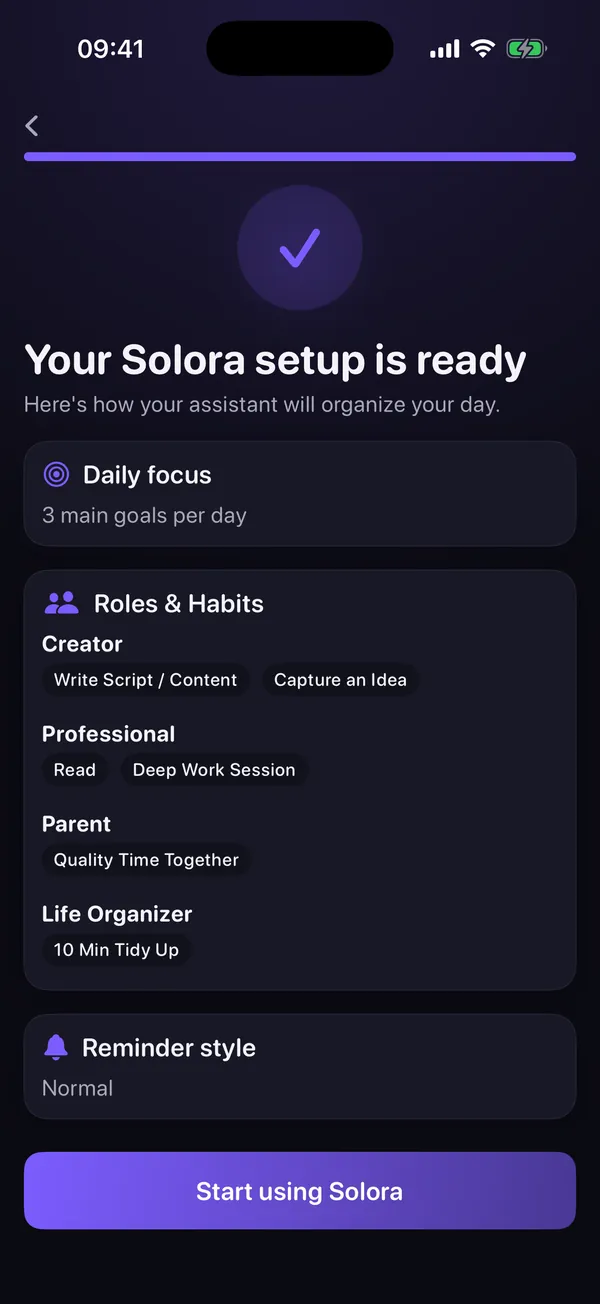
Here's what a set-up looks like in practice: each role holds its own habits, and a daily focus of three goals sits on top.
Why weekly targets work better than equal hours
Equal hours across roles is impossible and makes you feel like you're always failing. A small weekly target, like “Partner: 2 things this week”, is achievable, easy to count and flexible about which day it happens.
Think of targets as minimums, not quotas. Work might get 15 things done in a week and Partner only 2, and that week can still be balanced, because the 2 that mattered happened.
| Role | Weekly target | What counts |
|---|---|---|
| Professional | 5 | Meaningful work outcomes, not every email |
| Parent | 3 | Bedtime story, school meeting booked, Saturday park trip |
| Partner | 2 | Date night, a proper check-in after the kids are asleep |
| Wellness | 3 | Three walks or workouts |
| Home Manager | 2 | Groceries ordered, one admin task cleared |
Start lower than you think. A target you hit four weeks in a row beats an ambitious one you miss every week. You can raise it later.
One app detail: in Solora 3.0, a role's weekly progress counts the tasks you complete in that role; habits and project steps don't count toward it yet. If you want “three walks” in the number, add them as tasks.
How do I know which role I'm neglecting?
Once a week, compare what each role actually got with its target. The role furthest behind is your neglected role, and next week it gets one small, specific action. That's the whole check; it takes about five minutes.
- Count.
For each role: how many things got done this week vs the target?
- Spot the gap.
Which role is furthest behind? Usually it's obvious before you finish counting.
- Ask why, briefly.
Was it a heavy week (fine) or has this role been last for three weeks (a pattern)?
- Pick one small action.
Not “be a better friend”. “Text Ece about Saturday.” Put it on Monday's Big 3.
- Adjust if needed.
If a target keeps failing for good reasons (exam month, a launch, a newborn), lower it for now. Seasons change; targets should too.
In Solora this check is built in. The Weekly Review shows a Role Balance list with completed tasks vs target for every role and a “Roles on Track” count, so the gap is visible at a glance.
You can also ask the assistant “Which role am I neglecting?” (it's one of the quick suggestions). It lists what you finished in each role over the last 7 days, names the one that got the least attention, and offers to add one small task or habit for it.
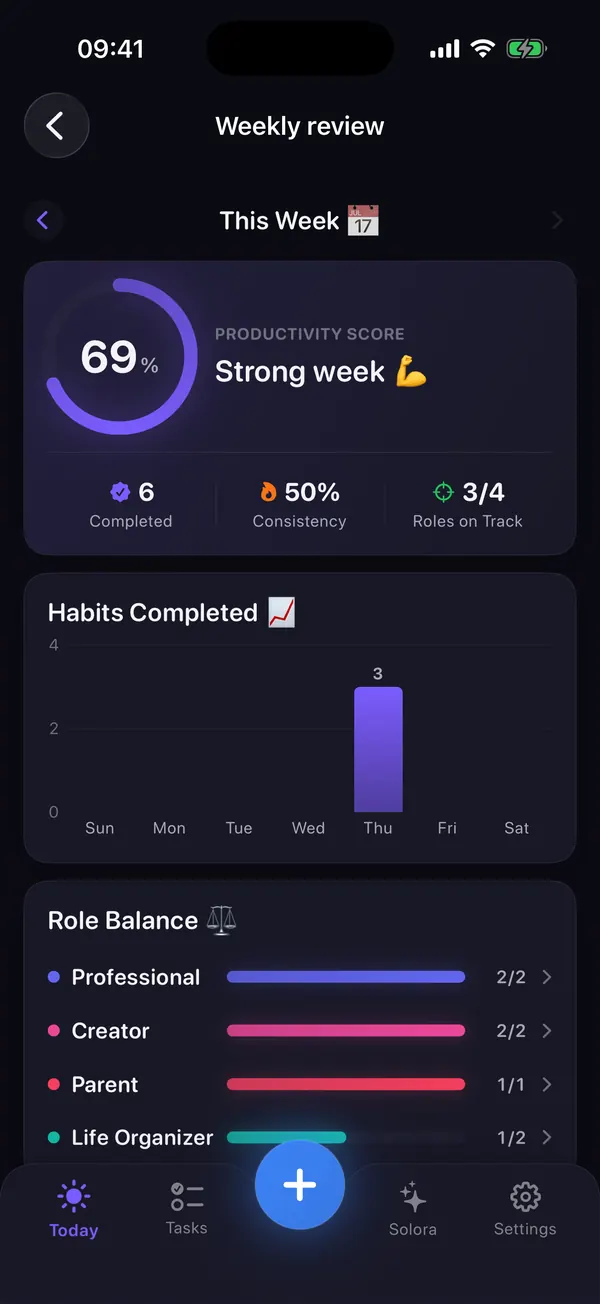
For the full weekly routine (wins, postponed tasks, next week's focus), see the 15-minute weekly review.
How do roles turn into today's plan?
Roles shape the week; the Big 3 shapes the day. Each morning or evening, pick three priorities, and when a role is behind its target, let one of the three come from that role.
You don't need every role every day. A good week often looks like this: work takes two slots most days, and the third slot rotates between family, health and home. Read more in the Big 3 method.
| Day | 1 | 2 | 3 |
|---|---|---|---|
| Mon | Finish the quarterly deck (Professional) | Book the dentist (Home Manager) | 30-minute run (Wellness) |
| Tue | Client call prep (Professional) | Homework help, phone away (Parent) | Pay the electricity bill (Home Manager) |
| Wed | Send the proposal (Professional) | Review two candidates (Leader) | Walk with a podcast (Wellness) |
| Thu | Team 1:1s (Leader) | Date night booked (Partner) | Bedtime story (Parent) |
| Fri | Close the sprint (Professional) | Yoga class (Wellness) | Date night (Partner) |
| Sat | Park trip (Parent) | Groceries ordered (Home Manager) | Call Grandma (Family Member) |
Try it in Solora
See your whole life on one screen, not one endless list
Solora: AI Life Planner is built around roles. Every task, habit and project can belong to one, and each role has a weekly target. In Solora 3.0, a role's weekly progress counts the tasks you complete; habits and project steps don't count toward it yet.
- Start from 23 role templates or create your own, with a color and an icon.
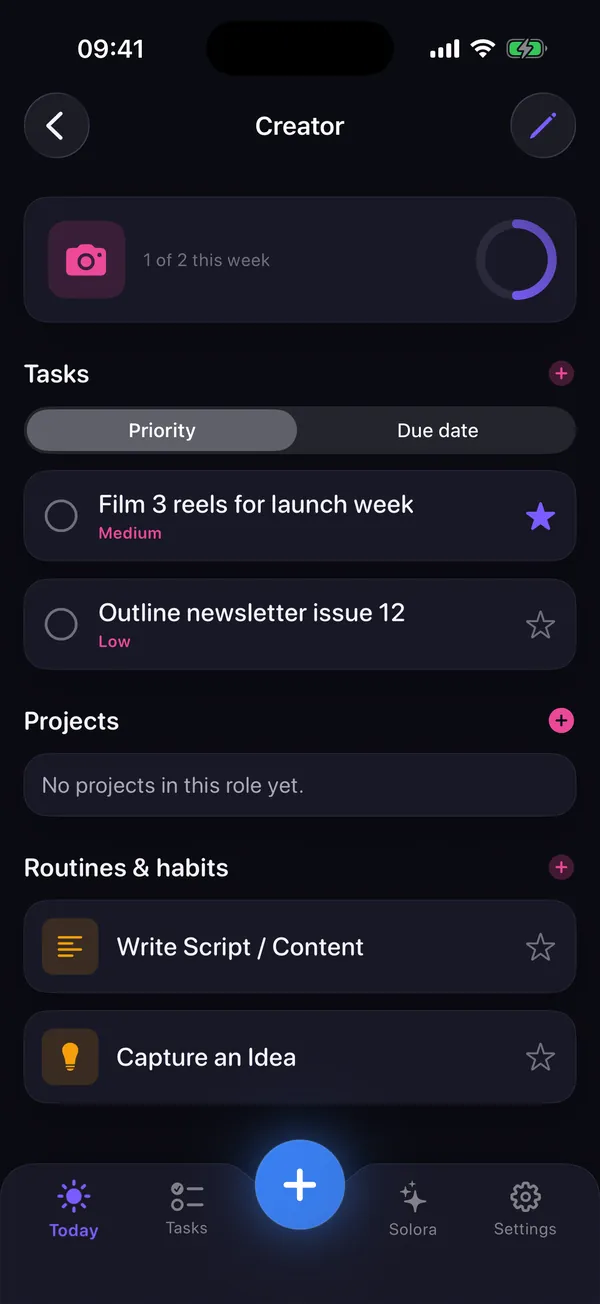
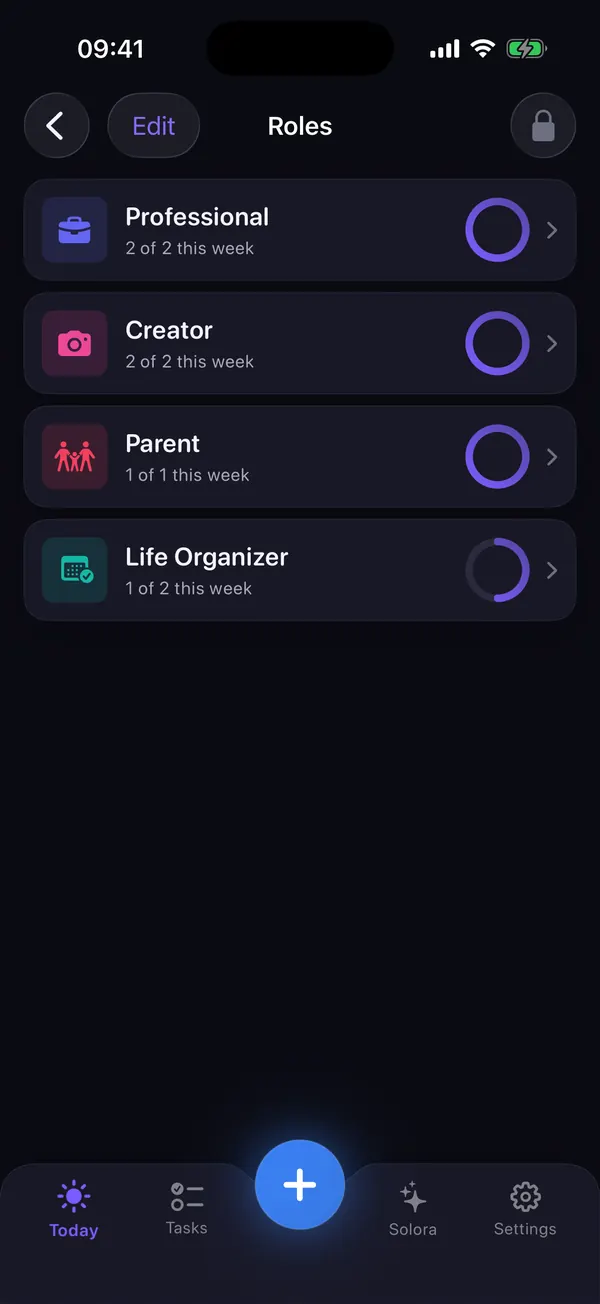
- Each role page shows its tasks, projects and habits, plus “1 of 2 this week” for completed tasks.
- The Weekly Review and Insights show how balanced your roles were.
- The assistant can tell you which role got the least attention this week.
 On your computer?Scan with your iPhone camera
Free plan: up to 4 roles, 15 active tasks and 20 habits. Premium removes the limits. No account needed.
Role-based planning on paper or in an app?
Paper is great if you love a Sunday ritual with a pen; an app helps when you need the counting, reminders and carry-over done for you. Both work. The method matters more than the tool.
| Option | Good at | Less good at |
|---|---|---|
| Paper weekly sheet | Reflection, no screens, total flexibility | Counting progress, carrying tasks over, daily reminders |
| Weekly role apps | Weekly goal-setting per role; some add teams, web and desktop | Some are weekly-only, English-only or subscription-first |
| Solora | Roles plus a daily Big 3, habits and projects; private, on-device AI; 6 languages | No sync between devices, no shared lists, no web or Mac app |
For a fuller, sourced comparison of Week Plan, Harmony, Griply, Structured and Solora, read role-based planner apps compared. If you're starting from zero, the where-to-start guide walks through a first reset.
Role-based planning FAQ
How many roles should I have?
Three to six. Fewer than three and you lose the balance view; more than six and the weekly check becomes a chore. If two roles always share the same tasks, merge them. Solora's free plan includes 4 roles, which is a good starting set; Premium allows more.
Is role-based planning the same as “life areas” or a wheel of life?
They're close cousins. Life areas (health, career, finance…) describe topics; roles describe who you are being (a parent, a teammate, a friend). Roles tend to feel more personal and make it easier to notice when a relationship, not just a topic, is being neglected.
What if work genuinely needs all my time this month?
Then lower the other targets on purpose, for example Partner 1 and Wellness 2, and write down when the busy season ends. The aim isn't perfect balance; it's making the trade-off a decision rather than an accident.
Can my partner and I share roles or lists in Solora?
No. Solora is a personal planner: there's no account, no cloud sync and no shared lists, so each person plans on their own device. For a shared shopping or chores list, use a separate shared-list app alongside it.
Do I need an app for role-based planning?
No. A sheet of paper with your roles, a weekly target per role and a daily list of three works. An app mainly saves you the counting, keeps unfinished items from getting lost, and puts the weekly numbers in front of you.
Your whole life. One focused day.
Set up your roles in about five minutes
Pick your roles, give each a weekly target, choose today's Big 3. Solora counts finished tasks per role and tells you when a role has gone quiet.
On your computer?Scan with your iPhone cameraFree on iPhone and iPad (iOS 18.6+). App Store privacy label: Data Not Collected.
Sources
- FranklinCovey, “Habit 3: Put First Things First”: franklincovey.com/the-7-habits/habit-3/
- Role templates, weekly targets, Weekly Review and assistant behavior checked against the shipped app (Solora 3.0) on 15 October 2026.