 Solora
What is a weekly review?
A weekly review is a short, regular check-in where you look back at the last seven days and decide what the next seven are for. It turns a pile of loose tasks into one clear plan and catches the things that are quietly slipping.
The idea was made popular by David Allen's Getting Things Done, where the weekly review has three phases: get clear, get current and get creative. The GTD version is thorough and can take an hour or more. Allen's own team is relaxed about the rhythm, noting that any time, any frequency, is better than not at all.
This guide is the short version for busy people: five questions, fifteen minutes, built around the roles you live rather than every list you own.
The 15-minute weekly review template
Set a 15-minute timer and answer five questions in order, about three minutes each. If you run out of time, skip to question four: next week's focus is the one part you shouldn't miss.
| Minutes | Question | Output |
|---|---|---|
| 0–3 | What got done? | 3 wins written down |
| 3–6 | Which role fell behind? | 1 small action for that role |
| 6–9 | What keeps getting postponed? | Split, schedule or drop it |
| 9–12 | What's next week for? | 1 focus + Monday's Big 3 |
| 12–15 | Which pile needs clearing? | Inbox, desk or camera roll, 3 minutes |
1. What got done? (3 minutes)
Scroll back through the week and write down three wins, big or small. This isn't fluff: it reminds you the week wasn't wasted, and it shows which kinds of plans actually happen. If the list is empty, that's useful too; it usually means the plans were too big.
2. Which role fell behind? (3 minutes)
Look at each role you live (work, family, partner, health, home…) and ask which one got the least. Not to feel guilty, but to choose one small, specific thing for it next week: “Book a babysitter for Friday”, not “be more present”. If you haven't set up roles yet, role-based planning explains how in ten minutes.
3. What keeps getting postponed? (3 minutes)
Find the task that moved the most times. It's almost always one of these:
- Too big: split it. “Do taxes” becomes “Find last year's documents”.
- Too vague: rewrite it as a first physical action.
- Waiting on someone: send the nudge, then schedule a follow-up.
- Not actually important: drop it, out loud. Relief included.
4. What's next week for? (3 minutes)
Choose one focus for the week: the thing that would make it a good week if it happened. Then write Monday's Big 3, so the week starts with a decision instead of an inbox. New to the Big 3? Read how to pick three priorities a day.
5. Which pile needs clearing? (3 minutes)
End with a quick physical or digital tidy, so the new week starts lighter: the downloads folder, the desk, the kitchen counter, or the camera roll full of screenshots and receipts. For a fuller digital tidy (inbox, downloads, camera roll), the Sunday digital reset from Solo.Swipe has a 10-minute version.
Try it in Solora
Your weekly review, already filled in
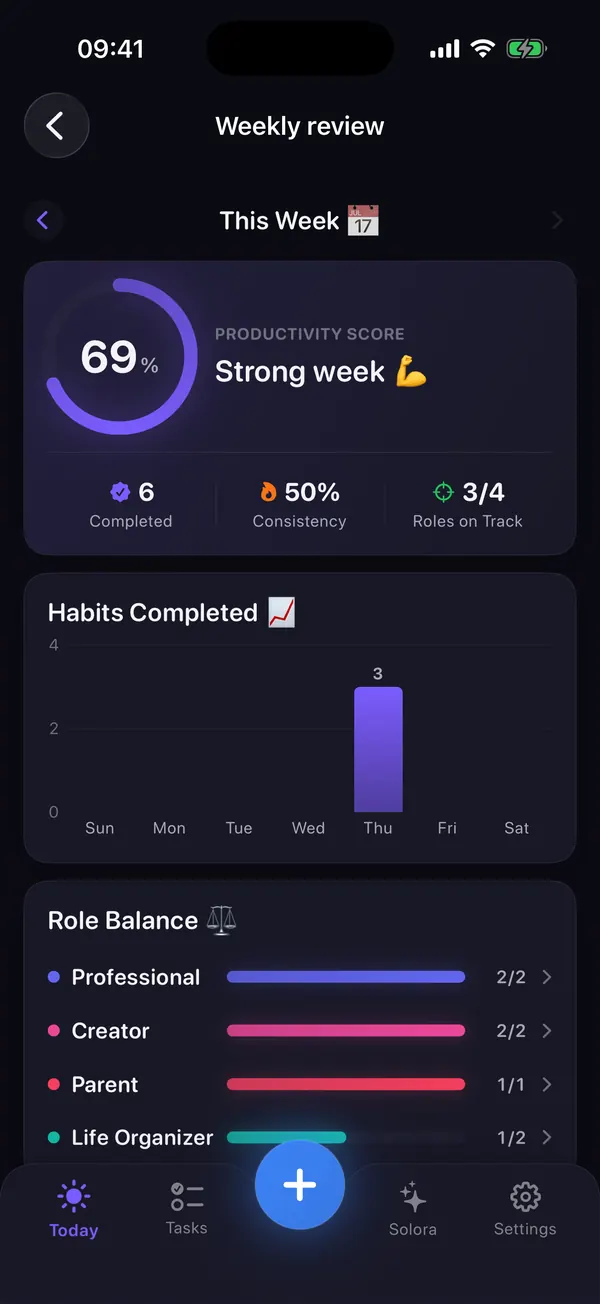
Solora: AI Life Planner collects the week for you, so the review is about decisions rather than counting.
- A productivity score with completed tasks, habit consistency and roles on track.
- Role Balance: completed tasks vs weekly target for every role.
- Postponed tasks and missed opportunities, so the stuck items surface on their own.
- Look back at last week or earlier weeks to spot patterns.
 On your computer?Scan with your iPhone camera
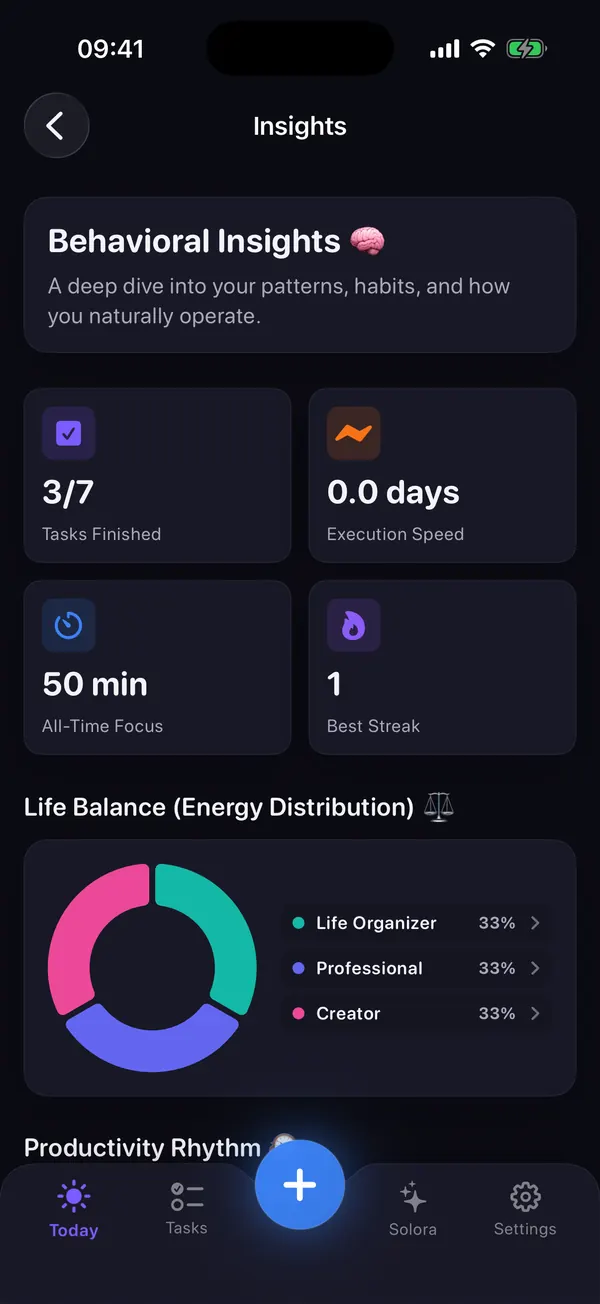
Free on iPhone and iPad. With Premium, Insights also writes a short AI weekly report on your device (needs Apple Intelligence).
When is the best time to do a weekly review?
Pick the slot you'll protect most easily. Friday afternoon is best for work-heavy weeks, Sunday evening for family-heavy weeks, and Monday morning only if your Mondays are reliably quiet.
| Slot | Why it works | Watch out for |
|---|---|---|
| Friday afternoon | Work details are fresh; you leave for the weekend with loops closed | Low energy at the end of the week |
| Sunday evening | Calm, covers family and personal roles, Monday starts with a plan | Can feel like the weekend is over early |
| Monday morning | Fresh mind, plan matches the week as it actually starts | Messages and meetings crowd it out |
Whichever you pick, attach it to something you already do: Sunday tea, the Friday commute, the first coffee. A new routine is easier to remember when it rides on one you already have.
Printable weekly review checklist
Print this list or copy it into your notes. Same five questions every week; the answers are what change.
- Three wins from this week
- The role that got the least, and one small action for it
- The most-postponed task: split, schedule or drop
- One focus for next week
- Monday's Big 3 written down
- One pile cleared: inbox, desk or camera roll
- Next review booked: same time next week
Weekly review FAQ
How long should a weekly review take?
Fifteen minutes is enough for most personal weeks. The full GTD weekly review is more thorough and often takes an hour; try the short version first and only add steps you miss.
What's the difference between this and the GTD weekly review?
GTD's review is about getting every list and inbox clear, current and creative. This version is lighter and role-based: it focuses on balance across the parts of your life, the one stuck task, and next week's focus. They work well together.
What if I skip a week?
Just do the next one. Don't try to review two weeks at once; answer the five questions for the week in front of you. A review that happens most weeks beats a perfect one that happens once.
Can I do a weekly review on my phone?
Yes. Notes app plus your calendar is enough. A planner like Solora fills in the numbers for you (what got done, which role fell behind, what was postponed), so the 15 minutes go to deciding rather than counting.
Your whole life. One focused day.
Make Sunday's 15 minutes the easiest part of your week
Solora tracks your roles, habits and postponed tasks during the week, so your review starts with the answers already on screen.
On your computer?Scan with your iPhone cameraFree, no account, iPhone and iPad (iOS 18.6+).
Sources
- Getting Things Done, “The GTD Weekly Review” (May 2009): gettingthingsdone.com
- FranklinCovey, “Habit 3: Put First Things First”: franklincovey.com
- Solora Weekly Review and Insights checked against the shipped app (version 3.0) on 15 October 2026.