
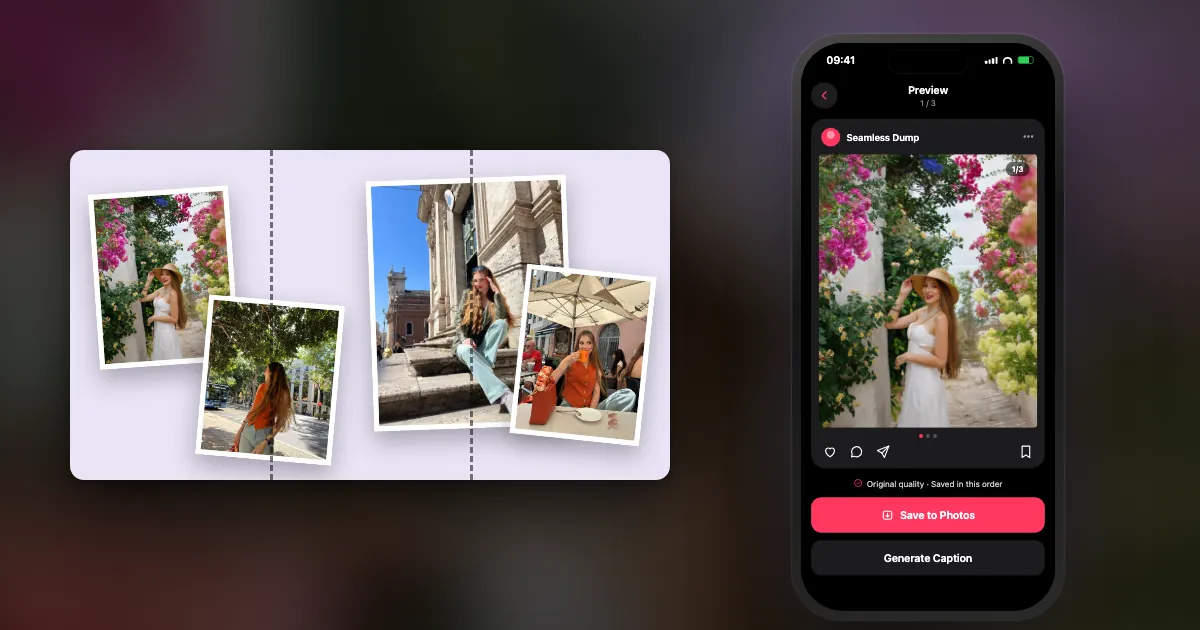
A seamless carousel turns a few slides into one long picture: as people swipe, the image keeps going. Below: what it is, the size to use, and 15 layout ideas.
Each idea has a small diagram. The dashed lines show where Instagram cuts one slide from the next.
What is a seamless (panorama) Instagram carousel?
One wide image cut into equal slides and posted in order, so swiping feels like panning across a single picture. Instagram has no panorama setting: the slides are cut before you upload them.
Every slide in a carousel is its own image. Because the slides sit edge to edge as you swipe, panels that line up exactly read as one continuous picture. The whole trick is making each panel the same size and cutting at the right place.
| Slides | Shape | Full canvas | Each slide |
|---|---|---|---|
| 2 | 4:5 portrait | 2160 × 1350 px | 1080 × 1350 px |
| 3 | 4:5 portrait | 3240 × 1350 px | 1080 × 1350 px |
| 3 | 3:4 portrait | 3240 × 1440 px | 1080 × 1440 px |
| 3 | 1:1 square | 3240 × 1080 px | 1080 × 1080 px |
Rule of thumb: canvas width = 1080 × the number of slides, with every slide exactly the same width. The full method, and why panels drift, is in how to make a seamless panoramic carousel.
Panorama layouts: one photo across every slide
The classic version. Choose wide, continuous scenes where a cut through the middle doesn't hurt.
- 1Horizon pan
A beach, a skyline or a field across three slides. Keep the horizon at the same height so the line runs straight through every cut.
- 2The reveal
Let part of the subject peek in from the right edge of slide one: a boat, a building, a tower. People swipe to see the rest. Best with objects, never faces.
- 3Leading line
A pier, a road or a shoreline that starts on slide one and ends on the last. The line pulls the eye, and the thumb, to the right.
- 4Sky from day to night
A long sunset or a blend of photos taken as the light changed. Each slide is a little darker than the one before.
Collage layouts: separate photos on one continuous background
The easiest kind to get right. The background runs across the slides while the photos sit on top, so nothing important gets cut.
- 5Scrapbook strip
Photos on a paper or plain background, with one print straddling each cut. The overlap is what makes people notice the slides connect.
- 6Film strip
A dark band with small frames running across all the slides, like a contact sheet. Good for a weekend dump with many small moments.
- 7Headline opener
One short headline across the first two slides ("october", "lisbon", "23"), then photos. Each half of the word should still read on its own.
- 8Colour story
The background shifts colour from slide to slide, with one photo on each. Pick photos that match their slide's colour.
- 9Timeline
A line runs across every slide with photos pinned above and below it. Works for a trip day by day or a year month by month.
- 10Route map
A dotted path wanders across the slides from stop to stop, with a pin and a photo at each place you went.
Hybrid layouts: seamless slides inside a normal dump
You don't have to make the whole carousel seamless. A connected section next to ordinary photos often looks better.
- 11Panorama opener
The first three slides are one wide shot; the rest is a normal dump. The opening makes people swipe, and the photos keep them going.
- 12Panorama closer
Ordinary photos first, then one wide scene across the last two slides. A calm, cinematic ending.
- 13Surprise in the middle
A seamless pair in the middle of a normal dump. Nobody expects it there, which is why it works.
- 14Before and after
One scene in two slides: the left half before, the right half after. A room, a garden, a street in summer and winter.
- 15Wide, then zoom in
A panorama across the first three slides, then close-ups of details from it. It works like a guided tour of the scene.
Tips for clean seams
Most broken panoramas come down to arithmetic, not taste.
- Keep faces, words and logos off the cut lines. Skies, water, sand and walls can be cut; people can't.
- Make every slide the same size and shape. Instagram crops the whole carousel to the first slide's shape.
- Export the full canvas once, then cut it. Repositioning and exporting each slide separately is how the seams drift.
- No filter on a single slide. It leaves a visible colour step at the join.
- Post in left-to-right order. You can reorder slides after posting, but you can't add a missing one.
How to make a seamless carousel in DUMP
DUMP does the cutting for you, so there's no pixel maths.
- Start a canvas with the slides you need.Add photos, text and stickers anywhere, including across the edge between two slides.
- Drag a photo across a slide edge and tap Make Seamless.Or use Position → Fill → Width 2x to stretch a photo over two slides.
- Save.Each slide is exported in order to a new album in Photos, so you can post them left to right without rearranging.
Frequently asked questions
What is a seamless carousel on Instagram?
A carousel whose slides are cut from one wide image, so the picture continues from one slide to the next as you swipe. It's also called a panorama or infinite carousel.
What size should a seamless Instagram carousel be?
Multiply 1080 px by the number of slides. For three portrait 4:5 slides, use a 3240 × 1350 px canvas and cut it into three 1080 × 1350 px slides.
How many slides can an Instagram carousel have?
Up to 20 photos and videos. For a seamless section, two to four slides is usually enough; longer panoramas lose people before the end.
Why doesn't my panorama line up on Instagram?
Usually the slides aren't exactly the same size, the canvas isn't an exact multiple of the slide width, or one slide has its own filter. Cut every slide from one export at the same width.
Can I mix seamless slides with normal photos?
Yes. A seamless opener followed by ordinary photos is one of the most popular layouts. Keep all slides the same shape so Instagram doesn't crop them differently.
Turn your camera roll into a photo dump in under a minute
Drag a photo across the edge between two slides and DUMP lines up the seams for you, then saves every slide to Photos in posting order. Free on iPhone and iPad.
 On a computer?Scan with your iPhone camera
Free · iPhone & iPad · iOS 18.6+ · No account · Works offline
More ideas
 Captions
100 photo dump captions
Short, funny, travel, monthly, birthday and Turkish-English lines, each with a Copy button.
 Ideas
40 photo dump ideas
What to put in a weekly, monthly, travel, summer and year-recap dump, plus slide order tips.
 Christmas
100 Christmas photo dump captions
Cozy, funny, puns, family, couples, Christmas morning and one-word lines, each with a Copy button.
 New Year
80 New Year photo dump captions
New Year's Eve, goodbye 2026, hello 2027, resolutions, couples and friends, each with a Copy button.
 Christmas
30 Christmas photo dump ideas
What to shoot in December: lights, baking, traditions, winter walks and Christmas morning.
 Birthday
30 birthday photo dump ideas
What to shoot before, during and after the party, plus ideas for a quiet birthday.
 Captions
150 Instagram captions
Good, cool, short, funny, aesthetic, selfie, friends and travel lines, each with a Copy button.
 Halloween
100 Halloween captions
Ghost, funny, short, spooky, couples, friends and costume lines, each with a Copy button.
GuideHow to make a seamless panoramic carousel
Canvas sizes, slicing and why seams drift.
Want the how-to as well? Browse the DUMP guides or see what DUMP does.