 Solora

Why does content planning fall apart?
Usually because "post something" sits on your list as one giant task, competing with your job, family and everything else.
A post isn't one task. It's an idea, a shoot, an edit, a caption and a publish, and those need different energy. It's also unlimited work: you could always post more, so you never feel finished. A plan for creators has to do two things: break the work apart, and set a limit that lets you stop.
What's a simple weekly system for creators?
- Give content its own role.
Add a Creator role alongside your others, such as Professional or Parent. Now you can see content competing with the rest of your life, instead of guessing.
- Set a target you could hit in a bad week.
Two posts is better than a heroic seven you'll abandon by Thursday. You can always beat it, and the target is what tells you when to stop.
- Keep an ideas habit that takes one minute.
Capture one idea a day, wherever you are. Ideas come in passing, and you don't want to start from zero on shoot day.
- Batch the same kind of work.
Shoot once, edit once, write captions once. One good session with a couple of outfits can cover a week or more.
- One content task in your daily Big 3.
On normal days, one step forward is enough: "edit carousel", not "do content".
- Choose your minimum post.
For weeks when life wins: a story, a photo from the archive, a simple carousel. Decide now, while you're calm.
- Review for 15 minutes a week.
What did you post, what worked, and what got squeezed to make it happen? The weekly review makes that visible.

How does Solora help creators?
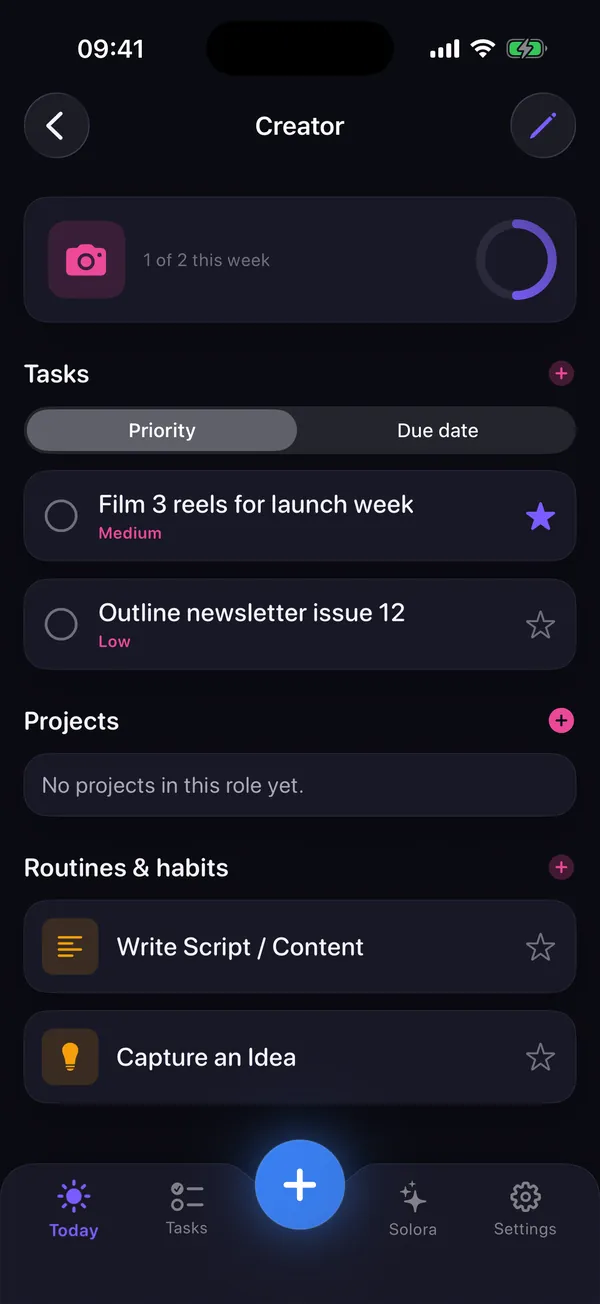
Solora has a Creator role and creator habit templates, so you can set up this system in a few minutes without building a template.
- Roles: Creator and Influencer are among the role templates, or you can make your own and give it a weekly target. A role's progress counts completed tasks.
- Habit templates: Capture content idea, Review content calendar, Write script or content, and Shoot content.
- Projects with a moodboard: for a campaign or series, add steps and collect images, notes, links and colors in one place.
- On-device assistant: ask it to "plan my next piece of content" and it proposes editable steps, if your device supports Apple Intelligence.
- Balance check: Insights and the Weekly Review show when content is eating your other roles, or the other way around.
What won't a planner do for creators?
Solora doesn't schedule or publish posts, connect to Instagram or TikTok, or show analytics. It's also for one person, so it's a poor fit for a team.
If you need a shared content calendar, a tool such as Notion or a dedicated scheduler will serve you better. Solora is for the question that comes before that: how do I fit this into my actual week?
For the full posting workflow across capture, editing and publishing, see how to post consistently as a creator. If you make photo dumps, DUMP, another app of mine, builds the carousel from your photos.
Try it
Try Solora free, with no account
Roles, a daily Big 3 and habits that survive bad days, on iPhone and iPad. It's listed on the App Store as Solora: AI Daily Planner.
 On your computer?Scan with your iPhone camera
Free plan: 4 roles, 15 active tasks, 20 habits, 5 projects, 5 assistant chats a day. Premium: monthly, yearly or one-time Lifetime. iOS 18.6 or later; the assistant needs iOS 26 with Apple Intelligence.
Frequently asked questions
What is the best planner app for content creators?
It depends on the job. For fitting content into your whole week on iPhone, Solora has a Creator role, creator habit templates and a daily Big 3. For a shared content calendar, a flexible tool such as Notion or a dedicated scheduler is a better fit, since Solora doesn't schedule or publish posts.
How many times a week should a small creator post?
There's no universal number. Choose the amount you could keep up in a bad week, even if it's only two posts, and increase it once that feels easy. Consistency you can sustain beats a pace you drop after a week.
How do I plan content with a full-time job?
Keep the target small, batch shooting and editing into one or two sessions, and keep just one content task in your daily top three. Capture ideas in a one-minute daily habit so you never start from zero.
Can Solora post to Instagram or schedule content?
No. Solora plans the work with tasks, habits and projects, but it doesn't connect to social platforms, publish posts or show analytics.
Sources
All checked on 3 November 2026.

Thanks for reading. If this helped, or if I got something wrong, I'd love to hear from you.
Independent iOS developer and the maker of Solora, so read my take on it with that in mind. The methods here work on paper too. Say hello on Instagram or at solostaseraofficial@gmail.com.