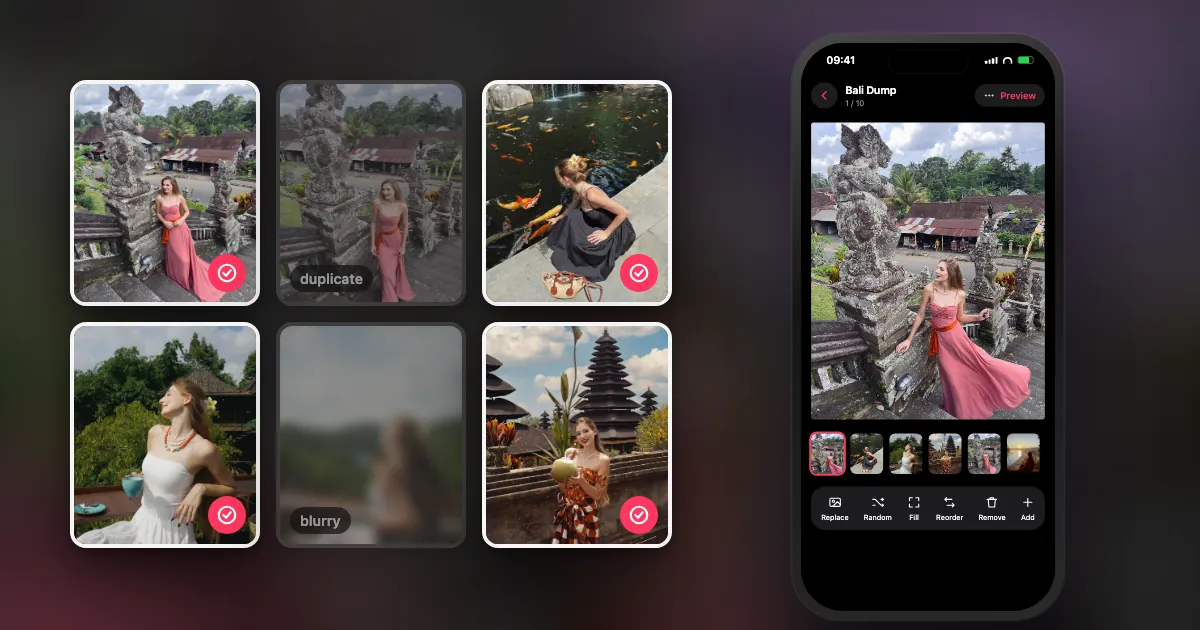
What does a photo dump maker do?
It does one or more of four jobs: choosing the photos, putting them in order, laying them out, and saving them ready to post. Instagram itself only does the last step.
You can post a dump straight from Instagram. The trouble starts earlier. You scroll through thousands of photos, tap them in the right order on small thumbnails, and lose your selection if you leave the screen. A dump maker exists to remove that friction, and each kind removes a different part of it.
What are the three types of photo dump maker?
Auto-pickers choose for you, design studios help you decorate, and web tools work in a browser without installing anything. Choose by the part you find hardest.
| Type | Examples | Best for | Trade-off |
|---|---|---|---|
| Auto-picker | DUMP, MyDump, Lately | People with thousands of photos who never post | Smaller template libraries; the app decides the first draft |
| Design studio | SCRL, Unfold, 17V28 | A designed, magazine-like carousel | You choose every photo yourself; more time per post |
| Web tool | Canva, browser-based makers | Working on a computer, or not installing an app | Your photos are usually uploaded to the service |
I keep a longer comparison with prices, privacy labels and free limits in photo dump apps, compared honestly. I built one of those apps, and the comparison says so.
What should you check before picking one?
Five things: where your photos are processed, whether the export is full quality, whether it adds a watermark, what the free plan actually includes, and whether it needs an account.
- Where do the photos go? Some tools analyse photos on your phone and others upload them. On iPhone, read the App Privacy section on the App Store listing. On a website, read the privacy policy.
- Does it re-compress? Instagram compresses every upload, so anything compressed before that costs you twice. Look for original-quality export or a high-resolution page size. Here is why that matters.
- Is there a watermark? Free plans often add one. Make a test export before you build a whole post.
- What is really free? Check the limits on photos per post, saved projects and templates, and whether "free" is a trial that turns into a subscription.
- Does it need an account? An account means your projects can sync, but it also means one more login and one more place holding your data.
How do you make a photo dump in 5 minutes?
Limit the time range first, take 8 to 12 photos, choose the cover and the closer, fill the middle with contrast, and post. Limiting the range is what makes it fast.
- Pick a window. "Last weekend" is a decision; "my camera roll" is a chore.
- Pull 15 candidates quickly. Do not debate them yet. Favourites and burst winners are a good start.
- Choose the cover. It is the only slide people see in the feed, so it has to earn the swipe.
- Choose the closer. Something funny, odd or self-aware rewards people who reach the end.
- Fill the middle with contrast. Mix a wide shot, a close-up, a face and a detail. Drop near-duplicates.
- Post, with a short caption. Need a line? Take one from these photo dump captions.
Want the reasoning behind each choice? How to pick photos for a photo dump has six rules and a 10-slot template.
Can you make a photo dump without an app?
Yes. Tap the multi-select icon in Instagram's new post screen, choose your photos in order, and share. Making an album in Photos first makes the order easier to manage.
The limits are the fiddly picking and the crop: Instagram applies one shape to every slide, so mixed photos get trimmed. The exact steps are in how to post a photo dump on Instagram, and the shapes are in the Instagram post size guide.
Where does DUMP fit, and where doesn't it?
DUMP is an auto-picker with a collage studio attached, for iPhone and iPad only. It suits people who want a first draft in seconds and prefer their photos to stay on the device.
I built it because choosing is the part that makes posts late. Smart Dump looks through up to 180 photos from the moment you choose, drops blurry shots and burst repeats, mixes people, places and details, and keeps everything in date order. It all runs on your iPhone: there is no account or server. On the free plan you get auto-built dumps of up to 10 items, three saved projects, and no ads or watermark on images.
It is not the right tool for everyone. There is no Android or web version, the template library is smaller than a dedicated studio's, and Smart Dump is a first pass, so you still make the final call on the cover and the closer.
Frequently asked questions
What is a photo dump maker?
An app or website that helps you turn many photos into one Instagram carousel by choosing the photos, ordering them, laying them out or exporting them. Most focus on one of those jobs.
What is the best free photo dump maker?
It depends on which part you find hardest. For choosing photos, try an auto-picker such as DUMP on iPhone. For decorating, try a design studio such as SCRL. Test a full export on the free plan first, because limits and watermarks vary.
Can I make a photo dump online for free?
Yes. Browser tools can lay out a collage or carousel, usually after you upload your photos to the service. Check the export quality and the privacy policy before you use personal photos.
How many photos should a photo dump have?
8 to 12 suits most dumps, and fewer for a single evening. Instagram allows up to 20, but a post people finish beats a long one they abandon.
Can I make a photo dump on Android?
Yes, with Instagram's own multi-select or with Android apps, but DUMP itself is iPhone and iPad only.
Skip the hour of choosing
DUMP picks your best shots on your iPhone, lets you reorder by dragging and preview the swipe, then saves your originals to a new Photos album in order. Free on iPhone and iPad, no account.
 On a computer?Scan with your iPhone camera
Free · iPhone & iPad · iOS 18.6+ · No account · Works offline

If your camera roll is full and your grid is quiet, try it on just one weekend. Then tag me in the dump, I would love to see it.
Indie iOS developer, and the maker of DUMP. Say hello on Instagram or at solostaseraofficial@gmail.com.
Sources
- App Store listings and pricing are collected, with dates, in photo dump apps compared.
- TechCrunch, 8 Aug 2024: Instagram carousels hold up to 20 photos and videos.
- Instagram Help Center, "Share multiple photos": the shape you choose applies to every item.
- DUMP facts were checked against the source code of DUMP 3.0.1, the version on the App Store on 1 Nov 2026.