 Solo.Swipe
Too Many Photos of Your Kids? Keep the Moment, Not All 40 Frames
Quick answer
Don't try to sort years of kid photos in one go. Once a week, spend ten minutes on that week only: keep the best take of each moment (eyes open, face sharp), favorite the one you'd print, file keepers into one album per child per year, and delete the near-misses. Clear the backlog one month at a time. Solo.Swipe turns this into a swipe session, and its Closed Eyes mode gathers likely blink shots, so you keep any that is the only photo of the moment.
You took 38 photos to get one where she's looking at the camera. Then a video of the first wobbly steps, plus the four false starts before it. Multiply by every week since they were born and the camera roll stops being a family album and becomes a haystack. The goal isn't fewer memories. It's being able to find the good ones.
Why do photos of kids pile up so fast?
Because you shoot in bursts to catch one good frame, and never go back for the other thirty. Kids move, blink, look away and pull faces, so parents take ten photos where anyone else would take one.
The rest of the pile comes from everywhere else: screenshots of school messages and forms, photos saved from family group chats, short accidental clips, and the same moment filmed by you and saved again from your partner. None of it feels worth deleting in the moment. All of it is in the way later.
Which photos of your kids are worth keeping?
The best take of each moment, plus the honest ones that show who they are. A good rule: keep the moment, not every frame of it.
- The best take per moment: eyes open, face sharp, expression right.
- One “real” shot even if it's imperfect: the tantrum, the spaghetti face, the blur of them running at you. Perfect isn't the point.
- Firsts and people: first steps, first day of school, and photos with grandparents, even blurry ones. These are the ones you can't retake.
- The clip, not the false starts: keep the video where it happened, delete the four where it didn't.
- Delete without guilt: near-identical retakes, blinks with a better retake, accidental pocket shots, and screenshots whose job is done.
What's a simple weekly routine for sorting kid photos?
Ten minutes, once a week, on that week's photos only. Nap time, the commute home, Sunday evening: pick a slot you already have.
-
Open this week only 30 sec
Not the whole library. In Solo.Swipe, Recents covers the last three days and By Day opens any single day. A set with an end is a set you'll finish.
-
Swipe away the obvious misses 3 min
Blurry, half a face, the floor. Two-second rule: if you need longer than two seconds to decide, skip it (swipe down) and come back.
-
Keep the best take, favorite the best of the best 3 min
Swipe right to keep. Tap the favorite button on the card for the one you'd print. Favorites are your shortlist for photo books and calendars later.
-
File keepers into the child's album 2 min
Swipe up to add a photo to an album, or create one on the spot: “Mia 2026”. One gesture, and it's both kept and organized.
-
Clear blinks, safely 1 min
Open Smart Modes › Closed Eyes. It lists photos where someone's eyes look closed. For each one ask: is there a better shot of this moment? Swipe left only if yes. (Smart Modes are Pro, or free for the rest of the day after one short ad.)
-
Confirm and close 30 sec
Review the Final Review screen, confirm the iOS prompt, done. Deleted photos sit in Recently Deleted for 30 days in case you change your mind.

How should you organize photo albums for your kids?
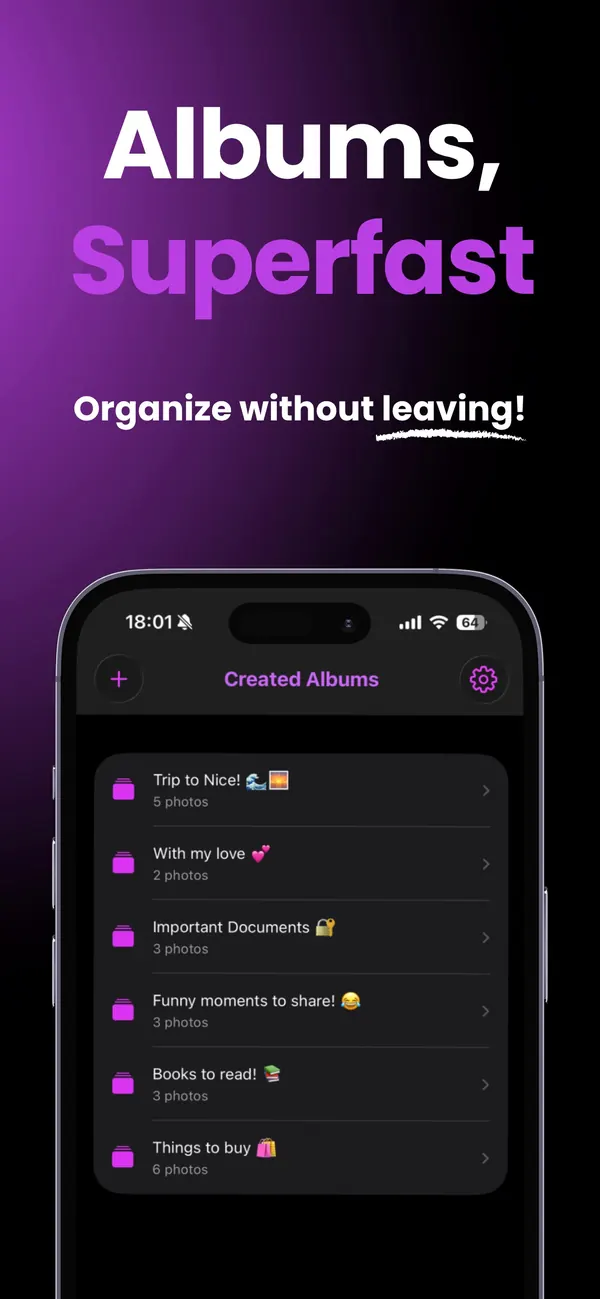
One album per child per year, plus Favorites, is enough for most families. It's simple to keep up, and it maps straight onto photo books and year-end recaps.
| System | Good for | Watch out for |
|---|---|---|
| Child + year (“Mia 2026”) | Most families; photo books; finding “that summer” | Siblings in one photo: file it in both albums (a photo can live in several albums without taking extra space) |
| Favorites only | Minimal effort; one heart per moment | Gets long; still worth splitting by year |
| Events (“Birthday 5”, “Beach week”) | Sharing one occasion with family | Creates many small albums; clean up empty ones monthly |
| Shared album with grandparents | Family sees the best shots without a group-chat flood | Share only the keepers, not the whole week |
Already have a mess of albums? The album clean-up guide shows how to delete empty albums and merge the chaos without losing photos.
How do you sort years of kid photos without burning out?
One month at a time, newest first, and stop when the timer ends. Recent months are freshest in your memory and hold the biggest videos, so they're quickest to decide and free the most space.
- By Month turns years into finishable chunks. One month per session is a realistic pace.
- Videos first if storage is tight. Solo.Swipe's video filters include Short Clips (under 5 seconds, often accidental) and Long Videos (over 5 minutes).
- Reviewed photos don't come back. Solo.Swipe remembers what you've decided, so each session starts where the last one ended.
- Let nostalgia help. The On This Day card shows what you took on this date in past years: a two-minute sort that feels like a treat.
Blur is common in kid photos. The blurry photos guide explains why portrait photos fool blur detectors, and when a blurry photo is still worth keeping.
How do you share kid photos with family, and make something from them?
Share from an album of keepers, not from the camera roll. Once the week is sorted, sharing takes a minute.
- Shared Albums in Photos let you invite people you choose; they can add their own photos and comments. Apple notes the organizer provides the iCloud storage for the album, and albums set to expire after 30 days use none.
- A monthly carousel or collage: open the month's album in DUMP, the developer's photo-dump and collage app. Solo.Swipe's albums have a Create a post with DUMP card for this.
- Watch them grow: Solo.Shots, another app by the same developer, can make an eye-aligned timelapse of a child from photos already in your library, all on the device. The preview is free; saving it as a project needs Premium.
If the camera roll is one of many things on your plate, the organize-your-life guide covers the rest of the week, including planning by roles with Solora.
Is it safe to use a photo cleaner on family photos?
With Solo.Swipe, your photos are analysed on your iPhone and never uploaded. The Closed Eyes mode measures how open eyes look, on the device; it doesn't recognize who anyone is.
To be complete: the free version shows Google AdMob ads, and the app sends usage statistics and crash reports to Google Firebase (you can turn this off in Settings › Privacy › Share Usage Data). City names for the Locations view come from Apple's geocoder. There's no account. The full details are in the privacy policy.
Questions
How many photos of my kids should I keep?
There's no right number, but a useful rule is the best take of each moment plus one or two honest, imperfect shots that show their personality. Near-identical retakes and blinks with a better retake can go. Firsts and photos with family are worth keeping even when they're not perfect.
Should I delete blurry photos of my baby?
Only if a sharper photo of the same moment exists. If it's the only photo of that moment, or of your baby with a grandparent, keep it. If it's a Live Photo, check whether another frame is sharp and set it as the key photo.
What's the best way to organize kids' photos on iPhone?
One album per child per year, plus Favorites for the very best. Sort weekly so the job never grows, and file keepers into the album as you go, for example by swiping up in Solo.Swipe.
How do I share photos with grandparents without filling their phone?
Use a Shared Album in the Photos app with only the keepers in it. Apple says the organizer of a shared album provides the iCloud storage for its content, and albums set to expire after 30 days don't use any iCloud storage.
Will Solo.Swipe delete anything automatically?
No. Nothing is deleted until you swipe it left, check the Final Review screen and confirm the iOS prompt. Deleted photos then stay in Recently Deleted for 30 days.
Related guides
Sources
- Apple iPhone User Guide, Edit Live Photos (Make Key Photo).
- Apple iPhone User Guide, Create shared albums in Photos (organizer provides storage; temporary albums use none).
- Apple iPhone User Guide, Delete or hide photos and videos (Recently Deleted for 30 days).