Guide · Groups
How to take a group photo with everyone in it
Someone always ends up holding the phone, and they’re never in the picture. Not this time.
 By Gül Eda Aydemir6 min read
- Prop the phone at eye level or a little above, a few meters away. Leave space around the group.
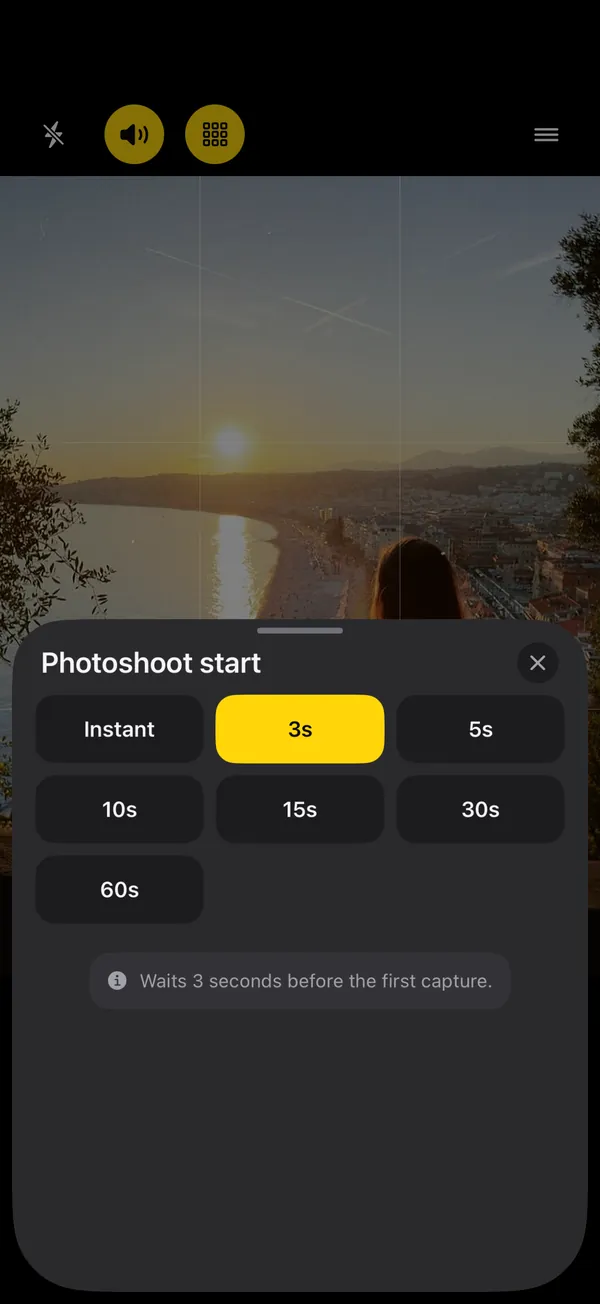
- Start delay: 15 s (30 s for big groups or a far-away phone).
- Interval: a photo every 2 to 3 s, 10 to 25 photos. One frame is never enough to beat the blinks.
- Start it from inside the group: say “Cheese” or raise a palm (SHOOTS, free), or tap start on an Apple Watch.
- Pick the frame where everyone looks good, and send it before anyone asks.
Every group has a photographer, and every group album is missing them. Asking a stranger means one blurry frame taken from hip height. The built-in timer means one frame, ten seconds after someone sprinted into place. Here’s how to get a group photo with everyone in it, eyes open, without handing your phone to anybody.
1. Set up the shot
- Height: eye level, or a little above and angled slightly down. It flatters everyone and lets the back row show. A phone on the ground looks up everybody’s nose.
- Something to stand it on: a wall, a table with the phone leaned against a bottle, a car roof (in the shade), a stack of bags. More in no tripod? prop your phone like this.
- Distance and lens: step back until the whole group fits on the 1× lens with space on every side. Tight room, big group? Use 0.5×, but keep people away from the edges of the frame, where ultra-wide lenses stretch faces.
- Arrange the group: tallest at the back or the sides, faces in the gaps between heads. Simple rule: if you can’t see the lens, the lens can’t see you.
- Save a spot for the photographer, on the side nearest the phone, so the walk in is short.
- Lock focus and exposure. Tap where the group stands, then touch and hold to lock it, so the camera doesn’t refocus on the background.
- Straighten it. Turn on the grid and the level guide. A tilted group photo looks like an accident.
2. Choose the start delay
The built-in iPhone Camera timer offers 3, 5 or 10 seconds (Apple’s guide, checked 22 October 2026). That’s fine for a small group right in front of the phone. For anything bigger, you want more time:
| Situation | Photoshoot start |
|---|---|
| Small group, phone close, photographer already beside it | 10 s |
| Photographer has to walk over and squeeze in | 15 s |
| Big group, stairs, or the phone is across the room | 30 s |
| Phone far away, like across a field or a beach | 60 s |
| Starting from an Apple Watch, already in place | 3 to 5 s |
| Starting with “Cheese” or a raised palm | Instant or 3 s (it always counts down at least 3 s) |
3. Why one photo is never enough
In a group of eight, someone is blinking, someone is mid-word, and someone is checking whether the phone has gone off yet. The fix isn’t a better moment; it’s more moments. Let the camera keep going:
- A photo every 2 to 3 seconds gives everyone time to reset between frames without the group falling apart.
- 10 to 25 photos gives you plenty of chances for a frame where every single person looks good.
- Plan the frames out loud: a few serious, a few laughing, one where everyone looks at each other, one completely ridiculous. You’ll use all of them.
- Countdown beeps tell everyone the shoot is starting. Turn on Announcements and SHOOTS says it out loud: “Here we go — the photoshoot is starting.” And when it’s over: “That’s a wrap! Your photoshoot is done.” No more frozen smiles waiting for a shutter that already went off.
- Photoshoot start
- 15 s
- Timer mode
- every 2 s
- Photo limit
- 25 photos
- Countdown beeps
- On
- Announcements
- On
- Shutter sound
- Paparazzi
The Paparazzi shutter sound plays your click plus a crowd of photographers firing too. With a group, it gets a laugh every time, and laughing faces are the best faces.
Twenty-five frames, one where everyone’s eyes are open. That’s the deal.
4. Let the photographer join the group first
The hardest part is the dash from the phone to the group. Skip it: start the shoot once everyone, photographer included, is already in place.
- Say “Cheese”. In SHOOTS, turn on Hands-free start → Say “Cheese” before you walk over. The camera listens while it waits, and the oldest line in group photography finally does something: the shoot counts down at least 3 seconds, then starts. It’s recognized in English, on the device, and needs microphone and speech recognition access.
- Raise a palm. Same menu, Raise your palm: one person holds an open hand up to the camera until the ring fills, then lowers it during the countdown. Works best within a few meters, in good light.
- A second phone. Anyone with SHOOTS on their iPhone (or an iPad) can be the remote: start, stop, switch lenses, for free. See using a second iPhone or iPad as the remote.
With an Apple Watch, there are two more ways:
- Apple’s Camera Remote (free, built in) shows a live preview on your wrist and takes a photo, with a 3-second timer, every time you tap. Great for checking everyone’s in frame; you tap for each photo. Range is about 33 feet (10 m).
- The SHOOTS Watch app starts the whole interval shoot from the wrist. The remote is free: start, stop, zoom with the Digital Crown, flip cameras, flash. The live viewfinder on the Watch is part of SHOOTS+. Set Photoshoot start to 3 or 5 seconds, tap, drop your arm, smile.
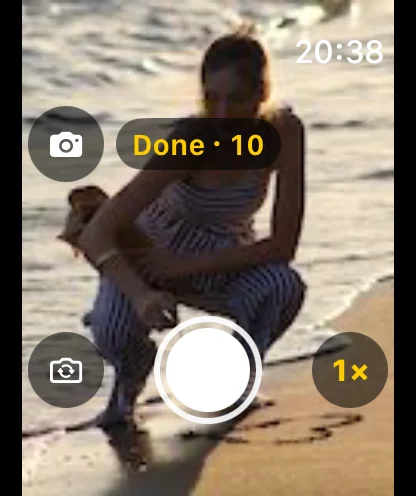
Full walkthrough in our Apple Watch camera remote guide.
5. Light for groups
- Even light beats bright light. Open shade or an overcast sky means nobody squints and nobody is half in the sun.
- Sun behind the group? Turn the group around, or set Flash to On to fill in faces.
- At night, Flash On and keep the group close to the phone: a phone flash only reaches a few meters. The back row will thank you.
- Indoors, face the group toward the windows, not away from them.
No extra app? The built-in version
You can get a decent group photo with nothing but what came on your iPhone:
- Set the Camera timer to 10 seconds and leave Live Photo on. Apple says a Live Photo captures what happens just before and after the shot, and you can pick a different key photo later if someone blinked.
- Run it three times. One take is a gamble; three takes is a choice. Have the photographer walk back to the phone between takes, or use Camera Remote on an Apple Watch to fire the next one from inside the group.
- Check the last take before everyone scatters. Once the group breaks up, it never quite reassembles.
It works. It’s just slower, and every take costs you a walk back to the phone or a tap on the wrist. An interval shoot gives you all those takes in one go. More on that trade-off in How to take more than one photo on an iPhone timer.
6. Pick the frame, share it fast
Open the shoot in the SHOOTS gallery, where it sits as its own album. Flick through, heart the frame where everyone looks good, and send it to the group chat before anyone asks. SHOOTS doesn’t edit faces or merge photos, which is exactly why more frames matter: the good one is already there. (Shooting in Live mode, part of SHOOTS+? Live Photos play right in the SHOOTS gallery, so you can see who blinked when.)
For a holiday, a birthday or a team day, turn the best few into a carousel with DUMP, then clear the near-duplicates from your camera roll with Solo.Swipe.

Shooting just yourself next time? Start with How to take good photos of yourself when no one’s around, or pick the right rhythm in Interval shooting on iPhone.
Questions people ask
How do I take a group photo without asking a stranger?
How long should the self-timer be for a group photo?
How do I stop people blinking in group photos?
Can I start a group photo by saying “Cheese”?
Can I use my Apple Watch to take a group photo?
How far should the phone be from the group?
Gül Eda Aydemir is the independent iOS developer behind SHOOTS, DUMP and Solo.Swipe. She designs, builds and answers support for every app herself. Say hi at solostaseraofficial@gmail.com.
Prop up your iPhone, step into frame and let SHOOTS run the whole photoshoot.
Download on theApp Store
On a computer?Scan with your iPhone camera
Keep reading
How to take good photos of yourself when no one's around
No tripod, no friend, no stranger you have to trust with your phone. Just a ledge, a timer and a plan.
Gül Eda Aydemir · 6 min read
How to take more than one photo on an iPhone timer (and space them out)
Apple’s timer counts down and shoots one moment. Here’s how to squeeze more out of it, and when to switch to an interval camera.
Gül Eda Aydemir · 7 min read
How to start a photoshoot without touching your phone
The worst part of a timer shot is the sprint from the phone to your spot. Here are all the ways to skip it, with Apple’s Camera and with SHOOTS.
Gül Eda Aydemir · 7 min read