Journal · Voice coach
Why a voice saying “Iconic.” makes you take better photos
Solo shoots are quiet. Too quiet. Here’s what changes when your phone starts talking back.
 By the SHOOTS Journal · edited by Gül Eda Aydemir5 min read
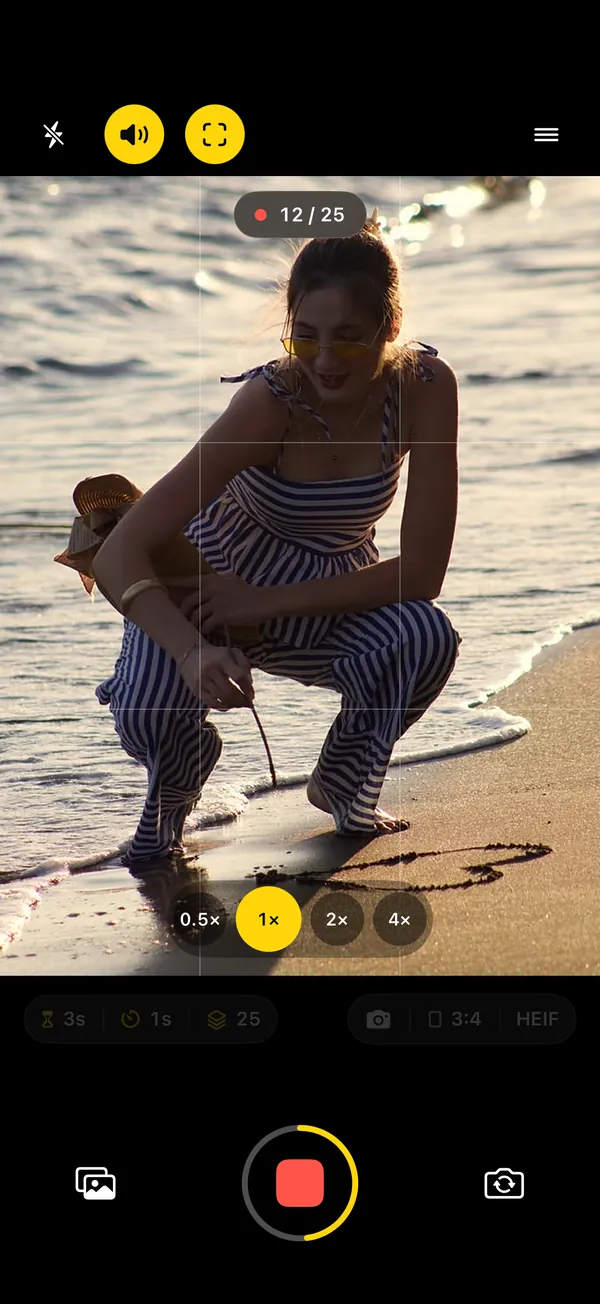
Here's what nobody tells you about photographing yourself: it's silent. With a photographer, there's a running commentary. "Good. Chin down. Now look at me. Yes, that." On a self-timer, the only voice is the one in your head, and it is not saying "gorgeous". It's saying "is my arm weird", "is it even taking photos", "is that man watching me". You can see it in the frames: shoulders up, a smile held one beat too long, the same face twenty-five times.
That silence is the reason SHOOTS talks. Its voice does the job a photographer's chatter does: it fills the quiet, it keeps you moving and, every so often, it makes you laugh at exactly the right moment.
What a photographer's chatter actually does
We're not going to dress this up as science. There's no study in this article, just what you notice after a few shoots with and without a voice in your ear.
- It gives you something to react to. A reaction is a real expression. A held pose is a held pose. Hearing "Okay, stop it, that's unreal!" from your own phone produces a face no amount of planning can.
- It breaks the loop in your head. It's hard to worry about your arm while someone is calling you Hollywood. Attention goes outward, and outward attention looks relaxed on camera.
- It keeps the rhythm. Each line is a small nudge: new pose, new angle, keep going. The shoot stops feeling like a test you're failing in silence.
- It's funny. Being told "Somebody call Vogue, right now!" while you're alone at a wall is objectively absurd. You laugh, your face softens, and the camera happens to be firing. That frame is often the keeper.
- It tells you what's happening. When the phone is ten steps away, you can't see the screen. A voice that says the shoot has started, and that it's done, means you stop squinting at the phone and start posing.
You can't hold a stiff face while your phone calls you Hollywood. We've tried.
What the SHOOTS voice says
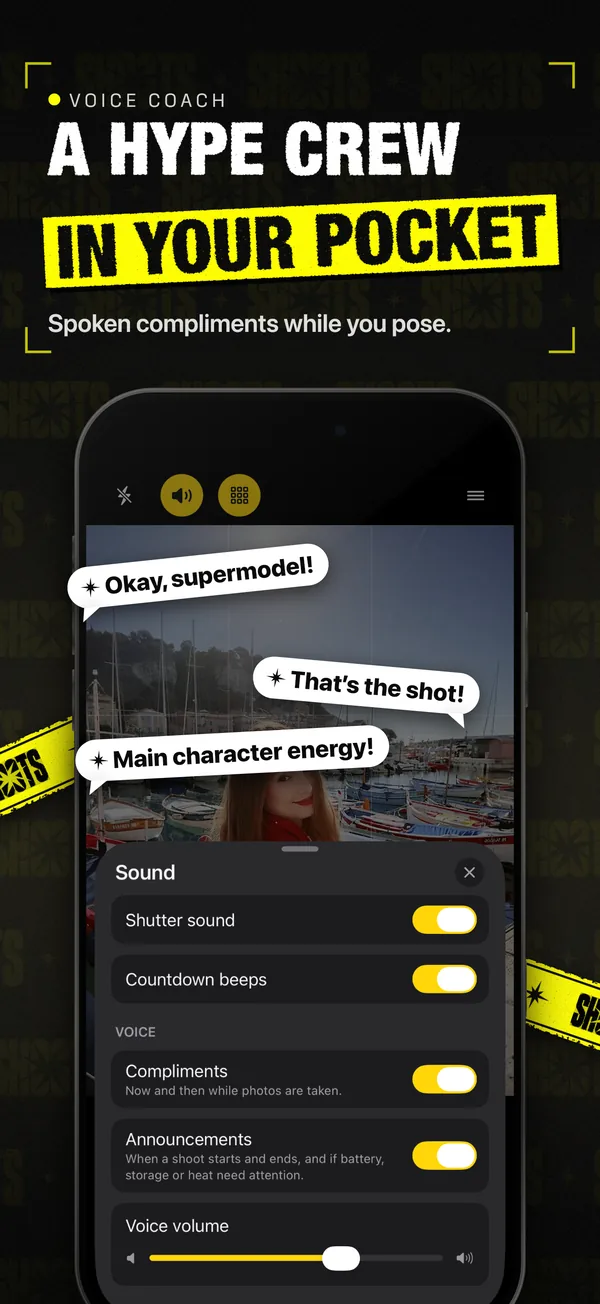
The voice comes in two parts, and you switch them separately in the camera's Sound sheet (the speaker button at the top of the viewfinder): Announcements and Talk to me.
Announcements (free)
For when you're away from the phone. The voice tells you "Here we go — the photoshoot is starting." and, at the end, "That's a wrap! Your photoshoot is done." In between, it speaks up if the battery, storage or heat need attention, so you hear about it when a long shoot needs you, instead of finding out afterward.
Talk to me (SHOOTS+)
A photographer's voice for the whole shoot. Under Coaching you pick what it does: Compliments, Pose coach or Both.
Compliments are the hype crew. A shoot opens with a kickoff line ("Here we go! Time to shine!" or "Okay, superstar, let's make some magic!"), then compliments keep coming now and then while photos are taken, shuffled so you don't hear the same one again right away. There are 60 of them. A few favorites from the set:
- "Okay, that one's going on the cover."
- "Honestly? Iconic."
- "You've got main character energy!"
- "Okay, Hollywood, I see you!"
- "Every angle is your good angle."
- "This is your runway, own it!"
- "Chin up, shoulders back... perfect!"
- "Hold it, hold it... got it!"
Pose coach is the director. Between shots it calls your next pose, picked for how the camera sees you: face-and-shoulders cues up close ("Rest your chin on your hand.", "Smile with just your eyes."), full-body cues when your legs are in the picture ("Now walk toward me.", "Give me a spin!"), and "Step into the frame so I can see you." when you've wandered off. Each pose holds for a couple of shots, and none comes back soon. The whole story is in Never run out of poses.
Both calls your next pose between shots and cheers you on in between. Tap to listen:
Talk to me stays quiet in the modes that record video (Video, Cinematic and the + Video modes), so the voice doesn't end up in your clips. The same switch and the Coaching choice are also in Settings → Feedback.
How to get the most out of it
- Turn it up. Outdoors, wind and traffic eat a quiet voice. The Voice volume slider sits right under the switches in the Sound sheet. And check the Silent switch: with Silent Mode on, SHOOTS stays quiet (it tells you so).
- Pick a rhythm that leaves room to react. A photo every 1 to 3 seconds works best: there's always a frame coming right after a line lands. The 10-minute solo photoshoot has the exact settings.
- Want direction, not just applause? Choose Pose coach or Both. The cues land right after a shot, so the whole interval is yours to move into the pose. On Compliments alone, treat the lines as accidental direction: when it says "Chin up, shoulders back", do it. Either way, pair it with 12 poses that work on a self-timer.
- React out loud. Answer back. Laugh. Say "thank you, I know". Nobody else is there, which is the whole point.
- Go full red carpet. Add the Paparazzi shutter sound (Settings → Feedback → Shutter click): your click, plus photographers around you firing too. With a flash and a voice yelling "Okay, Hollywood, I see you!", the scene builds itself. The full night look is in Be your own paparazzi.
Isn't it a bit much?
Yes. That's the feature. The lines are written to be over the top, and nobody actually believes their phone is about to ring a magazine. That's exactly why it's easy to take: you're not being judged, you're being cheered, and cheering is easy to laugh at. The awkwardness of posing alone has to go somewhere. Better it goes into a laugh than into your shoulders.
If it's not for you, it switches off. Some people keep only the announcements for the practical part, or turn on the Beep shutter sound instead (one beep the moment each photo is taken) and shoot in near silence. Everything in the Sound sheet is optional.
What's free, what's SHOOTS+
Announcements, countdown beeps and all five shutter sounds are free. Talk to me (Pose coach and compliments) is part of SHOOTS+, an optional upgrade; see the App Store for details. If you're curious why the app talks at all, that story is in Why I built SHOOTS. And for the basics of shooting yourself (prop, frame, set, pose, pick), start with how to take good photos of yourself alone.
Questions people ask
Does SHOOTS talk during a photoshoot?
Can I turn the voice off?
What language is the SHOOTS voice in?
Gül Eda Aydemir is the independent iOS developer behind SHOOTS, DUMP and Solo.Swipe. She designs, builds and answers support for every app herself. Say hi at solostaseraofficial@gmail.com.
Prop up your iPhone, step into frame and let SHOOTS run the whole photoshoot.
Download on theApp Store
On a computer?Scan with your iPhone camera
Keep reading
Be your own paparazzi: why the 2000s flash photo is back, and how to shoot it alone
Hard flash, a background gone black, a glint off your sunglasses. The red-carpet photo never needed a red carpet. It just needed someone to fire the flash, and that someone can be your iPhone.
SHOOTS Journal · 7 min read
Never run out of poses
Every photographer has a running script: chin down, turn, walk to me, laugh. Now your propped-up iPhone has one too.
SHOOTS Journal · 5 min read
Shoot it, DUMP it, swipe the rest: my 3-app camera roll routine
Twenty-five photos in, one carousel out, and a camera roll that doesn't make me sigh. The whole routine, from shutter to post.
Gül Eda, xoxo · 5 min read