Journal · My settings
The 10-minute solo photoshoot: my exact settings
Two rounds, fifty photos, one wall to lean the phone on. The recipe I use when I need new photos, have no time and have nobody around.
 By Gül Eda, xoxo6 min read
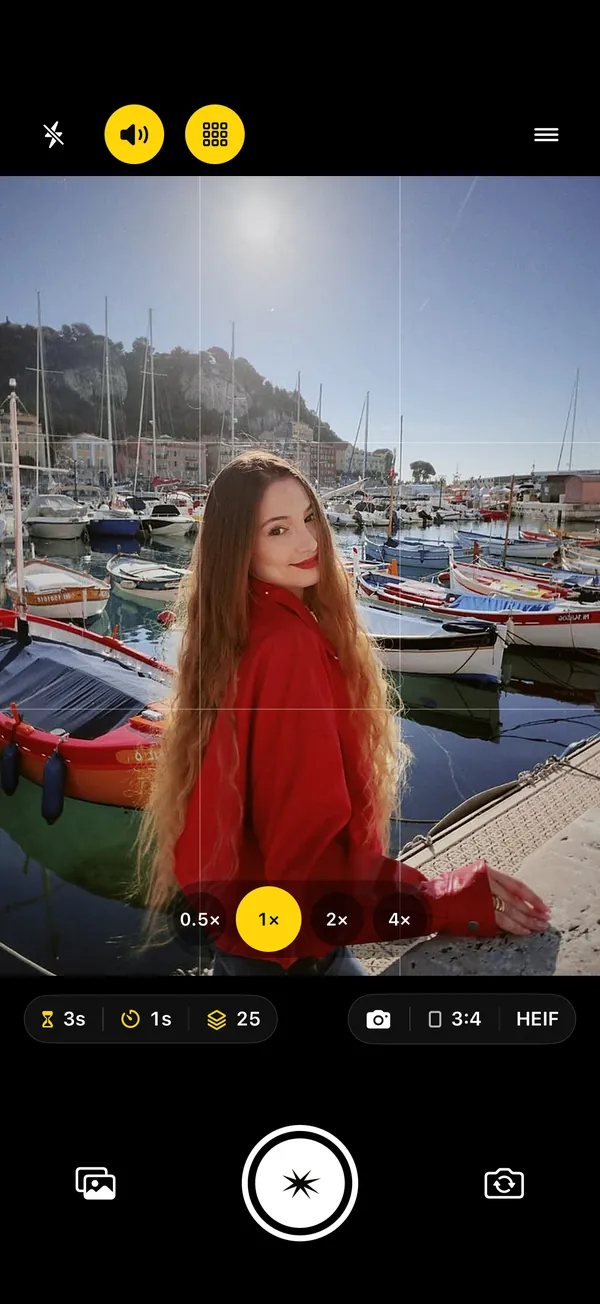
The blank settings screen is the hardest part of a first solo shoot. How long a delay? How many photos? How fast? So here's my exact recipe: ten minutes, two rounds, and every setting spelled out so you can copy it. Everything in it works on the free version of SHOOTS; the one SHOOTS+ extra I mention, the Pose coach, is optional.
| Minutes | What happens |
|---|---|
| 0–2 | Find the light, prop the phone, frame the spot |
| 2–4 | Round one: posed, a photo every 3 seconds |
| 4–5 | Quick check, one adjustment |
| 5–7 | Round two: movement, a photo every second |
| 7–10 | Pick the keepers in the gallery |
Minutes 0–2: light, phone, spot
Light first. I turn so the light falls on my face: open shade, a bright window, or the hour before sunset. If the sky is blazing right behind me, I move. Two minutes of walking to better light beats twenty minutes of editing.
Then the phone. Back camera, propped at chest height for full length, eye level for waist-up. A wall, a bench, my bag; anything still works. (No tripod? Here are places to prop your phone.) I turn on the grid and the level guide (the viewfinder button on the camera screen, or Settings → Framing), because a tilted horizon is the number one giveaway of a propped-up phone.
Then where I stand. On the 1× lens I stand about six to eight feet from the phone for a full-length shot, with space above my head and below my feet. On 2×, I back up to about twice that, which is a little kinder to faces and proportions. I mark my spot with something (a leaf, a crack in the pavement, my bag), tap to focus there, and touch and hold to lock focus and exposure so the camera doesn't refocus on the background when I walk in.
Minutes 2–4: round one, the posed set
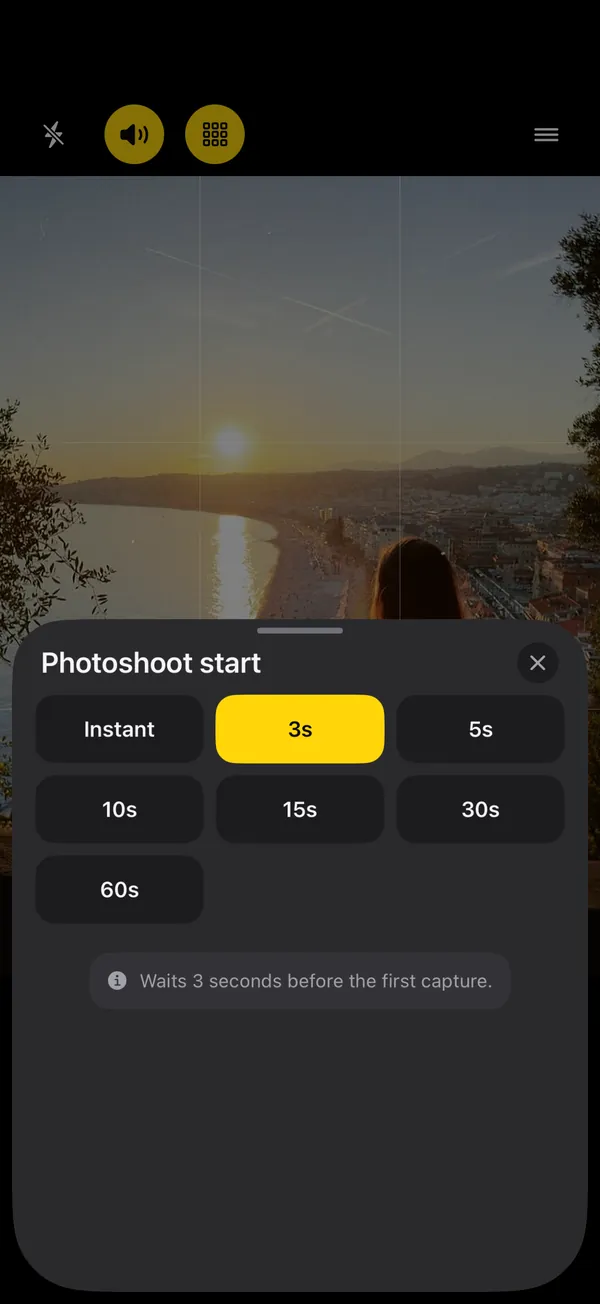
- Photoshoot start
- 10 s
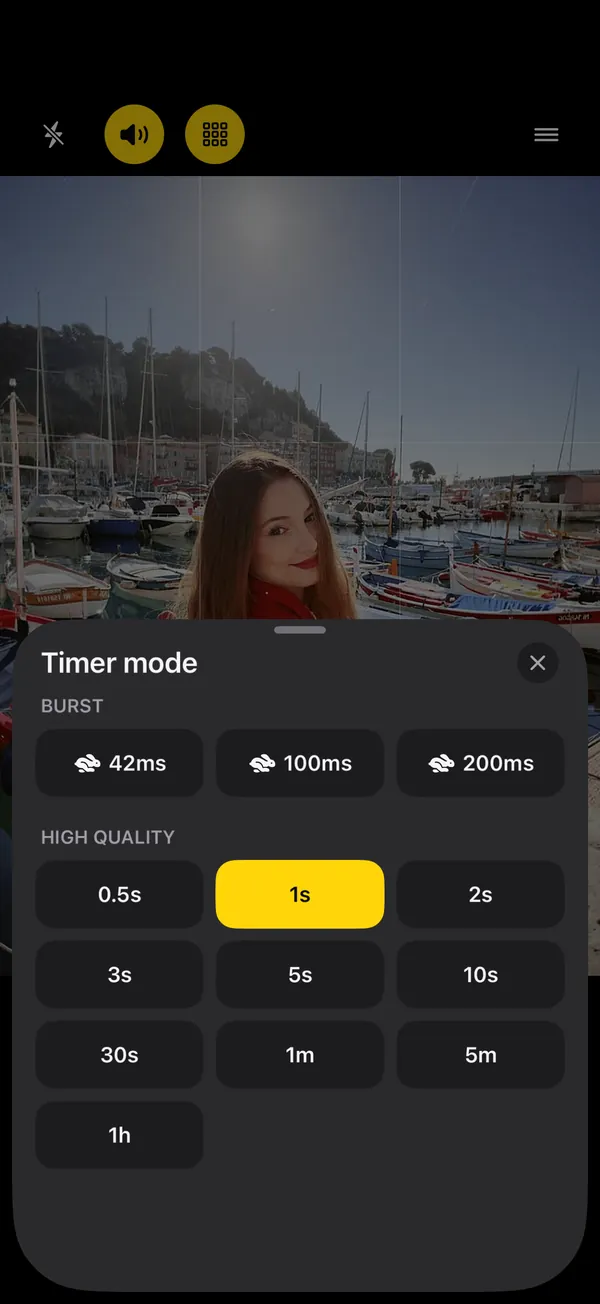
- Timer mode
- every 3 s
- Photo limit
- 25 photos
- Aspect ratio
- 3:4
- Shutter sound
- Beep
- Countdown beeps
- On
- Announcements
- On
- Talk to me
- Pose coach (SHOOTS+, optional)
10 seconds is enough to walk to my spot and settle without rushing. Every 3 seconds is enough to shift my weight, turn my head or move a hand, and short enough that I stay in the flow. 25 photos is about a minute and a quarter of posing, which is roughly how long I stay natural before I start to look like a mannequin.
My favorite trick is the Beep shutter sound (Settings → Feedback → Shutter click). It plays one beep the moment each photo is taken, so I always know when the frame happened and can change pose right after. Twenty-five photos, twenty-five beeps, zero guessing.
What I do in those 25 frames: five poses, five frames each. Five looking at the lens, five looking away, five leaning on the wall, five sitting or crouching, five with my hands busy (sunglasses, sleeve, hair). It sounds mechanical, and that's why it works: I never run out of ideas halfway. If you want a bigger menu, I keep a list of 12 poses that work on a self-timer.
On days my brain is empty, I hand the directing over. With SHOOTS+, Talk to me with Coaching set to Pose coach calls the next pose right after a shot ("Chin down, just a little.", "Turn your shoulder toward me.") and has me hold it for a couple of frames, which fits a 3 second interval nicely. I still do my five-by-five when I have a plan; the coach is for when I don't. More in Never run out of poses.
Minute 4–5: one quick check
I open the gallery and look at two or three frames. Not to judge my face, just three questions: Is the horizon straight? Am I cut off anywhere? Is the focus on me? Then I fix one thing and move on. Checking after every few frames is the fastest way to lose the mood.
If you wear an Apple Watch, this is where it earns its place: you can start, stop and resume the shoot from your wrist (free), and with SHOOTS+ the Watch shows a live viewfinder, so you can check the frame without walking back. More in the Apple Watch camera remote guide.
No Watch on? My favorite shortcut for round two is Raise your palm (Photoshoot start → Hands-free start, free). I stay on my mark, hold my hand up to the camera until the ring fills, and drop it during the countdown, which is never shorter than 3 seconds. Saying “Cheese” works too, if the street is quiet enough. Every other way to start without touching the phone is in How to start a photoshoot hands-free.
Minutes 5–7: round two, movement
- Photoshoot start
- 10 s
- Timer mode
- every 1 s
- Photo limit
- 25 photos
- Shutter sound
- Quick
- Countdown beeps
- On
Same spot, faster rhythm. One photo a second catches the in-between moments that look the most natural: mid-step, mid-turn, mid-laugh. I switch the shutter to Quick, a short, crisp click that doesn't turn into noise at this pace.
- Walk-in: I start a few steps behind my spot and walk slowly toward the phone, looking just past it.
- Look-back: walk away, turn my head over my shoulder.
- Spin or hair flip: twice, because the first one is always too careful.
- Laugh: fake it until it turns real, usually by the third beep.
With SHOOTS+ there are burst intervals too (about 42, 100 or 200 milliseconds), which are great for one perfect hair-in-the-air frame. For a ten-minute shoot I honestly don't need them. Want to know which interval suits which shot? Read interval shooting on iPhone.
Minutes 7–10: pick the keepers
This is the step everyone skips, and it's the one that decides whether you ever post anything. I do it right there, before I leave the spot.
- Open today's shoots. Each round is its own session in the gallery, under Today, so the posed set and the movement set are already separated.
- Fast first pass. I flip through full screen and tap the heart on anything I like. No overthinking; hearts are cheap.
- Delete the misses in one go. Tap the ⋯ menu, choose Select, and drag a finger across the thumbnails to select a whole run at once. Then Delete. Deleted shots wait in Trash for 30 days, so I can be brutal.
- Save the keepers to Photos. Each shoot gets its own album in Photos, named like "SHOOTS - 22/10/26 14:05". My rule: three keepers per round, maximum.
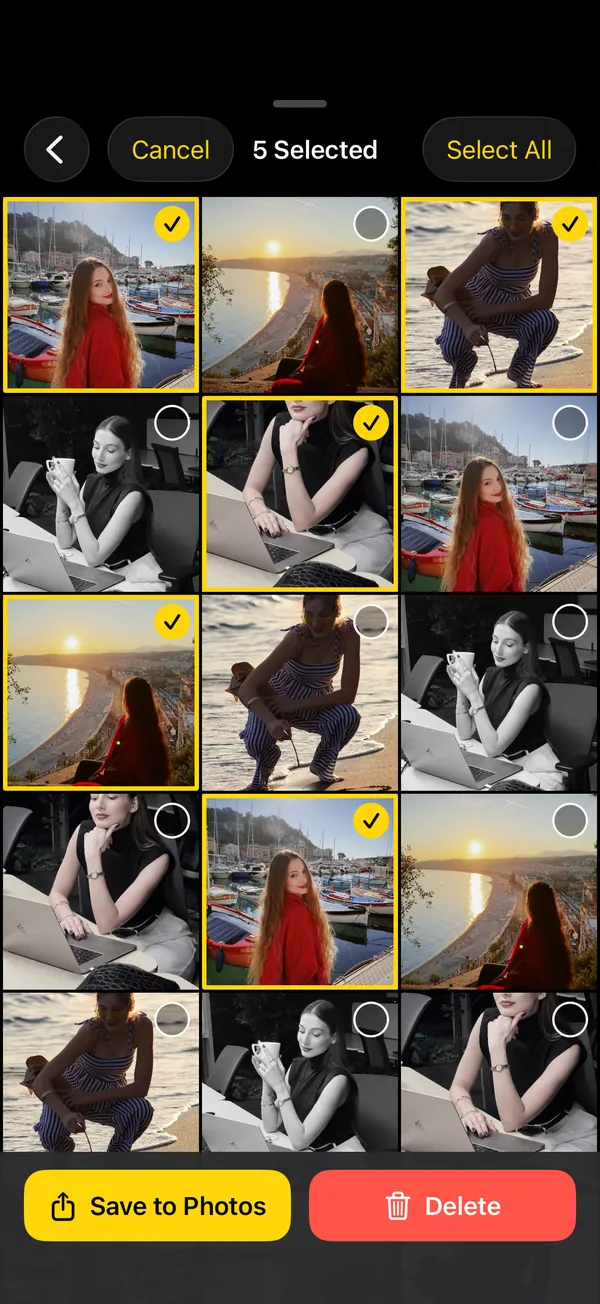
Six keepers from ten minutes is a very good day. From there, I turn them into a carousel and clean up the rest; that's my 3-app routine with DUMP and Solo.Swipe.
Ten minutes, fifty frames, six keepers. Nobody had to hold the phone.
When I change the recipe
- Outfit photos at home: 5 second interval, so I can step back to the mark between frames. Full setup in outfit photos at home.
- Golden hour: I add a round at 30 seconds while I just sit and watch the light change.
- Night: Flash On and a 1 second interval for the paparazzi look; see Be your own paparazzi.
Questions people ask
What are good self-timer settings for a quick solo photoshoot?
How far from the phone should I stand for a full-body photo?
How do I start the second round without walking back to the phone?
How do I know when each photo is taken?
Gül Eda Aydemir is the independent iOS developer behind SHOOTS, DUMP and Solo.Swipe. She designs, builds and answers support for every app herself. Say hi at solostaseraofficial@gmail.com.
Prop up your iPhone, step into frame and let SHOOTS run the whole photoshoot.
Download on theApp Store
On a computer?Scan with your iPhone camera
Keep reading
Be your own paparazzi: why the 2000s flash photo is back, and how to shoot it alone
Hard flash, a background gone black, a glint off your sunglasses. The red-carpet photo never needed a red carpet. It just needed someone to fire the flash, and that someone can be your iPhone.
SHOOTS Journal · 7 min read
Never run out of poses
Every photographer has a running script: chin down, turn, walk to me, laugh. Now your propped-up iPhone has one too.
SHOOTS Journal · 5 min read
Shoot it, DUMP it, swipe the rest: my 3-app camera roll routine
Twenty-five photos in, one carousel out, and a camera roll that doesn't make me sigh. The whole routine, from shutter to post.
Gül Eda, xoxo · 5 min read