 Solora
: AI Life Planner · by indie developer Gül Eda Aydemir
Your whole life. One focused day.
Too much to do across work, family and yourself? Solora turns it into a short list you can actually finish: name the roles you live, pick today's Big 3, and keep habits going even on low-energy days, with an AI assistant that runs on your device.
Made for people who juggle several roles: parents, students, creators, founders and busy professionals.
- Free · optional Premium
- No account
- iPhone & iPad
- iOS 18.6+
- 6 languages
- Data Not Collected
Not another to-do list
What is Solora?
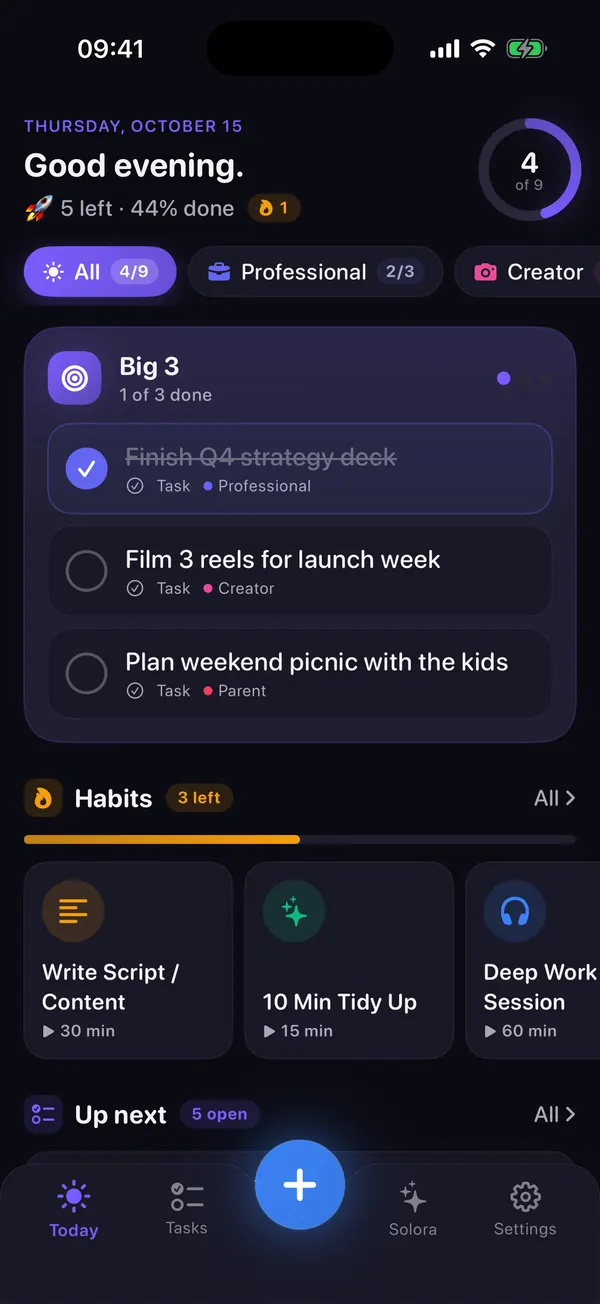
Solora: AI Life Planner is a free planner for iPhone and iPad by independent developer Gül Eda Aydemir. You organize tasks, habits and projects by the roles you live (parent, student, creator, professional…), choose a short daily focus list called the Big 3, and get help from an Apple Intelligence assistant that runs on your device. There's no account and no server: the App Store privacy label is “Data Not Collected”.
A typical to-do app
Endless lists
- Tasks pile up with no priority
- Everything looks equally urgent
- No sense of which part of life you're neglecting
- Guilt grows as the list grows
- You stay busy, but not aligned
Solora
Intentional days
- Your day is built around the roles you live
- A daily Big 3 makes priorities obvious
- A weekly check shows which role you've neglected
- Unfinished focus carries over instead of piling up
- A private, on-device AI plans with you
How it works
Three steps to a calmer week
Set up your roles once. After that, it's a quick daily pick and a short weekly look back.
-
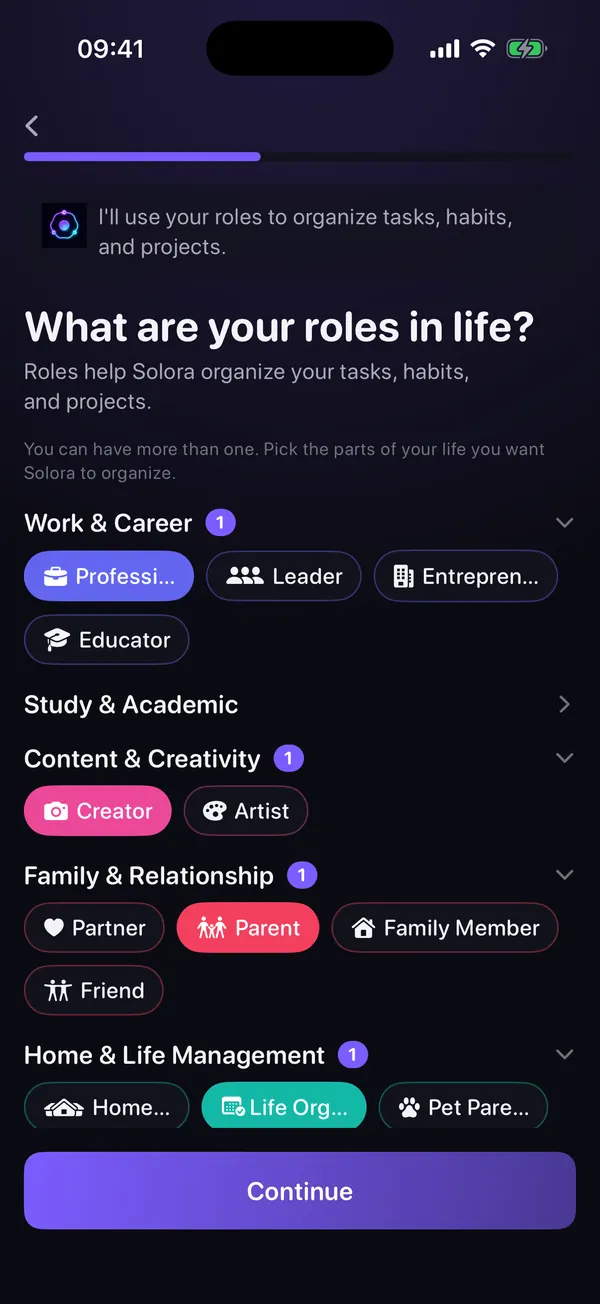
Name the roles you live
Pick from 23 role templates (Professional, Parent, Student, Creator, Athlete…) or make your own. Each role gets a color, an icon and a small weekly target.
-
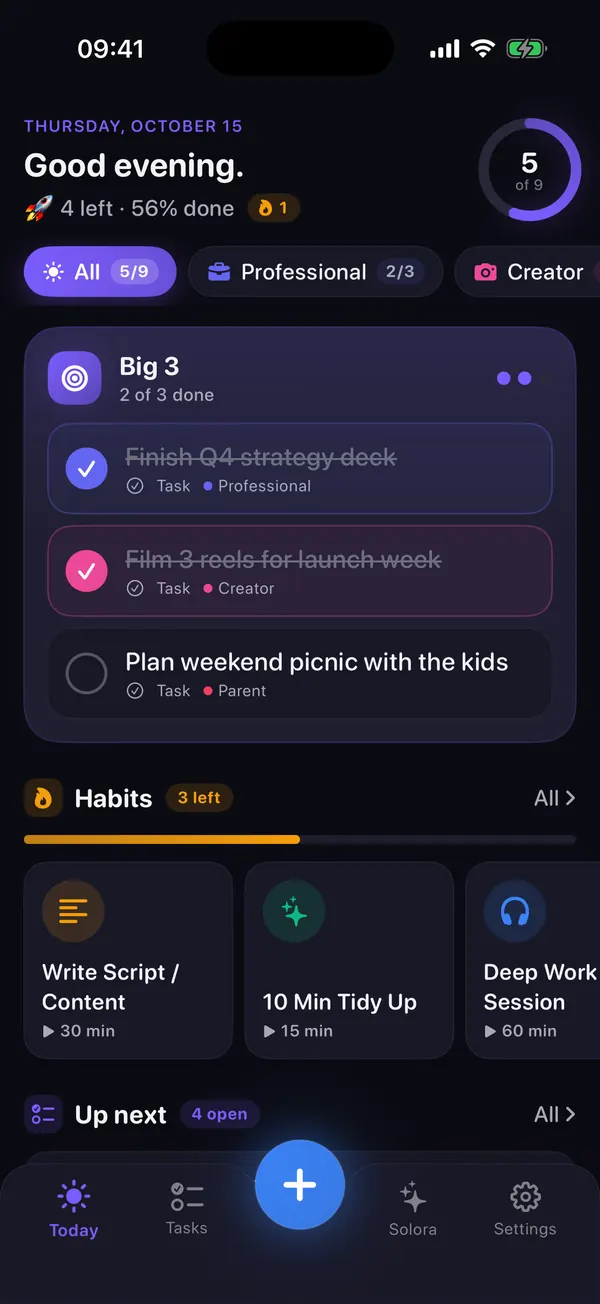
Pick today's Big 3
Choose the three things that would make today a good day (or 1, or 5). Anything unfinished carries over to tomorrow, and overdue tasks keep a “Late” tag instead of quietly disappearing.
-
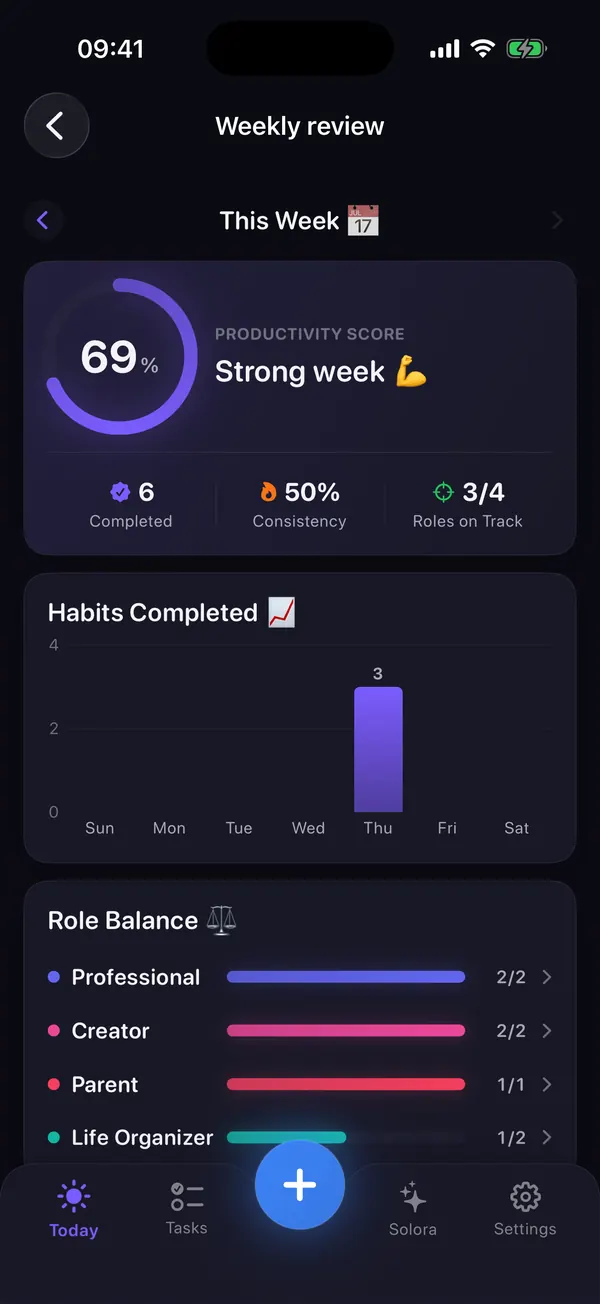
Review the week, rebalance
The Weekly Review shows your score, habit consistency and how each role did against its target, so you can see which role could use more attention next week.
The method
What is the Big 3 method?
The Big 3 means choosing the three most important things for today and doing them before anything else. Not thirty. Three. When everything is a priority, nothing is, so you commit to the few that matter and let the rest wait in one place.
- Three is achievable. Even a chaotic day usually has room for three wins, so a busy day can still end with real progress.
- Choosing is the work. Deciding what matters most is harder, and more valuable, than doing busywork.
- Roles keep it balanced. Each role has a weekly target for finished tasks, and your Weekly Review shows which role you've neglected, so tomorrow's Big 3 can include it.
- Nothing is lost. Unfinished Big 3 items carry over to tomorrow, marked as carried over, instead of vanishing into a backlog.
- Your number, your call. Prefer one big thing, or five small ones? Choose 1, 3 or 5 daily priorities during setup.
Want the full method, with examples and how it compares to MIT, 1-3-5 and Ivy Lee? Read the Big 3 method guide.
Example: one day, three roles
What Solora does for you
One calm home for your whole life
Not a longer list of features. Fewer decisions, kinder bad days, and a clear picture of what matters.
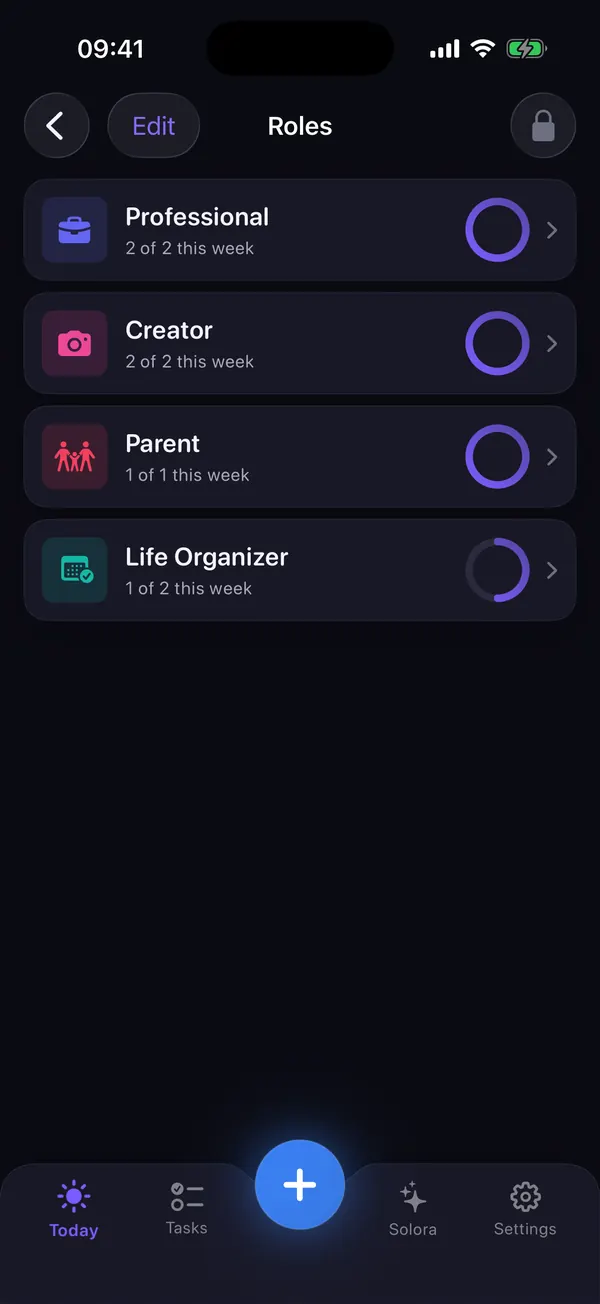
Roles
Every part of your life gets its own space
Work stops swallowing everything else. Each role holds its own tasks, habits and projects, with a small weekly target.
- 23 role templates across work, study, content, family, home, health and growth, plus your own custom roles
- A weekly target per role, for example Parent 3, Health 3, Work 5. In Solora 3.0 it counts the tasks you complete in that role; habits and project steps don't count toward it yet
- See which role is falling behind in the Weekly Review's Role Balance, or ask the assistant “Which role am I neglecting?”
Habits
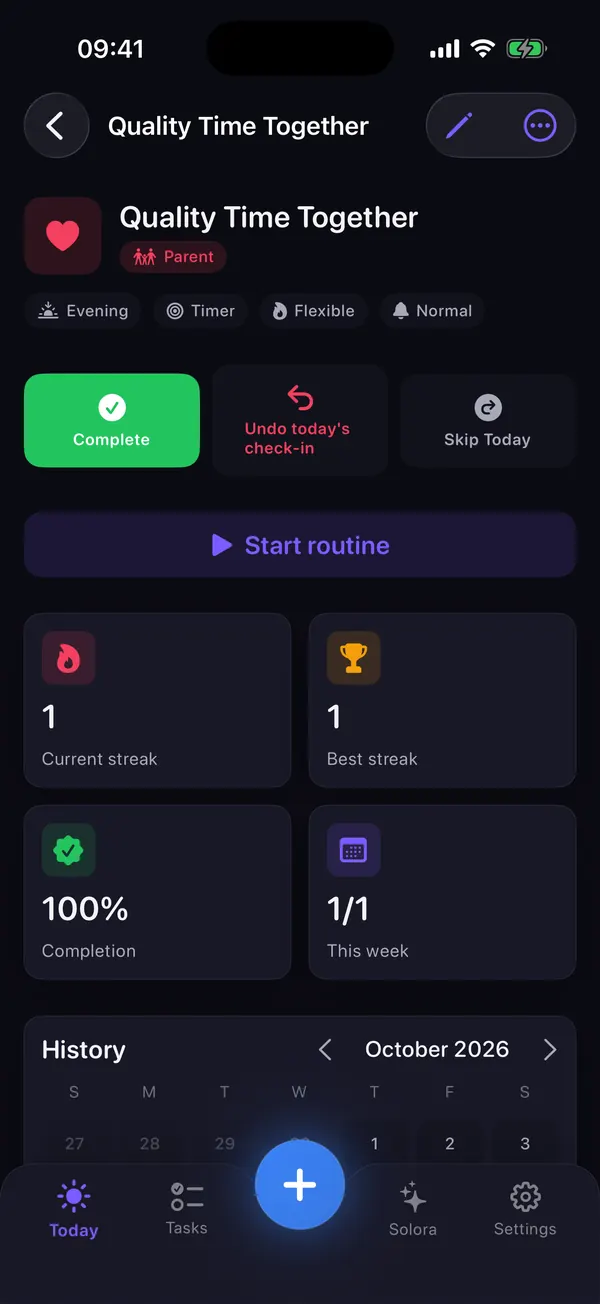
Habits that survive real life
A streak shouldn't die because you got sick. Solora plans for the bad days too.
- Simple, count, timer and step-by-step routine habits, with 52 templates to start from
- An easier version for low-energy days: a 5-minute stretch instead of a 30-minute workout (set it on the habit; log it in one tap from the Premium Light Mode widget)
- Strict, flexible or shielded streaks: protect a day with a reason like sick, travel or rest
- Heatmap, history and charts for every habit, free
On-device AI
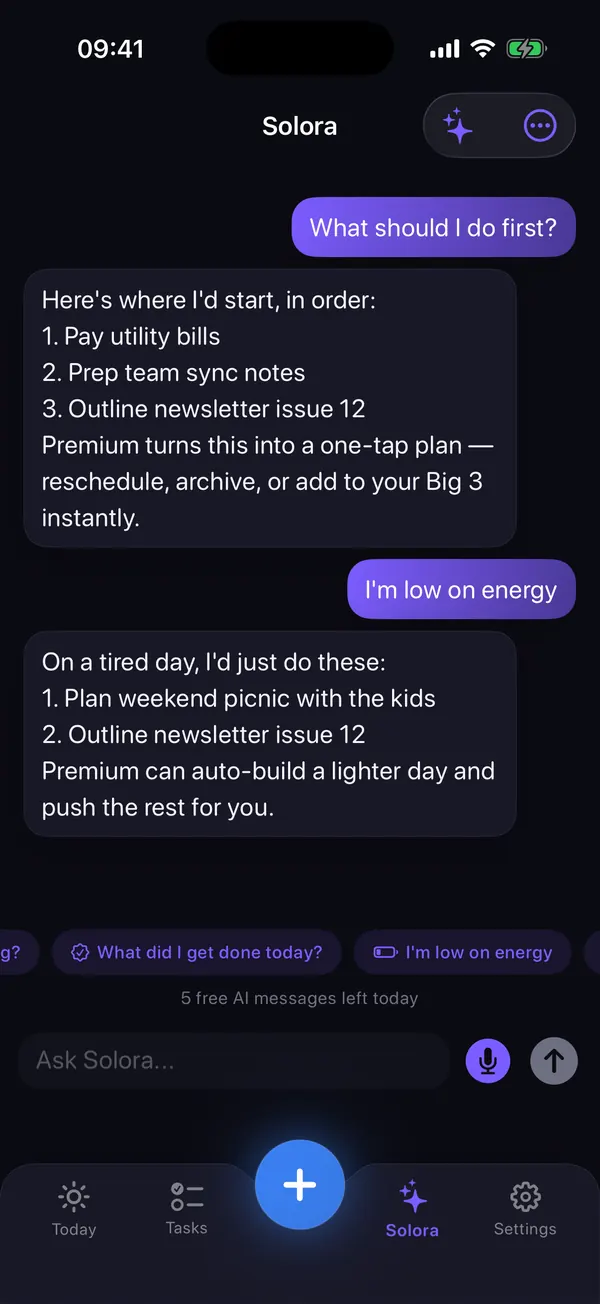
A private assistant that does the busywork
Type or say what's on your mind. Solora turns it into tasks, habits and projects as cards you can edit before anything is saved, and you can undo.
- Create several items from one message, plan your day, prioritize, or lighten the load when you're overwhelmed
- Break a big goal into steps with time estimates (3 a month on the free plan)
- Voice input is transcribed on your device, and the assistant replies in the language you write in
The assistant runs on Apple Intelligence, on your device. It needs iOS 26 or later and an Apple Intelligence–capable iPhone or iPad (iPhone 15 Pro, iPhone 16 or later, or an iPad with M1 or later; see Apple's list) with Apple Intelligence turned on. Everything else in Solora works on iOS 18.6 and later.
Insights
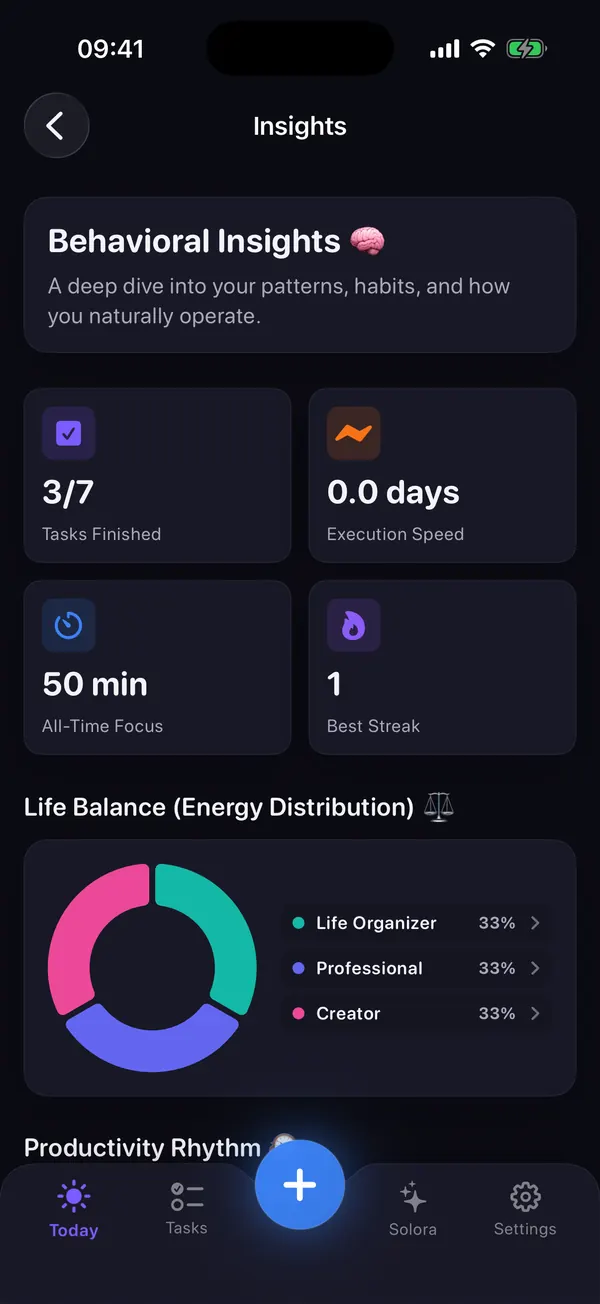
See what's actually working
Insights show what you finished, when you work best, what blocks you most, and how balanced your roles are.
- Daily rhythm: are you a morning, afternoon or evening finisher?
- Biggest blocker, learned from why tasks slip
- Life Balance across your roles, plus focus minutes and best streak
- An AI-written weekly report with Premium
Morning Kickoff & Evening Shutdown
Start with an energy check-in and today's focus. End with “3 of 4 done today” and close the day.
Missed it? Make it doable
When a task slips, Solora asks what got in the way, then helps you split it, make it easier, move it or let it go.
Projects with ready-made steps
9 templates (trip, move, job search, book…), progress bars and a moodboard for photos, notes, links and colors.
Widgets & Siri
11 Home Screen widgets, including a habit check-in you can tick right from the Home Screen, and “Quick add to Solora” for Siri and Shortcuts.
Calendar-aware, if you want
Connect your calendar, turn on “Add tasks to calendar”, and Solora adds the steps of a project breakdown one after another, starting at your next free slot. With Premium, the assistant plans your day around your events.
Six languages
English, Türkçe, Español, Français, Português (Brasil) and 简体中文. Switch any time in Settings.
Make it yours, free
7 accent colors or your own, light or dark mode, and gentle, normal or strict reminder styles.
iPhone and iPad
The same app on both. There's no cloud sync, so each device keeps its own data.
Nothing vanishes by accident
Completed and deleted items go to the Archive, where you can restore them.
Private by design
Your day. Your data.
Solora has no account, no server and no analytics or advertising SDKs. Your plans live on your device, the assistant runs on Apple Intelligence on your device, and voice input is transcribed on the device.
- No account
- No servers
- No ads or analytics
- AI & voice on-device
- App Store label: Data Not Collected
The honest trade-off: there's no cloud sync between devices and no data export. Your data is included in your normal iPhone or iPad backup.
Pricing
Free vs Premium
Solora is free to download and useful for free. Premium removes the limits and adds a few AI extras. No ads either way.
| Feature | Free | Premium |
|---|---|---|
| Roles | 4 | Unlimited |
| Active tasks | 15 | Unlimited |
| Habits | 20 | Unlimited |
| Projects | 5 | Unlimited |
| Assistant chats | 5 a day | Unlimited |
| AI project breakdowns | 3 a month | Unlimited |
| Calendar-aware AI day planning | – | Included |
| Assistant plans: prioritize, reschedule, lighter day | Text suggestions | One-tap plans |
| Assistant remembers preferences you tell it | – | Included |
| AI-written weekly report | – | Included |
| Premium widgets and widget themes | – | Included |
| Big 3, rituals, habit stats, Insights, Archive, colors | Included | Included |
Premium plans: monthly, yearly, or one-time Lifetime with no subscription. See the current price on the App Store.
The App Store shows prices in your currency. Subscriptions renew automatically until you cancel in Settings → your name → Subscriptions. Restore purchases from Solora's Settings.
At a glance
Solora facts
- App
- Solora: AI Life Planner
- Developer
- Gül Eda Aydemir, independent iOS developer
- Price
- Free to download, with optional Premium (monthly, yearly or one-time Lifetime); see the current price on the App Store
- Requires
- iOS 18.6 or later · iPadOS 18.6 or later
- AI assistant
- iOS 26 or later on an Apple Intelligence–capable device, with Apple Intelligence on
- Devices
- iPhone and iPad (no Apple Watch or Mac app)
- Languages
- English, Türkçe, Español, Français, Português (Brasil), 简体中文
- Privacy
- App Store label “Data Not Collected”; no account; no analytics or ad SDKs
- Sync & backup
- No cloud sync or export; included in your device backup
- Version
- 3.0, released 7 October 2026 (first release 1 July 2026)
- Size
- 22.6 MB
- Category
- Productivity
Facts checked against the app and its App Store page on 15 October 2026.
What's new
Solora 3.0
Released 7 October 2026
- Faster and smoother experience
- Smarter AI
- New languages: Spanish, French, Portuguese and Chinese
- Improved habits
- Completed tasks now move to the Archive
- Bug fixes and UI improvements
From the App Store release notes. Version history on the App Store
Learn the basics
How the pieces fit together
Short animations recreated for the web from Solora's in-app “Learn the basics” guide: roles hold your tasks, habits and projects, and your Big 3 picks today's focus from all of them.
Guides
Plan better, with or without the app
Short, practical guides to the methods behind Solora. They work on paper too; Solora just does the counting for you.
Comparing apps? See AI planners, Structured, Sunsama, Todoist and Notion alternatives. All guides, grouped by situation: Solora guides · New to all this? Start with where to start organizing your life.
Questions
Solora FAQ
What is Solora: AI Life Planner?
Solora: AI Life Planner is a free planner for iPhone and iPad by independent developer Gül Eda Aydemir. You organize tasks, habits and projects by the roles you live, pick a short daily focus list called the Big 3, and get help from an AI assistant that runs on your device with Apple Intelligence. It needs no account.
What is the Big 3 method, and how does Solora use it?
The Big 3 means choosing the three outcomes that would make today a success and doing them before anything else. In Solora you choose 1, 3 or 5 daily priorities during setup, pick them from your tasks, habits and projects, and unfinished ones carry over to tomorrow.
How do I balance work, family and time for myself?
Give each role a small weekly target instead of chasing equal hours, then check once a week which role got neglected. Solora's Weekly Review shows completed tasks vs target for every role (habits don't count toward the target in Solora 3.0), and you can ask the assistant “Which role am I neglecting?”, so tomorrow's Big 3 can include it. The role-based planning guide walks through it.
Is Solora free? What does Premium add?
Yes, Solora is free to download and use. The free plan includes 4 roles, 15 active tasks, 20 habits, 5 projects, 5 assistant chats a day and 3 AI project breakdowns a month. Premium (monthly, yearly or one-time Lifetime; see the current price on the App Store) removes those limits and adds calendar-aware AI day planning, one-tap assistant plans (prioritize, reschedule, lighter day), assistant memory for your preferences, an AI weekly report, premium widgets and widget themes.
Is there an option without a subscription?
Yes. Lifetime is a one-time purchase with no subscription; see the current price on the App Store. The monthly and yearly plans renew automatically until you cancel them in your Apple Account subscription settings.
Does Solora's AI send my data to the cloud?
No. The assistant runs on Apple's on-device models (Apple Intelligence), and voice input is transcribed on the device. Solora has no account, no server and no analytics or advertising SDKs, and its App Store privacy label is “Data Not Collected”.
Does Solora work without Apple Intelligence?
Yes. Roles, the Big 3, tasks, habits, projects, rituals, Insights and widgets work on any iPhone or iPad with iOS 18.6 or later. The AI assistant needs iOS 26 and an Apple Intelligence–capable device (such as iPhone 15 Pro, iPhone 16 or later, or an iPad with M1 or later) with Apple Intelligence turned on. Without it, the assistant can still turn simple requests into items and suggest a basic plan.
Does Solora work on iPad, and does it sync between devices?
Solora runs on both iPhone and iPad. There's no cloud sync, so each device keeps its own data, which is included in that device's normal backup. There's no Apple Watch or Mac app and no data export.
Does Solora work offline?
Yes. Everything is stored on your device and there's no server, so planning works without internet, and so does the assistant on supported devices. You only need a connection to download the app or buy Premium.
What happens on a bad or low-energy day?
Solora is built for imperfect days. The Morning Kickoff starts with an energy check-in, habits can have an easier version (a 5-minute stretch instead of a workout, logged in one tap from the Premium Light Mode widget), streaks can be shielded with a reason like sick or travel, and when a task slips Solora asks what got in the way and helps you split it, shrink it or move it. It's a planner, not medical advice: if you feel exhausted for weeks, talk to a doctor. More ideas in what to do on a low-energy day.
Which languages does Solora support?
Six: English, Turkish, Spanish, French, Portuguese (Brazil) and Simplified Chinese. Solora follows your device language, you can switch it in Settings → Language, and the assistant replies in the language you write in.
Does Solora have widgets and Siri shortcuts?
Yes. There are 11 Home Screen widgets, including Big 3, Today's Focus, Add to Solora, Streak and the interactive Check in widget, where you can complete or skip a habit right from the Home Screen. Some widgets are Premium, including the full Light Mode widget, which shows your smallest next step and logs a habit's easier version in one tap. With Siri or Shortcuts, say “Quick add to Solora” and it sorts what you say into a task, habit or project.
More answers, troubleshooting and contact details are on the Solora support page.
Who makes Solora
Made by an independent developer
Solora is designed and built by Gül Eda Aydemir, who also makes ATHA, DUMP, Solo.Swipe and Solo.Shots. Solora itself has no ads, no account and collects no data.
Start your most intentional day.
Free on iPhone and iPad. No account, nothing to set up but your roles.
 On your computer?Scan with your iPhone camera